•
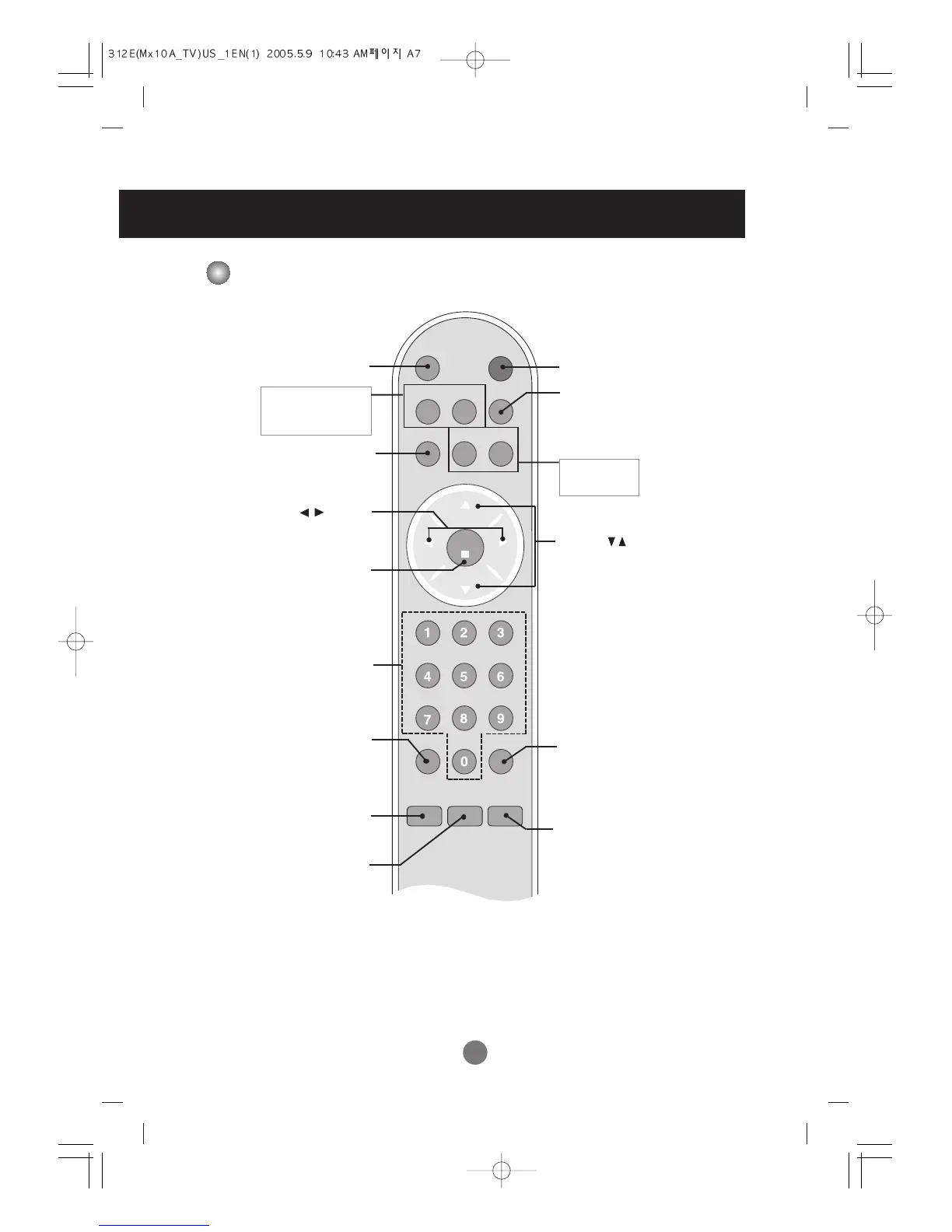
Input Select Button
•
TV/AV Button
(See next page)
Sleep Button
When watching AV/TV
-
The screen will be automatically turned
off after a certain period of time.
Press this button repetitively to select an
appropriate time duration.
Video Button
When watching AV/TV/PC
- Automatically adjusts the image.
Press this button repetitively to set the
intended screen.
cc Button
Select a closed caption
•
Exit Button
•
Menu Button
Channel Number Select
Button
Operational at the TV mode only
Set Button
Audio Button
Use this button to select the sound tone.
Press repeatedly to select Flat, Music,
Movie, Sports, User sound tone.
Mute Button
Name and Function of the Parts
Name of the Remote Control Buttons
mts(Sound Mode Select) Button
Press repeatedly to select Mono, Stereo,
SAP sound tone.
But Stereo, SAP mode are available only
if included on the broadcast signal.
fcr Button
Favorite channel button.
flashbk Button
Turn to the last channel viewed.
Channel ( ) Button



 To Next Page