44
Using the Remote Control
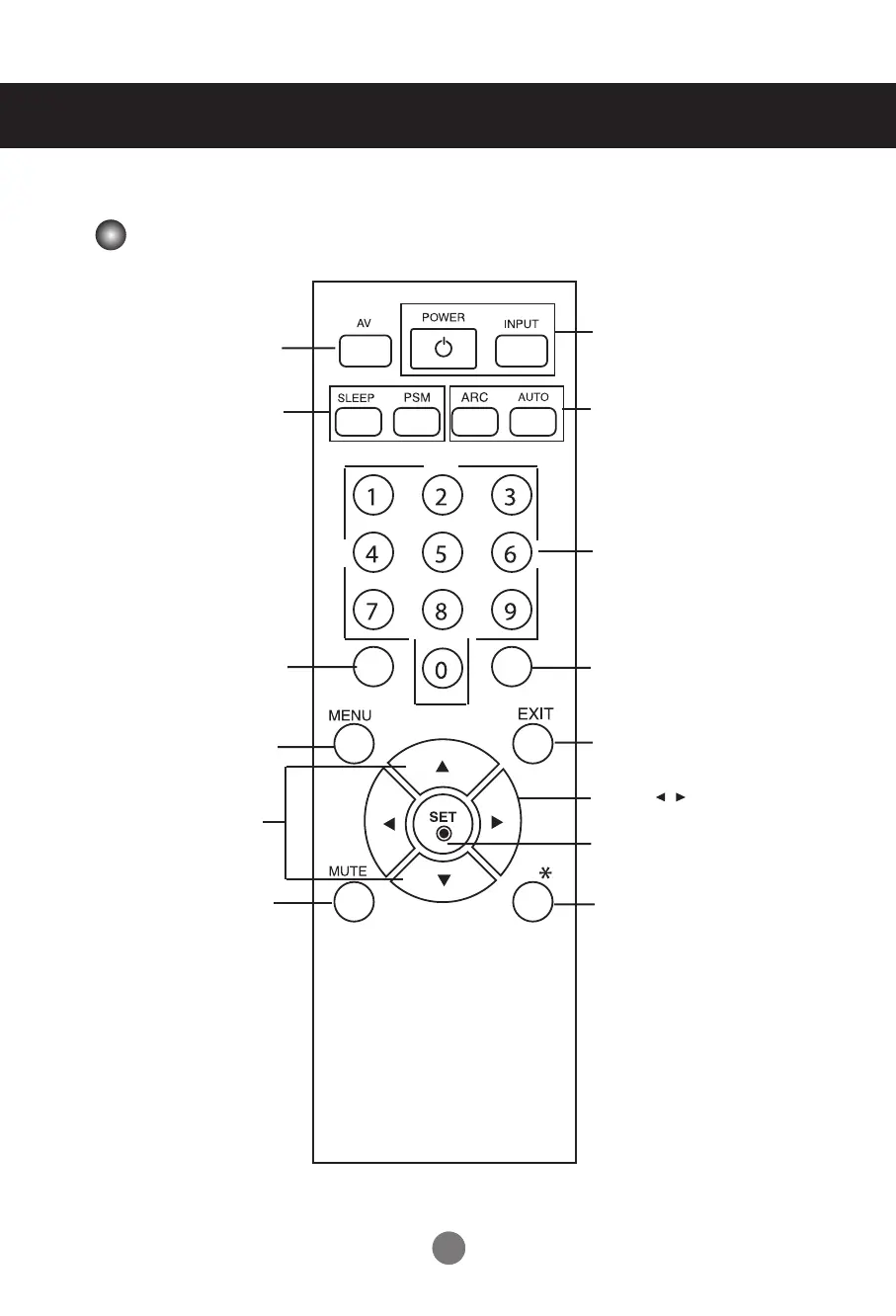
Name of the Remote Control Buttons
•
AV Button
•
Sleep Button
When watching AV, RGB PC,HDMI/DVI,
Component
The product will be automatically turned
off after a certain period of time.
Press this button repetitively to
select an appropriate time duration
•
PSM Button
- Toggles through preset video
settings.
•
Menu Button
•
Check Button
•
Volume Button
Volume up and down
•
Mute button
There is not a function
which is supported
•
UP and Down buttons
Bring up and down direction
adjustment.
•
ARC button
Aspect Ratio Correction. Toggles
through aspect ratio options.
•
Auto Button
Automatic adjustment function
(Operational for the analog signal only)
•
Exit Button
There is not a function
which is supported
There is not a function
which is supported
There is not a function
which is supported
•
Power On/Off Button
•
Input Select Button
(See next page)



 To Next Page