3
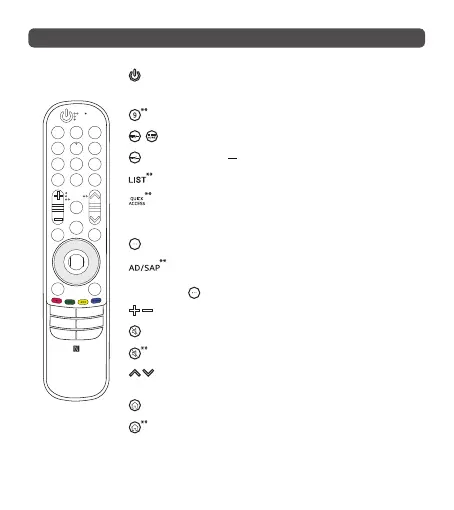
Remote Description
PowerTurnstheTVonoro.
Number buttons Entersnumbers.
Accessesthe[QuickHelp].
/
Accessesthe[Guide].
DashInsertsa betweennumberssuchas2-1and2-2.
Accessesthesavedchannelsorprogrammeslist.
Accessesthe[EditQuickAccess].
- [EditQuickAccess]isafeaturethatallowsyoutoenteraspeciedapp
orLiveTVdirectlybypressingandholdingthenumberbuttons.
More actions Displaysmoreremotecontrolfunctions.
Audiodescriptionsfunctionwillbeenabled.(Dependingoncountry)
SAP(SecondaryAudioProgram)featurecanalsobeenabledbypressing
the button.(Dependingoncountry)
Volume buttonsAdjuststhevolumelevel.
MuteMutesallsounds.
MuteAccessesthe[Accessibility]menu.
Channel buttons / Programme buttons Scrollsthroughthesaved
channelsorprogrammes.
HomeAccessestheHomemenu.
HomeLaunchesthelastusedapps.



 To Next Page