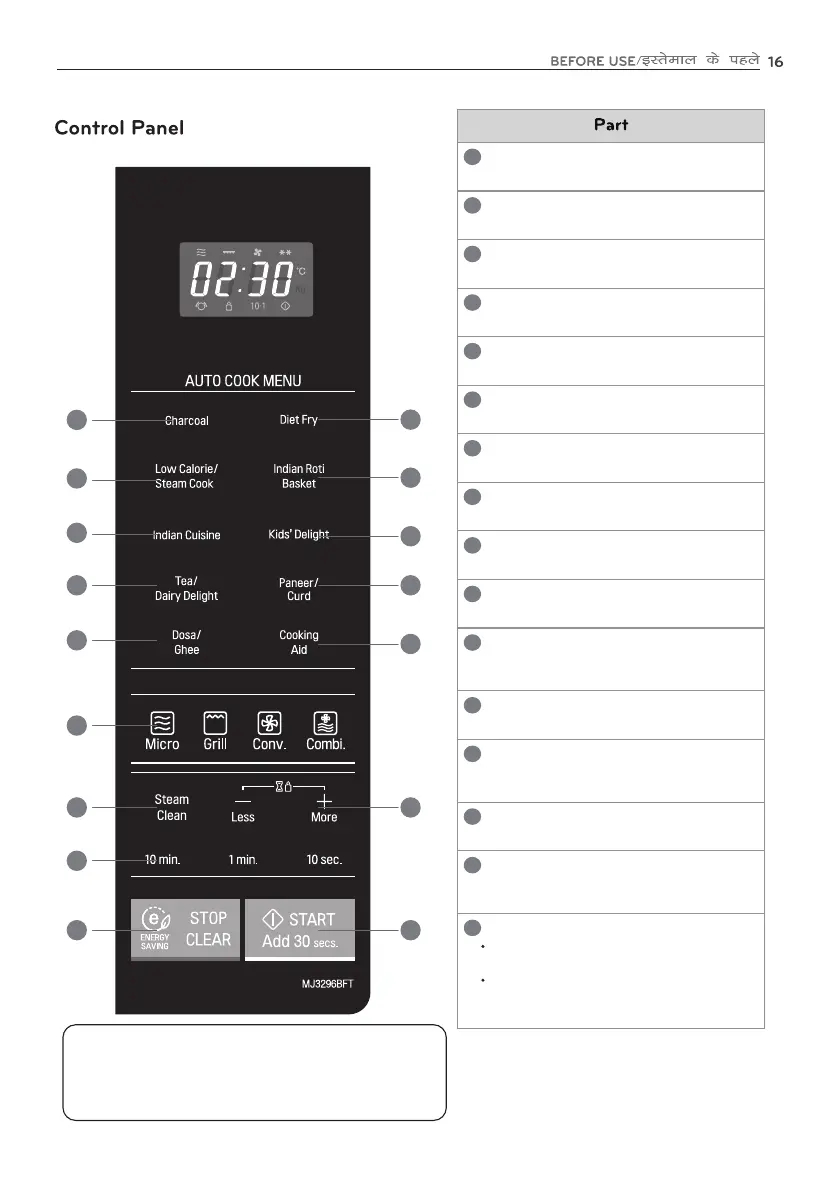
Charcoal
Check the recipe manual
1
Diet Fry
Check the recipe manual
2
Low Calorie/Steam Cook
Check the recipe manual
3
Indian Roti Basket
Check the recipe manual
4
Indian Cuisine
Check the recipe manual
5
Kids' Delight
Check the recipe manual
6
Tea/Dairy Delight
Check the recipe manual
7
Paneer/Curd
Check the recipe manual
8
Dosa/Ghee
Check the recipe manual
9
Select Manual Cooking
11
Steam Clean
-Less/+More
For Selecting the cooking time
12
13
14
Cooking Aid
Check the recipe manual
For selecting - Micro, Grill, Convection &
Combi Functions.
Check the recipe manual
For decreasing/increasing the cooking time &
selecting auto cook weight limit.
10
STOP/CLEAR
15
Used to stop oven and clear all entries.
For energy saving feature.
START/Add 30secs.
16
1
2
4
3
8
5
6
10
7
9
13
11
12
16
14
15
In order to start cooking which is selected,
press START/Add 30secs. button one time.
The START/Add 30secs feature allows you to
set 30 seconds intervals of HIGH power
cooking with a touch of the Add 30secs button.
Using Glass Touch Controller
1. Touch the middle of letter or number to activate.
2. If you touch the button with a fingernail or fingertip the
controller may not sense it is being touched.
3. If the controller or your hands are wet it may not sense your touch
4. Remove gloves prior to touching the controller.



 To Next Page