3-15
Copyright © 2018 LG Electronics Inc. All rights reserved.
Only for training and service purposes.
ONE POINT REPAIR GUIDE
NO SOUND
There is no sound output in the CD FUNCTION, repair the set according to the following guide.
6-2. CD FUNCTION
6-2-1. Solution
Replace IC501 on MAIN board.
6-2-2. How to troubleshoot (Countermeasure)
1) Check CD_BCK, CD_LRCK, & CD_DATA signals from IC501 to IC401.
If no signal, check if the RF & servo signals from MD is entered to IC401.
Refer to the “No operation of MD” guide on Item 5.
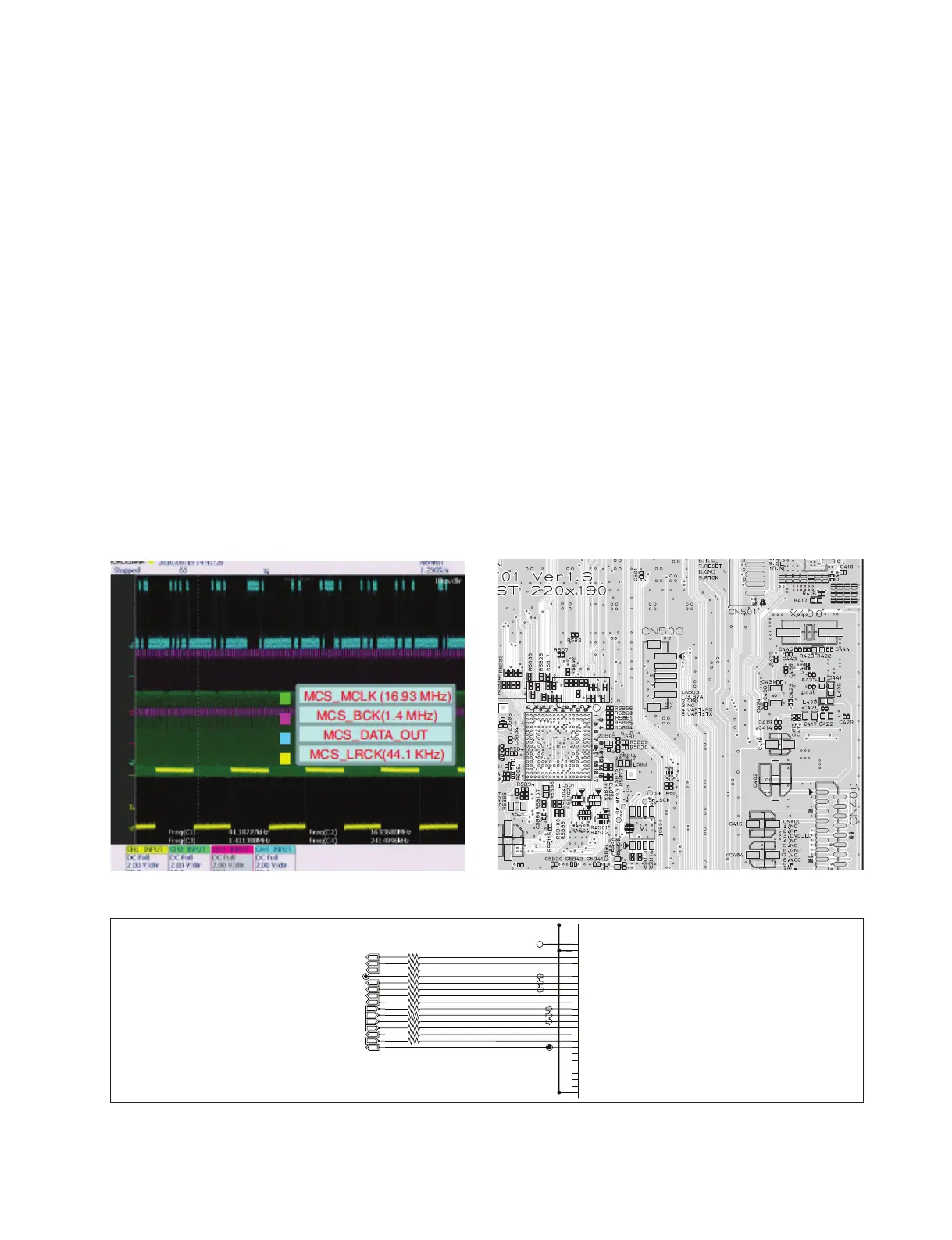
2) Check the following I2S signal flow. < I2S audio signal Interface >
- MCS_BCK : IC501_pin E1 --> IC601_pin23
- MCS_LRCK : IC501_pin D1 --> IC601_pin22 (44.1 kHz)
- MIX_DATA0_OUT : IC501_pin E2 --> IC601_pin24
- MIX_DATA2_OUT : IC501_pin R2 --> IC601_pin26
If there is any trouble, check the power for each IC.
The power is normal but, if the signal waveform to the IC is distorted or no signal,
replace it with a new one.
6-2-3. Service hint (Any picture/ Remark)
< Waveform of I2S audio interface signals >
IC501
D4
VDD33IO
E5
VSS33IO
B1
PGPA09
C1
PGPA10
C2
PGPA11
D2
PGPA12
D1
PGPA13
E1
PGPA14
E2
PGPA15
E4
PGPB00
F2
PGPB01
F1
PGPB02
G1
PGPB03
G2
PGPB04
F4
PGPD04
H2
PGPB05
G5
PGPD13
H1
PGPB06(Boot[0])
G4
PGPD14
J1
PGPB07(Boot[1])
H4
PGPD15
J2
PGPB08
J4
VDD12INT
J5
VSS12INT
R5B9
100
R5B7
100
R5B37
NC
R5B12
33
R5B13
33
R5B44
33
R5B43
33
R5B42
33
100
R5B19
R5B11
100
R5B22
33
R5B10
100
R5B23
33
R5B8
100
DFT_TX
+3.3VA
MIC_DATA_IN
DSPI_MCLK
DSPI_BCK
DSPI_LRCK
DSPI_ADATA
VFD_PWR_CTRL
DEBUG_CON_OUT
MIX_DATA0_OUT
VFD_STB
MCS_BCK
MCS_LRCK
VFD_CLK
BT_ADC_SCL
DIR_SCL
MCS_MCLK
< MAIN - CD DSP circuit >
< MAIN board top view >
IC501



 To Next Page