Using the Remote Control Button
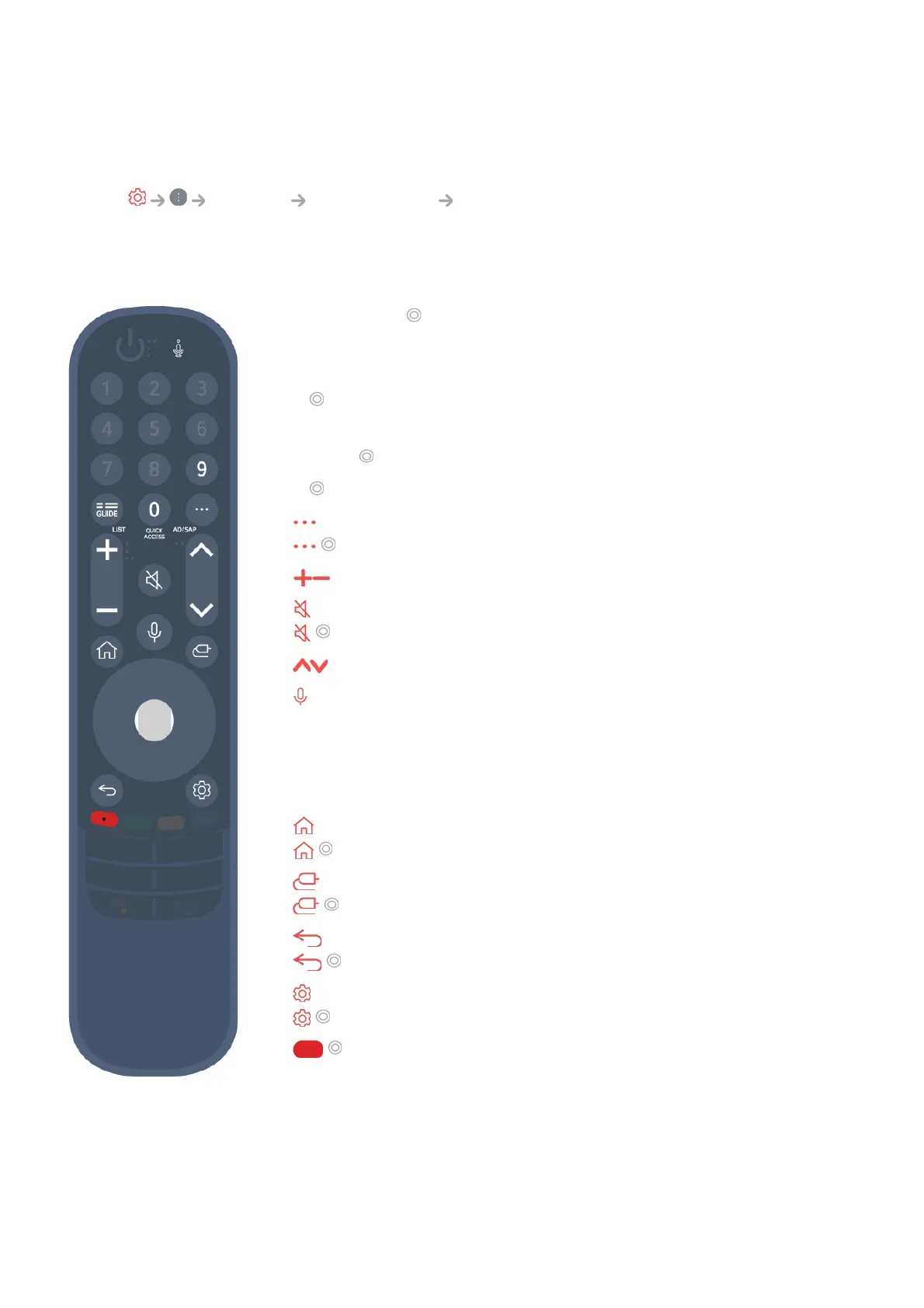
Briefly press or press and hold remote control button to access various functions.
Select General Accessibility Learn Remote Control. Press a button on
the remote control following the on-screen instructions to get information about the
button.
Using the Magic Remote
9 : Launch Quick Help.
●
GUIDE : Launch Guide.
GUIDE : Displays Programmes.
●
0 : The Quick Access edit screen appears.
●
: Display the additional buttons on the remote control.
: Audibly describes the contents of the screen.
●
: Adjust the volume level.
●
: Select to turn off the sound from the TV.
: Enter the Accessibility menu.
●
: You can change the programme.
●
: Check out the recommended contents. (Recommendation
service may not be available depending on the countries you are
in.)
You can use the voice recognition feature by holding down the
button and speaking toward the top of the remote control.
●
: Displays the Home menu.
: Launches the last used app.
●
: Selects an input source.
: Entering into the Home Dashboard.
●
: Move to the previous step.
: Closes the menu.
●
: Enters the Quick Settings menu.
: Enters the All Settings menu.
●
: Launch Record. (Some models may not be supported.)
●


 To Next Page