The LG Magic Remote (model AN-MR400) is an advanced remote control designed to enhance the user experience with compatible LG televisions. This manual details its functions, technical specifications, usage, and maintenance.
Function Description
The Magic Remote serves as a primary interface for navigating TV menus, controlling playback, and accessing smart features. It combines traditional remote control buttons with motion-sensing capabilities and voice recognition, offering a more intuitive and interactive way to operate the TV.
Key functions include:
- Power: Turns the TV on or off.
- Wheel (OK): Selects menus or options, confirms input, and scrolls through saved channels. When the pointer is active, pressing a navigation button temporarily hides the pointer, allowing the remote to function as a regular remote control. Shaking the remote from side to side redisplays the pointer.
- Navigation (Up/Down/Left/Right): Scrolls through menus or options.
- BACK: Returns to the previous screen.
- SMART: Accesses the Smart Home menu.
- Voice Recognition: Allows users to control the TV using voice commands. A network connection is required for this feature. To activate, press the Voice recognition button and speak when the voice display window appears on the left of the TV screen. For optimal performance, the remote should be held no further than 10 cm from the user's face. Recognition may fail if the user speaks too fast or too slow, or if there is significant background noise or high TV volume.
- 3D: Used for viewing 3D video. This button is non-functional on non-3D TV models (e.g., LN**, PN**, MS53*, MS73*).
- 123/Q.MENU: Accesses the Universal Control Menu and the quick menu.
- MUTE: Mutes all sounds.
- VOL (+/-): Adjusts the volume level.
- CH/P (Up/Down): Scrolls through saved channels.
Important Technical Specifications
The Magic Remote Control communicates with the RF Dongle using Bluetooth Version 3.0.
- Output Power (Max.): 10 dBm or lower.
- Maximum Communication Distance: Approximately 10 meters (30 ft) in a line of open sight.
- Frequency Range: 2.400 GHz - 2.4835 GHz.
- Data Rate (Max.): 3 Mbps.
RF Dongle:
For certain TV models (LA97**, LA96**, LA88**, LA86**, LA79**, LA74**, LA71**, LA69**, LA68**, LA66** (except LA6600 for Korea), LA64** (Japan, Asia, Australia, Middle East, Africa), LA6250 (Korea), LA6205 (Brazil, Mexico, USA, Canada), LA620* (Japan, Asia, Australia, Middle East, Africa), LN6100 (Middle East, Africa), LN5750 (Brazil, Mexico, USA, Canada), LN570* (Korea, Middle East, Africa), PH67**, PH66**, PH47**, PN47**), an external RF Dongle (AN-MR400D) is required for the Magic Remote to function. For other models, the RF Dongle is built into the TV.
Usage Features
Registering the Magic Remote Control:
- Insert batteries into the Magic Remote Control and turn on the TV.
- Point the Magic Remote Control at the TV and press the WHEEL (OK) button.
If registration fails, turn the TV off and back on, then try again.
Re-registering the Magic Remote Control:
To unpair the remote, press the BACK and SMART buttons simultaneously for five seconds. To re-register, press the WHEEL (OK) button on the remote control.
Pointer Control:
- Shake the Magic Remote Control slightly to the right and left, or press SMART or 123/Q.MENU buttons to make the pointer appear on the screen.
- To center the pointer, shake the remote slightly to the right and left.
- The pointer will disappear if not used for a certain period.
- The Wheel also functions as the 'OK' button when pressed.
- Channels can be changed and menus scrolled using the Wheel.
- The pointer can be moved by moving only the wrist, rather than the entire arm.
- If the pointer loses calibration, set the remote down for a few minutes to allow it to recalibrate.
Installing the RF Dongle (if required):
- Locate the designated Velcro attachment area on the TV (location varies by TV model). Tear off the protective paper and attach the Velcro.
- Connect the RF Dongle Cable plug from the RF Dongle to a USB or USB Apps jack on the TV.
- Attach the RF Dongle to the Velcro, aligning it with the upper left corner bracket.
- Turn on the TV and wait 20 seconds, then register the Magic Remote Control.
- If a wireless media box RF Dongle is already attached, attach the Magic Remote Control RF Dongle to the below right of the back of the TV.
- To avoid wireless interference, maintain a distance of over 20 cm between the Wi-Fi dongle and the remote RF dongle.
Precautions to Take:
- Use the remote within the specified range (10 m / 30 ft). Communication failures may occur outside this range or if obstacles are present.
- Communication failures may also occur due to other accessories.
- Devices operating in the same 2.4 GHz frequency band (e.g., microwave ovens, wireless LAN) can cause communication failures.
- The Magic Remote Control may not work properly if a wireless router (AP) is within 1 meter of the TV. Ensure the wireless router is more than 1 meter away from the TV.
Maintenance Features
Installing Batteries:
- Press the end of the battery cover, slide it back, and lift the cover.
- Insert two AA (1.5 V) Alkaline batteries, matching the and ends to the labels inside the compartment.
- Close the battery cover securely.
- Ensure the remote control is pointed at the TV's remote control sensor.
- Do not mix old or used batteries with new ones.
- To remove batteries, reverse the installation steps.
Battery Care:
- Do not disassemble or heat the battery.
- Do not drop the battery; avoid extreme shocks.
- Inserting the battery incorrectly may result in an explosion.
- The Magic Remote Control depletes batteries faster than a normal remote due to its advanced features. Using rechargeable batteries is recommended.

 Need help?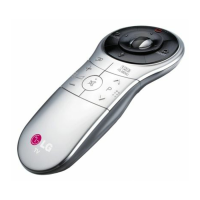

 To Next Page
 General