Need help?
Do you have a question about the LG OLED48C17LB.AVS and is the answer not in the manual?
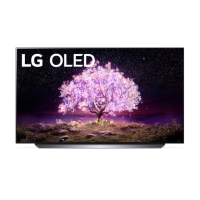
This document is an owner's manual for an LG OLED TV, providing comprehensive instructions and safety guidelines for its operation, maintenance, and setup.
The primary function of this manual is to guide users through the process of setting up and using their LG OLED TV. It covers everything from initial installation to advanced features and troubleshooting. The manual emphasizes safety precautions to ensure the longevity of the device and the well-being of the user.
The manual details various usage features, starting with the basic setup. It explains how to lift and move the TV safely, recommending that larger TVs be handled by at least two people and that the screen should always face away from the user to prevent damage. When transporting, the TV should be kept upright, avoiding jolts or excessive vibration.
For mounting, the manual provides instructions for both table-top and wall mounting. For table-top setup, it specifies maintaining a minimum 10 cm space from the wall for proper ventilation and connecting the power cord to a wall outlet. It warns against using foreign substances on screw parts and emphasizes securing the TV to prevent overturning. For wall mounting, it advises attaching a VESA standard mounting interface and connecting all cables before installing fixed wall mounts. It also recommends using the accessory cable holder for specific OLED models.
Connecting external devices is a key feature. The manual explains how to connect an antenna/cable to a wall antenna socket using an RF cable (75 Ω), noting that a signal splitter can be used for multiple TVs and a signal amplifier may be needed for poor image quality. It also covers connecting to a satellite dish. For HDMI connections, it highlights the importance of using certified HDMI cables (Ultra High Speed HDMI®/™ cable, 3 m or less) and explains how to adjust the [HDMI Deep Colour] setting for optimal picture quality, depending on the TV model. USB connections are also covered, with advice on using extension cables for optimal fit and performance. The manual also describes how to view encrypted services using a CI module, emphasizing correct insertion to prevent damage.
The manual provides detailed instructions for starting the TV, including turning it on using the physical button and adjusting basic settings like volume and program control. It also explains how to register and deregister the Magic Remote Control, which is crucial for interacting with the TV's smart features. The NFC Tagging feature is described, allowing users to connect smart devices and access LG ThinQ app features by simply bringing the device near the NFC logo on the remote.
The manual includes several maintenance features designed to protect the OLED TV screen and ensure its optimal performance.
One of the most important maintenance features is the detailed advice on protecting the OLED TV screen from image retention (burn-in). It explains that OLED displays can experience image retention due to the nature of organic materials and prolonged display of static images. The manual identifies specific types of images likely to cause retention, such as those with black bars, 4:3 or 21:9 aspect ratios, or fixed elements like program numbers, station logos, and game console icons.
To mitigate image retention, the manual recommends running the [Pixel Cleaning] feature. This feature automatically activates after four hours of cumulative use or 2,000 hours of cumulative use, checking the screen status and preventing image retention. Users can also manually activate Pixel Cleaning through the TV's support menu. It's noted that horizontal lines may appear during this process, which is normal, and the TV must remain connected to power for approximately one hour.
Further recommendations for minimizing image retention include adjusting picture settings. Users are advised to set the picture mode to [APS] and reduce the [OLED Pixel Brightness] in [Advanced Settings]. Additionally, setting the [Adjust Logo Brightness] value to [High] in [OLED Panel Care] is recommended. For images with black bars, the manual suggests using [Vertical Zoom] or [4-Way Zoom] in the [Aspect Ratio] settings to remove them. It also advises turning off menus for setting up external devices when not in use to prevent static images from being displayed for extended periods. The manual also mentions that the screen brightness will automatically reduce when a fixed image is displayed for a long time, and then restore once the content changes, which is a normal function to minimize image retention.
General cleaning instructions are provided, emphasizing the importance of unplugging the power cord and using a soft/dry cloth. It strictly warns against spraying water or other liquids directly onto the TV, or using chemicals like glass cleaner, air fresheners, insecticides, lubricants, wax, abrasives, thinner, benzene, or alcohol, as these can damage the product and/or its panel.
The manual also covers battery maintenance for the remote control, advising users to store batteries out of reach of children, not to short circuit, disassemble, or overheat them, and to dispose of them properly according to local regulations. It also warns against mixing new and old batteries or incorrect polarity, which can lead to overheating, leakage, fire, or explosion.
Troubleshooting tips are included for common issues such as the remote control not working, no image or sound, sudden TV shutdown, and no signal when connecting to a PC via HDMI. It also addresses abnormal display phenomena like "flicker" when the TV is cold, tiny black/colored dots (pixels), and variations in brightness/color depending on the viewing position, clarifying that these are often normal characteristics of the panel and not malfunctions. "Cracking" noise due to thermal contraction and "electrical circuit humming/panel buzzing" are also explained as normal operational sounds.
 General
| Screen Size | 48 inches |
|---|---|
| Display Type | OLED |
| Refresh Rate | 120 Hz |
| Smart TV | Yes |
| Operating System | webOS |
| HDMI Ports | 4 |
| USB Ports | 3 |
| Processor | α9 Gen4 AI Processor 4K |
| HDMI Version | HDMI 2.1 |
| VRR | Yes |
| Bluetooth | Yes |
| Wi-Fi | Yes (802.11ac) |
| Ethernet | Yes |
| Resolution | 3840 x 2160 (4K UHD) |
| HDR Support | HDR10, HLG, Dolby Vision |
| Audio Output | 40W |


 To Next Page