Due to our policy of continuous product innovation, some specications may change without notication.
©LG Electronics U.S.A., Inc., Englewood Cliffs, NJ. All rights reserved. “LG” is a registered trademark of LG Corp.
User Manual
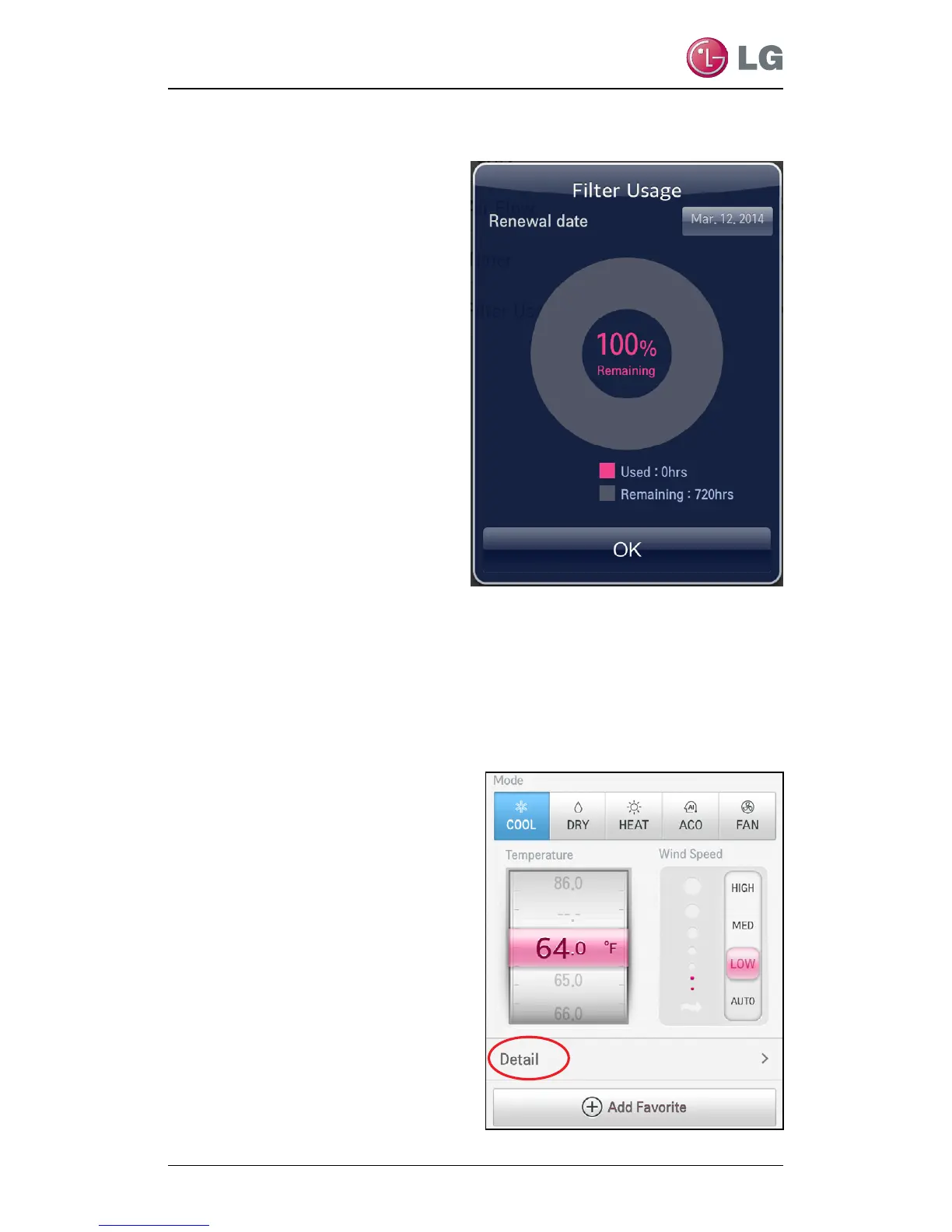
At the Filter Usage screen, you
can see the Renewal date (1)
and percentage of lter remain-
ing (2) as well as, the Used and
Remaining time (as hrs) before
the lter needs to be cleaned (3).
3. Tap OK to close the screen
when done.
• You will be returned to the
mode screen.
Filter Usage - Monitoring - Continued
Setting Filter Renewal Date
You can set a reminder date that will alert you when it is time to
clean your filter. Follow your unit owner’s manual for suggested
maintenance cycles (i.e., monthly or quarterly). To set up a
renewal date follow the steps below.
1. From any of the mode
screens, tap Detail.
1
2
3


 To Next Page