EasyManua.ls Logo

LG PWFMDB200 - User Manual

LG PWFMDB200
14 pages
Print Icon
To Next Page IconTo Next Page
Loading...
www.lg.com
INSTALLATION MANUAL
CLOUD
GATEWAY
Please read this installation manual completely before installing
the product.
Installation work must be performed in accordance with the
national wiring standards by authorized personnel only.
Please retain this installation manual for future reference after
reading it thoroughly.
Cloud Gateway
PWFMDB200
Original instructions
MFL71720406
Rev.03_070622
Copyright © 2021 - 2022 LG Electronics Inc. All Rights Reserved.
ENGLISH
ภาษาไทย
TÜRKÇE
Question and Answer IconNeed help?

Do you have a question about the LG PWFMDB200 and is the answer not in the manual?

Summary

Important Safety Instructions

General Safety Warnings

Essential warnings and cautions regarding product installation and operation, emphasizing qualified personnel.

Installation Safety Guidelines

Specific safety instructions for the installation process, covering electrical work and environmental placement.

Product Use and Handling Safety

Electrical Work and Environmental Safety

Safety precautions for electrical work, wiring, and avoiding hazardous environments like gas leakage.

Operational and Power Safety

Guidelines for safe power cable handling, using intact outlets, and product placement.

Product Safety Precautions

Operational Safety Measures

Safety measures for product operation, including avoiding liquids, using correct parts, and handling malfunctions.

Child Supervision and Environmental Checks

Safety advice on child supervision, operating within temperature limits, and responding to abnormal product behavior.

Product Handling and Maintenance Safety

Product Handling and Storage Safety

Safe practices for product handling, storage, power plug removal, and cleaning procedures.

Installation and Operational Safety Checks

Safety checks for product installation, environmental compatibility, and operational procedures like sterilization.

Product Composition and Specifications

Product Composition Overview

Lists and illustrates the various components included with the Cloud Gateway.

Technical Product Specifications

Presents key technical specifications including dimensions and interface details.

Installation Instructions

Installation and Setting Procedure

Provides a step-by-step guide for the installation and initial setup of the controller.

Installation Environment and Wiring

RS485 Communication Line Setup

Details the correct connection and configuration of RS485 communication lines for indoor units.

Environment Inspection and Address Assignment

Covers inspection of the installation environment and assigning unique addresses to devices.

Product Mounting and Connection

Product Installation and RS485 Wiring

Instructions for physically mounting the product and connecting the RS485 cable to the terminal.

Network Connectivity and ThinQ App

Indoor Unit Search and App Registration

Guides on searching for indoor units and registering the product with the LG ThinQ app.

Network Connection Methods

Steps for establishing network connection for the Cloud Gateway via wired or wireless methods.

ThinQ App Features and Integration

Connecting to LG ThinQ Account

Instructions for logging into and creating an LG account for the ThinQ app.

Product Synchronization and Control

Explains synchronizing information and controlling the product via the ThinQ app interface.

Advanced Product Information

BECON Cloud Interlocking and Settings

Details on setting up BECON cloud interlock and managing address settings.

Wireless Specifications and RF Exposure

Information on wireless frequency range, output power, and RF radiation exposure limits.

Open Source Software Guide

Troubleshooting and Product Disposal

Problem Resolution Guide

Steps to check and resolve common product issues before contacting the service center.

Product Disposal Guidelines

Disposal of Old Appliances

Guidelines for proper and environmentally friendly disposal of waste electrical and electronic equipment.

Disposal of Waste Batteries

Instructions for the separate and safe disposal of used batteries.

Regulatory Compliance

Declaration of Conformity

Official declaration of the product's compliance with relevant EU directives for radio equipment.

Overview

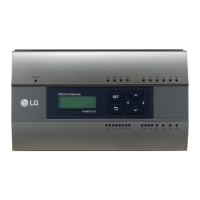
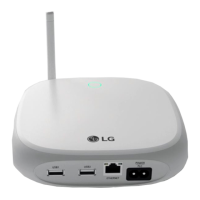
The LG Cloud Gateway (Model: PWFMDB200) is a controller designed to facilitate communication and control between LG air conditioning and ventilation units and the LG ThinQ smart home ecosystem. It acts as a central hub, allowing users to monitor and manage their HVAC systems remotely via the ThinQ app.

Function Description:

The Cloud Gateway's primary function is to bridge the communication gap between LG HVAC units (indoor units, outdoor units, ventilation equipment) and the LG ThinQ cloud platform. It enables:

  • Centralized Control: A single Cloud Gateway can connect up to 16 indoor units, allowing for unified management of multiple HVAC devices.
  • Remote Monitoring and Control: Through the LG ThinQ app, users can remotely monitor the status of connected air conditioners and ventilation units, adjust settings, and receive notifications.
  • Device Registration: The gateway facilitates the registration of HVAC units, making them discoverable and controllable within the ThinQ app.
  • Network Connectivity: It supports both wired (Ethernet) and wireless (Wi-Fi) connections to the user's home network, ensuring flexible installation options.
  • BECON Cloud Interlocking: For advanced functionalities, the Cloud Gateway can interlock with the BECON cloud system, requiring a separate PC program for setup and configuration.

Important Technical Specifications:

  • Power Supply: 12 V (from the outdoor unit's output power).
  • Communication:
    • RS485: Maximum 1 km communication length. Used for connecting to indoor/outdoor units.
    • Ethernet: 10/100 Mbps. For wired network connection.
    • Wi-Fi: 2.4 GHz. For wireless network connection.
  • LED Indicators: Two LEDs (red for product mode, green for power) indicate the device's status, including power, network connection, and indoor unit search progress.
  • Switches:
    • Change product mode: For registration (LED dimming) or use (LED lighting).
    • Reset the power: To restart the device and re-initiate indoor unit search.
  • Temperature Specifications:
    • Operating Temperature: 0 °C to 40 °C.
    • Storage Temperature: -20 °C to 60 °C.
  • Wireless Product Specifications:
    • Frequency Range: 2412 MHz - 2472 MHz.
    • Output Power (Max): 18.12 dBm.
    • Wireless Function S/W Version: V 1.0.
  • Dimensions: Approximately 120 mm (width) x 120 mm (height) x 29 mm (depth).
  • Mounting: Wall-mounted using a wall installation plate and fixing screws.
  • USB Port (C-Type): Not used in this specific product.

Usage Features:

  • Installation Process: The installation involves inspecting the environment, setting equipment addresses, physically installing the controller, connecting power and communication lines (RS485, Ethernet), and finally, setting up the ThinQ app.
  • Indoor Unit Search: Upon power-on, the controller automatically searches for connected indoor units. The number of found units is indicated by the LED dimming.
  • ThinQ App Integration: The device is designed to work seamlessly with the LG ThinQ app for account registration, network connection (wired or wireless), and remote control.
  • Address Setting: Each connected HVAC unit requires a unique, non-overlapping address (00-0F) for proper identification and control. For Multi V outdoor units, a recommended addressing scheme uses the first digit for the outdoor unit number and the second for the indoor unit number.
  • RS485 Communication: Requires careful wiring, ensuring correct polarity and using appropriate cable specifications (e.g., >0.75 mm² communication cable, polychloroprene sheathed).
  • Network Requirements: The ThinQ app requires a 2.4 GHz Wi-Fi network (5G is not supported by the modem). WPA2 authentication is recommended for wireless routers.
  • BECON Cloud: Interlocking with BECON cloud requires a separate PC program for setup and allows for more advanced control and data management.

Maintenance Features:

  • Safety Precautions: The manual emphasizes the importance of professional installation, adherence to wiring standards, and avoiding unauthorized repairs to prevent fire, electric shock, or product damage.
  • Environmental Considerations: Users are advised to install the product in a dry, non-combustible environment, away from firearms, excessive moisture, and potentially explosive atmospheres.
  • Cleaning: The product should be cleaned with a soft cloth and mild detergent, avoiding strong solvents that could cause damage or fire.
  • Troubleshooting: The manual provides a troubleshooting guide for common issues like product registration failures or frequent disconnections, offering solutions related to router settings, signal strength, and network connectivity.
  • Firmware Updates: While not explicitly detailed as a user-initiated feature, integration with the ThinQ app and cloud platform typically allows for remote firmware updates to improve functionality and security.
  • Disposal Information: Instructions are provided for the proper disposal of the appliance and waste batteries, adhering to environmental regulations.
  • Open Source Software Guide: Information is provided on how to obtain the developer source code for the product, aligning with open-source licensing requirements.

LG PWFMDB200 Specifications

General IconGeneral
BrandLG
ModelPWFMDB200
CategoryGateway
LanguageEnglish

Related product manuals