EasyManua.ls Logo

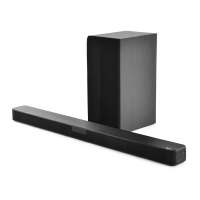
LG S54A1-D - User Manual

LG S54A1-D
30 pages
Print Icon
To Next Page IconTo Next Page
Loading...
Please read this manual carefully before operating
your set and retain it for future reference.
NB5540 (NB5540, S54A1-D)
NB4540 (NB4540, S44A1-D)
OWNER’S MANUAL
4.1 ch Hi-Fi
Sound Bar
www.lg.com
ENGLISH
NB5540-NE_DSGPLLK_ENG.indd 1 2014-01-15  2:53:18

Table of Contents

Questions and Answers

  • R
    Rebekah BushAug 12, 2025
    Why is there no sound coming from my LG S54A1-D?
    • T
      Timothy SchmidtAug 12, 2025
      If your LG Speaker System isn't producing any sound, first ensure that the correct input source is selected. If the mute function is activated, press the MUTE button or adjust the volume. If you're using an external device like a set-top box or Bluetooth device, also check and adjust the volume level on that device.
  • V
    Victoria MurphyAug 16, 2025
    What to do if my LG S54A1-D Speaker System has no power?
    • J
      Julie ClarkAug 16, 2025
      If your LG Speaker System isn't powering on, ensure the power cord is securely plugged in. Also, test other electronic devices on the same power outlet to rule out any power issues.
  • J
    John BaileyAug 19, 2025
    How to fix LG S54A1-D remote control that is not working?
    • K
      Kelly KimAug 19, 2025
      If the LG Speaker System remote control isn't working, make sure you're within 7 meters of the unit and that there are no obstacles blocking the signal path. If problems persist, replace the batteries with new ones.
  • L
    leblancreginaldAug 23, 2025
    Why is the AUTO POWER function not working on my LG S54A1-D Speaker System?
    • A
      Alexander MurphyAug 23, 2025
      If the AUTO POWER function isn't working on your LG Speaker System, verify the connection of the external device, such as a TV, DVD/Blu-Ray player, or Bluetooth device. Also, check the state of SIMPLINK and try turning SIMPLINK off. Note that depending on the connected device, this function may not operate.
  • R
    ryan08Aug 27, 2025
    What to do if there is no woofer sound from my LG Speaker System?
    • M
      murrayethanAug 27, 2025
      If you're not getting any sound from the woofer of your LG Speaker System, first ensure that the subwoofer's power cord is securely connected to the wall outlet. If it is, the pairing between the main unit and the subwoofer might be disconnected. Connect the unit and the subwoofer.
  • B
    Brett CastilloAug 30, 2025
    How to troubleshoot an LG S54A1-D that does not work properly?
    • G
      Gregory GoodwinAug 30, 2025
      If the LG Speaker System unit isn't working correctly, turn off the power to both the unit and any connected external devices like TVs, woofers, DVD players, or amplifiers. Then, turn them back on. If that doesn't work, disconnect the power cords of the unit and connected devices before reconnecting them.
  • A
    Allison AndersonSep 3, 2025
    What to do if there is no display on my LG S54A1-D Speaker System?
    • K
      Kenneth FernandezSep 4, 2025
      If the display on your LG Speaker System is not showing, the DISPLAY OFF function may be activated. Press the SLEEP button repeatedly to cancel this function.
  • A
    Alicia CarterSep 7, 2025
    Why is the output sound of my LG Speaker System low?
    • C
      Christopher FreemanSep 7, 2025
      If you find the output sound of your LG Speaker System is low, switch the DRC (Dynamic Range Control) function to OFF using the remote controller. If the sound bar is connected to a TV, change the AUDIO DIGITAL OUT setting on the TV Setup Menu from PCM to AUTO or BITSTREAM. If connected to a Player, change the AUDIO DIGITAL OUT setting on the Player Setup Menu from PCM to PRIMARY PASS-THROUGH or BITSTREAM. You can also try changing the Audio DRC setting on the Player setup menu to the OFF state.

LG S54A1-D Specifications

General IconGeneral
Channels2.1
SubwooferYes
Frequency Response40 Hz - 20 kHz
Input Sensitivity500 mV
Power SupplyAC 220-240V, 50/60Hz
Weight (Satellite)0.5 kg
Type2.1 Speaker System

Related product manuals