A8
Image Control Icons
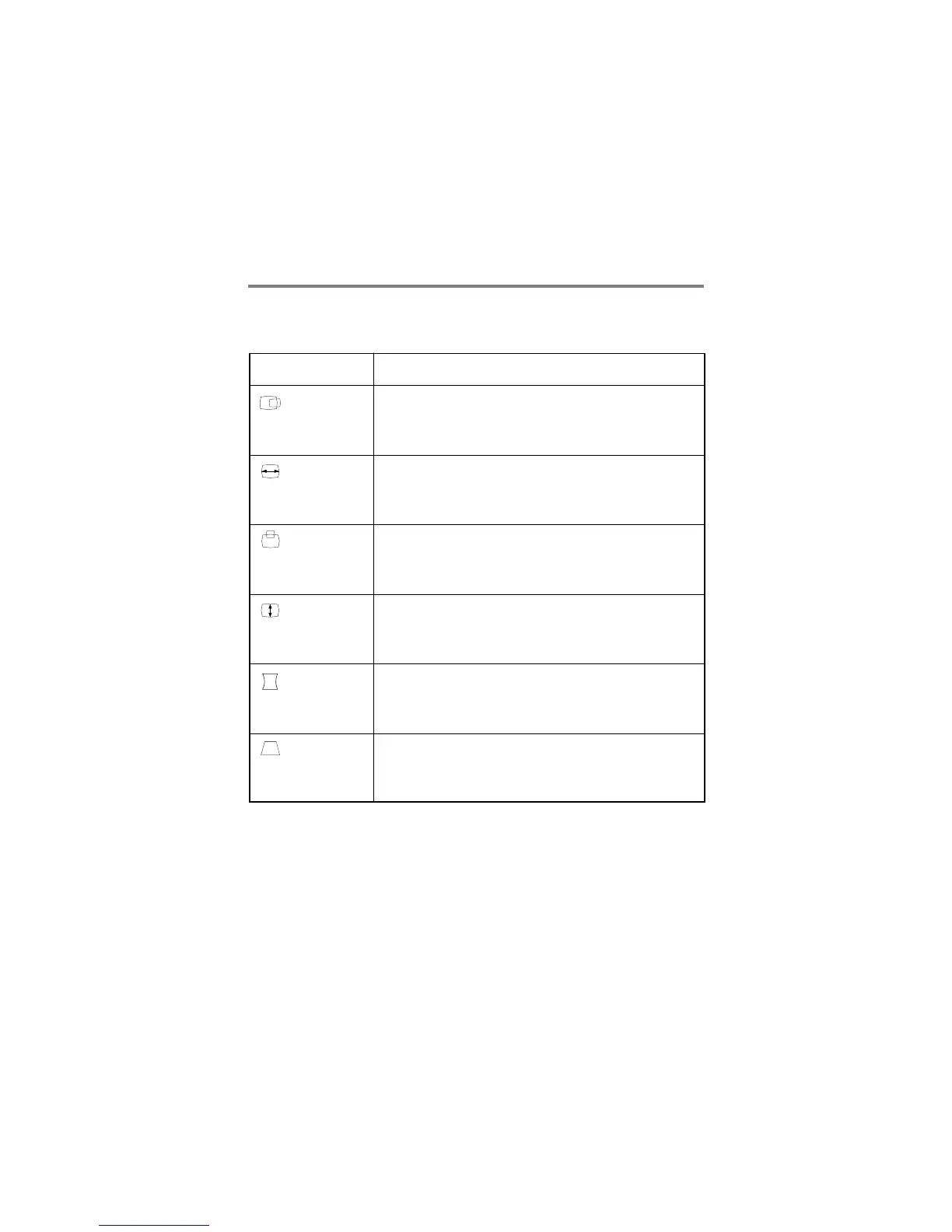
Listed below are the icons, icon names, and icon descriptions of the
items.
To move picture image left and right.
- Moves the screen image left.
+ Moves the screen image right.
To adjust image width.
- Decreases the size of the screen image.
+ Increases the size of the screen image.
To move image up and down.
- Moves the screen image down.
+ Moves the screen image up.
To adjust image height.
- Decreases the size of the screen image.
+ Increases the size of the screen image.
To correct the bowing in and out of the image.
- Curves the image's edges inwards.
+ Curves the image's edges outwards.
To correct geometric distortion.
- Makes the screen image narrower at the top.
+ Moves the screen image wider at the top.
Horizontal
Position
Descriptionicon
Horizontal
Size
Vertical
Position
Vertical
Size
Side
Pincushion
Trapezoid
When the user wants to recall one of the 6 fatory fixed image
modes, push the - and + buttons simultaneously. To recall the next
image mode, press both the - and + buttons again.
* Recall Function





 To Next Page