HBS-760
QUICK START
GUIDE
Pairing and Connecting
Pairing with Tone & Talk
TM
* (for Android™ devices)
1. With the power off, press
the CALL button and slide
the Power switch to the ON
position at the same time for
2 seconds.
2. Open the Tone & Talk app on
your handset or tablet and
press Start.
3. Tap Search for devices and select LG HBS760 from
the list.
* To download the application, search for Tone
& Talk in Google Play
TM
or scan the QR code.
Follow the installation instructions.
Tone & Talk
Manual Pairing (pairing with another phone or re-pairing)
1. With the power off, press the CALL button and slide
the Power switch to the ON position at the same time
for 2 seconds.
2. Locate the
Bluetooth
®
menu on your handset or tablet
and search for or add new devices.
3. Select LG HBS760 from the list of devices to pair it.
* Once the device is paired, this pairing procedure is no
longer required for the same device.
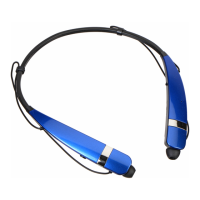
Product Description
FF/REW Switch
Charging Port
Power Switch
Microphone
Earbud (L)
LED Indicator
CALL Button
VOLUME Switch (+/-)
PLAY/PAUSE/STOP Button
Earbud (R)
Using Tone & Talk
Function Action
Current time
alert
Slide the FF/REW switch to the FF position for
1 second.
Read latest
SMS or
MMS
Slide the FF/REW switch to the REW position
for 1 second.
Designated
contact
1. Select Designated contact in the Headset call
settings of the app.
2. Press the CALL button twice on your headset
to call the Designated contact.
Favorite
contacts
1. Select Favorite contacts in the Headset call
settings of the app.
2. Press the CALL button twice on your headset.
3. Use the FF/REW switch to choose the contact.
4. Press the CALL button twice to call the
contact.
Call logs 1. Select Call logs in the Headset call settings
of the app.
2. Press the CALL button twice on your headset.
3. Use the FF/REW switch to choose the contact.
4. Press the CALL button twice to call the
contact.
Rev 1.0 US

 To Next Page
 General
 Weight and Dimensions