EasyManua.ls Logo

LG WDP2 Series - User Manual

LG WDP2 Series
7 pages
Print Icon
To Next Page IconTo Next Page
Loading...
SERVICE MANUAL
PEDESTAL
For washer, dryer, and combo
LG 27"
CAUTION : READ THIS MANUAL CAREFULLY TO DIAGNOSE
CORRECTLY BEFORE SERVICING THE UNIT.
MODEL : WDP1*/WDP2*/WDP3*
Question and Answer IconNeed help?

Do you have a question about the LG WDP2 Series and is the answer not in the manual?

Overview

This is a service manual for the LG 27" pedestal, designed for use with LG washers, dryers, and combo units. The manual covers installation, disassembly, and an exploded view of the pedestal, providing essential information for servicing and maintenance. The models covered are WDP1*, WDP2*, and WDP3*.

Function Description

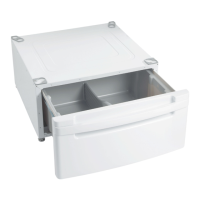
The LG 27" pedestal serves as a base for LG washers, dryers, and combo units, elevating the appliance to a more convenient height for loading and unloading. It often includes a storage drawer, providing additional space for laundry supplies or other items. The pedestal is designed to integrate seamlessly with the appliance, ensuring stability and proper operation.

Important Technical Specifications

The manual does not explicitly list technical specifications such as dimensions, weight capacity, or material composition. However, it implies that the pedestal is designed to support the weight of LG 27" washers, dryers, and combo units. The installation process involves attaching the appliance to the pedestal using brackets and screws, indicating a robust connection. The pedestal also features adjustable legs to ensure a solid and level placement on the floor, which is crucial for the proper operation of the appliance.

Usage Features

Installation: The installation process is detailed for both washer/combo and dryer units.

  1. Unpacking: Remove the pedestal, installation hardware, and instructions from the shipping carton.
  2. Positioning the Appliance: Place the washer/combo or dryer on top of the pedestal. This step requires two or more people due to the weight of the appliance.
  3. Bracket Attachment: Attach double-faced tape of the brackets to the appliance, ensuring the bent parts align with the edge. Press the adhesive parts firmly to the appliance.
  4. Securing with Screws: Install eight screws (supplied) to attach the brackets to the pedestal.
  5. Drawer Preparation: Remove the paper from the bracket of the drawer.
  6. Placement and Leveling: Move the appliance and pedestal assembly to the desired location. It must be placed on a solid and level floor. Adjust the legs of both the appliance and the pedestal by turning them with a wrench. Then, adjust the lock nut toward the pedestal while holding the pedestal leg with a wrench.

Pre-installation Notes:

  • If a washer or combo was previously installed, it must be unplugged, and inlet/drain hoses disconnected and drained.
  • If a dryer was previously installed, it must be unplugged, gas supply turned off (for gas dryers), and the exhaust vent disconnected.

Safety Warnings during Installation:

  • Excessive Weight Hazard: Two or more people are needed to install and move the appliance and pedestal assembly.
  • Do not allow children to play on the drawer.
  • Do not step on the handle.
  • Level both the appliance and pedestal after installation or service.
  • Ensure all feet are stable and resting on the floor/pedestal.
  • When pushing down the edges of the appliance top plate diagonally, it should not move at all (check all directions).
  • After installation/servicing, operate the appliance to ensure it functions correctly.

Maintenance Features

Disassembly Instructions: The manual provides a step-by-step guide for disassembling the pedestal, which is essential for servicing or repair.

  1. Floor Protection: Protect the floor with a large piece of cardboard, ensuring it covers the entire lower back of the appliance.
  2. Drawer Screw Removal (Internal): Open the drawer and remove four screws (two on each side) from both sides of the drawer.
  3. Drawer Screw Removal (External): Remove two screws from either side of the drawer.
  4. Drawer Removal: Pull up the drawer to disassemble it.
  5. Front Cover Screw Removal: Remove six screws from the front cover assembly.
  6. Pedestal Leg Removal: Loosen the leg using the supplied wrench.
  7. Pedestal Bottom Screw Removal: Remove twelve screws from the bottom of the pedestal.
  8. Slide Screw Removal: Remove four screws (two on each side) from both sides of the slide.

Exploded View: An exploded view diagram (Section 3) is provided, illustrating the individual components of the pedestal and their assembly. This view is crucial for identifying parts during repair or replacement. Key components are labeled with alphanumeric codes (e.g., A100, A101, A110, A120, A130, A140, A150, A160, A170, A190, A200). While specific part names are not listed in the text, the diagram visually separates the main body, drawer, handle, slides, and adjustable feet, indicating their relative positions and connections. This visual aid is invaluable for technicians performing repairs or ordering replacement parts.

The manual emphasizes the importance of careful diagnosis and correct servicing, highlighting the need to read the manual thoroughly before attempting any service on the unit.
LG WDP2 Series Specifications

General IconGeneral
BrandLG
ModelWDP2 Series
CategoryWasher
LanguageEnglish

Related product manuals