30
2. INTRODUCTION
2.1 OVERVIEW
The device is equipped with a large dot-matrix display,
a rotating encoder with push (knob), both with backlight
in order to ensure the use in low light situations, and two
buttons (picture 3).
Note: from GENERAL SETTINGS Menu, it is possible to
change the backlight time. Backlight function depends on
connected UC, if it has not the Smart Power function the
backlight does not work.
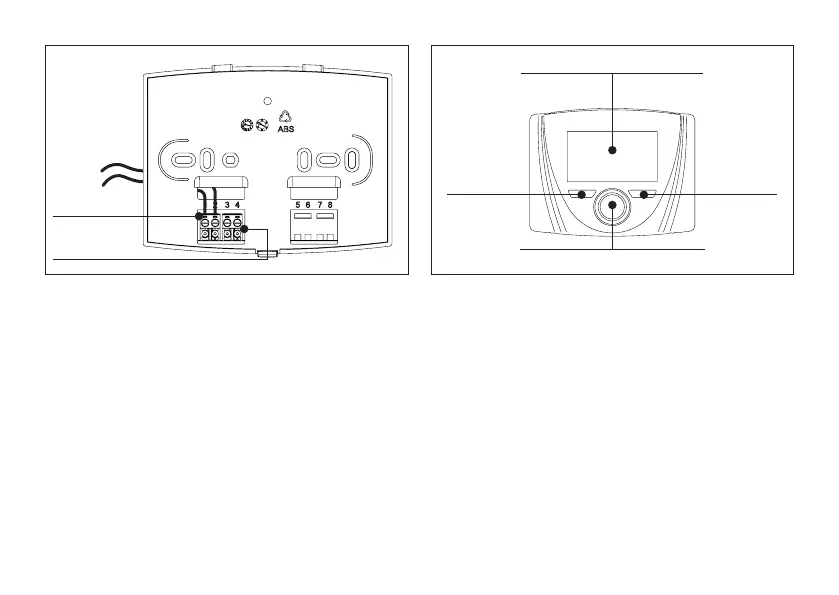
terminal for OT
communication
terminal for GSM
input
picture 2
rotating encoder with push (knob)
white and black display with backlight
Right button
Left button
picture 3
2.2 FIRST STARTING
Note: RC21 communicates and is powered through the
connection of OT with UC. When UC is powered, also
RC21 starts working.
At the rst starting, the device shows model and FW
version. In a second time, Home appears (picture 4)
showing Room temperature, status, and if external probe
is available, external temperature.
By default: language is italian and the status is OFF (so all
functions are disabled except for antifreeze).
See INTERFACE paragraph for more information
concerning display, buttons/knob and how to use the menu.



 To Next Page