37
5.1 ROOM SET (Winter)
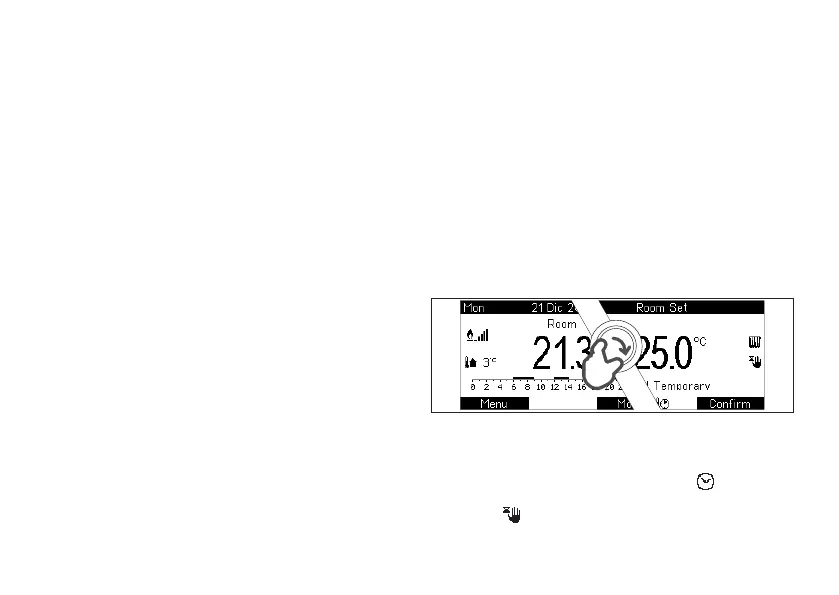
Temperature Set is always displayed in Room Home, at
low right (picture 6) and can be modied quickly turning
knob from this page.
Procedure:
1. From Home, turn knob to enter the modication of
the Set temperature (picture 9)
2. Turn again knob until the desired temperature has
been achieved
3. Save changes pressing Conrm button. Otherwise
press Cancel to exit without saving
Temporary Manual and Party:
• If, after step 2., you Conrm with R button without
using knob:
1. With Automatic program active , the set will
be active until next slot (Temporary Manual
)
5. QUICK TEMPERATURE SETTING
Hot water is active, hot water production is enabled
assuring a xed out temperature (or on tank)
corresponding to the manual set xed by user through Hot
Water Set window.
AUTOMATIC
The weekly time schedule conforms to the one set by user
(HOT WATER SETTINGS Menu) diversifying Comfort and
Economy (some UC do not manage this program).
4.4 MEANING OF HEATING PROGRAMS
STANDBY
Heating is permanently off, Antifreeze function is active (if
enabled).
MANUAL (default)
Heating is active and room temperature is managed
following the Set xed by user.
AUTOMATIC
The heating program follows the weekly time schedule
settable by user (HEATING SETTINGS Menu). Room
temperature is managed according to a variable trend
in the time, dened by a set of Comfort and Economy
time slots, with corresponding Room Set Comfort and
Economy temperature levels which can be programmed
for the whole week.
picture 9



 To Next Page