General Data
Pendant Transmitter Battery Life: 6 years (for typical
use)
Frequency (MHz): 315.
Note: The 315 MHz version only was tested for
compliance with UL standards.
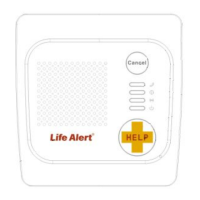
Indicators: 4 LED indicators.
Battery Pack: NI-MH 3.7 V, 2.0 Ah
Supply Voltage: 5VDC , 1A (via 120VAC/60Hz
Compliance: Complies with FCC part 68 and part 15,
and UL 985 Home Health Care Signaling Equipment.
LEDs:
Indicates all system
troubles
Communication with call
center established
AC power is not
connected.
When the conditions
below do not exist.
- Calling for help by using an emergency pendant
transmitter
- Speakerphone (hands-free) when communicating
with Life Alert Call Center
- The system supports up to 15 users (pendant
transmitters and smoke detectors).
- Computer control and data download/upload
- Remote control by SMS commands
- Remote diagnostic and event log using a PC
software or SMS
Operating Temperature: 32
Size: 179.5 x 185.5 x 50mm
Note: The product supports Life Alert monitoring center
To set up your system, follow the steps below.
If possible, select a central location in your home for the
Unit. This location should be in the area where you
spend most of your time. The location should also
enable an optimal signal reception for pendants,
smoke , CO detectors and Cellular network .
The Unit can be placed on a table, desk, or counter. It
also can be mounted on a wall.
Make sure that the location you have selected is near
an electrical outlet.
Connect Power to the unit
During normal operation, the unit runs on electrical
power.
1. Insert the plug on the power cord into the "AC"
connector on the unit.
2. Connect the AC/DC adapter into a nearby electrical
outlet. DO NOT USE AN OUTLET CONTROLLED
BY A WALL SWITCH.
5. Turn the ON/OFF switch to ON.
The Unit is now connecting you to
After you complete the steps above press the Help
button, the unit will automatically call Life Alert call
center and the dispatch will be in touch with you .
Transmitters Enrolling
Without PC:
Up to 15 wireless devices / transmitters can be enrolled
locally without a PC. The unit will recognize the device


 To Next Page