3.2 Functions
3.2.1 Courtesy light
The courtesy light function switches a light on during any automation movement.
The light remains on after the last manoeuvre for a 30-second period.
3.2.2 Deceleration in opening and closure
The automation decelerates in the final stretches of opening and closureo.
3.1.2 Automatic reclosure
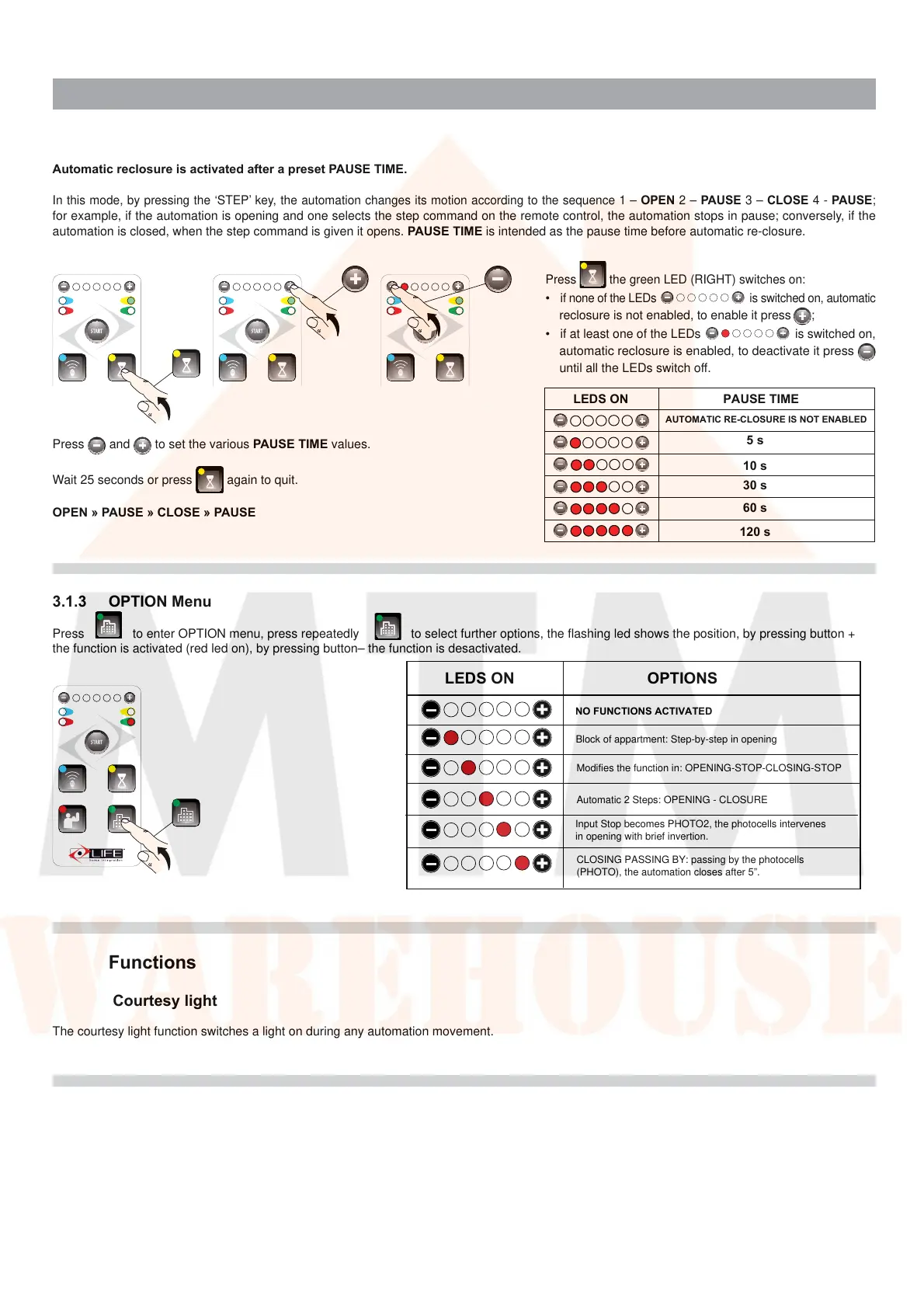
Automatic reclosure is activated after a preset PAUSE TIME.
In this mode, by pressing the ‘STEP’ key, the automation changes its motion according to the sequence 1 – OPEN 2 – PAUSE 3 – CLOSE 4 - PAUSE;
for example, if the automation is opening and one selects the step command on the remote control, the automation stops in pause; conversely, if the
automation is closed, when the step command is given it opens. PAUSE TIME is intended as the pause time before automatic re-closure.
Press
and to set the various PAUSE TIME values.
Wait 25 seconds or press
again to quit.
OPEN » PAUSE » CLOSE » PAUSE
Press the green LED (RIGHT) switches on
:
• i
f none of the LEDs is switched on, automatic
reclosure is not enabled, to enable it press ;
• i
f at least one of the LEDs is switched on,
a
utomatic reclosure is enabled, to deactivate it press
until all the LEDs switch off.
LEDS ON PAUSE TIME
AUTOMATIC RE-CLOSURE IS NOT ENABLED
5 s
10 s
30 s
60 s
120 s
3.1.3 OPTION Menu
Press to enter OPTION menu, press repeatedly to select further options, the flashing led shows the position, by pressing button +
the function is activated (red led on), by pressing button– the function is desactivated.
LEDS ON
OPTIONS
NO FUNCTIONS ACTIVATED
Block of appartment: Step-by-step in opening
Modifies the function in: OPENING-STOP-CLOSING-STOP
Automatic 2 Steps: OPENING - CLOSURE
Input Stop becomes PHOTO2, the photocells intervenes
in opening with brief invertion.
CLOSING PASSING BY: passing by the photocells
(PHOTO), the automation closes after 5”.



 To Next Page
 Loading...