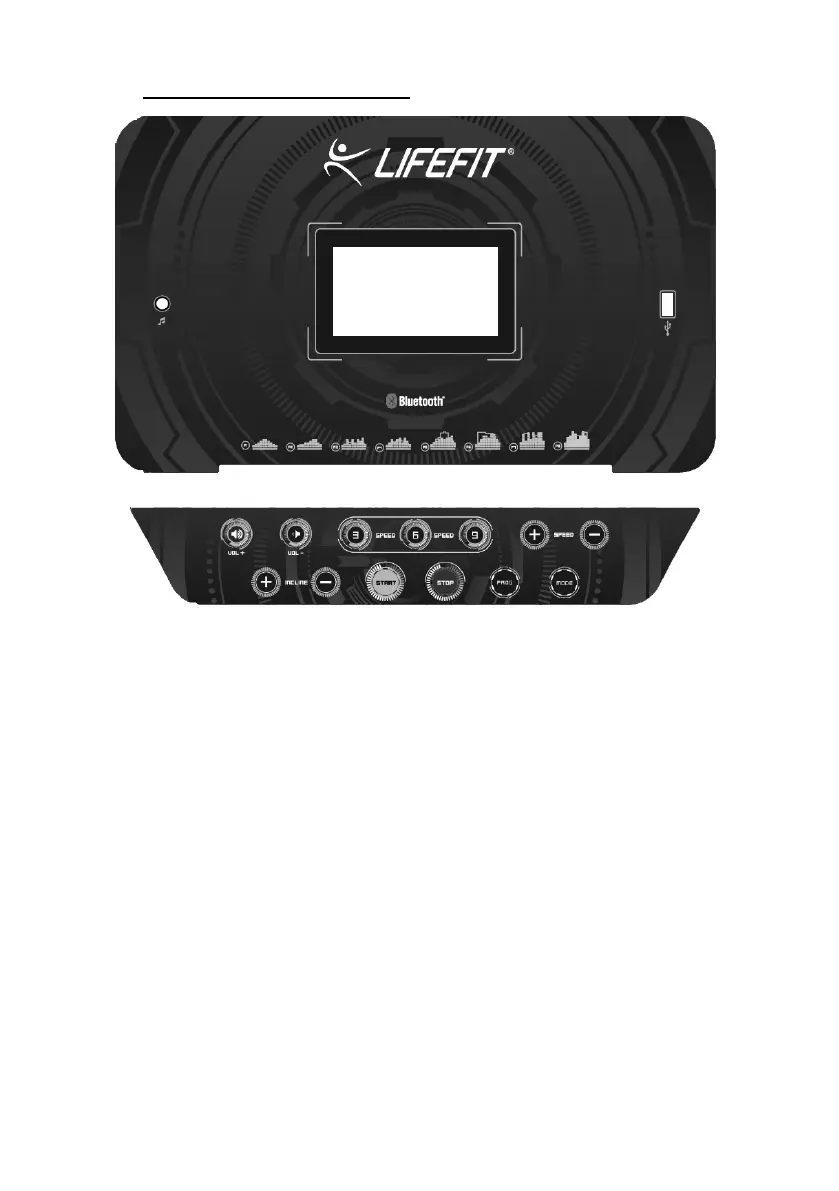
5. Control panel and function
1. Before you start exercising on the machine, please make sure the safety key is in
the correct position and the other end is attached to your clothing. Press „START".
The machine starts to count down for 3 seconds with a beep (beeping) and then sets
at 1 km / h.
2. To increase speed, press „+" and press „-" to slow down. The top speed is 17 km
/ h and the lowest is 1 km / h.
3. Press button „SPEED“, where you can choose „3", „6" or „9" to quickly select the
speed.
4. The „MODE" button switches between speed, time, and calories. If „SCAN" is
set, the speed, time, and calories will automatically alternate on the display every 5
seconds.
5. The treadmill has 12 programs. Before selecting the program, make sure the
machine is in standby mode and the belt does not move. Select the program by
pressing „PROG" and turn on the machine with the „START" button.
6. If one of the preset programs is running, the „+" or „-" button can not be used.
7. Heart Rate Sensor: Hold the sensor for min. 5 seconds and the heart rate is
displayed on the display. When testing, the heart-shaped mark flashes. The heart
rate monitoring system may not be accurate.
8. On the left hand grip is the „+/-" button for incline and the right-hand handle


 To Next Page
 Loading...