
 Need help?
Do you have a question about the Lifegoods LG1177 and is the answer not in the manual?
Specifies the product is for household use and not for precise weather forecasting.
General safety advice, handling, and use precautions for the device, components, and persons.
Detailed safety instructions for battery handling, insertion, disposal, and leakage.
Instructions for checking contents, reporting damage, and filing claims upon delivery.
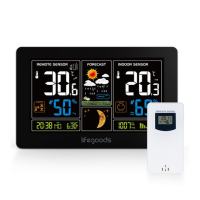
Visual identification of the weather station and sensor components.
Specifications for size, weight, material, power, and measurement ranges.
Lists extra features like radio control, calendar, language options, and alarms.
Step-by-step guide for initial setup, including battery insertion and sensor connection.
Explains automatic and manual DCF signal reception for time synchronization.
Instructions for setting the time, date, and year manually if radio reception fails.
Guide on how to set and configure daily alarm times and functions.
How to activate the snooze function and turn the alarm on/off.
How to switch temperature units, view comfort levels, and monitor trends.
How to view remote sensor data, set temperature alerts, and frost warnings.
How to view and reset max/min temperature and humidity readings.
Indicator for low battery and how to interpret weather forecasts.
Instructions for adjusting backlight brightness and turning it on/off.
Instructions for cleaning the weather station and sensor.
Recommendations for storing the device in a clean, dry place.
Guidance on environmentally responsible disposal of the product.
Information on obtaining service and warranty terms.
 General
| Display Type | LCD |
|---|---|
| Humidity Range | 20% to 95% |
| Power Source | Battery |
| Indoor Temperature Range | 0°C to 50°C |
| Outdoor Temperature Range | -20°C to +60°C |
| Temperature Range | -20°C to +60°C |
| Power Source (Main Unit) | 2 x AA batteries |
| Features | Indoor/Outdoor Temperature, Indoor/Outdoor Humidity |
| Wireless Range | Up to 60m (open field) |

 To Next Page