AMPLIFIER/SPEAKER
5
Amplifier/Speaker
800.236.4327 z 608.348.7918 FAX z WWW.LIFELINEAMP.COM
INPUT SECTION
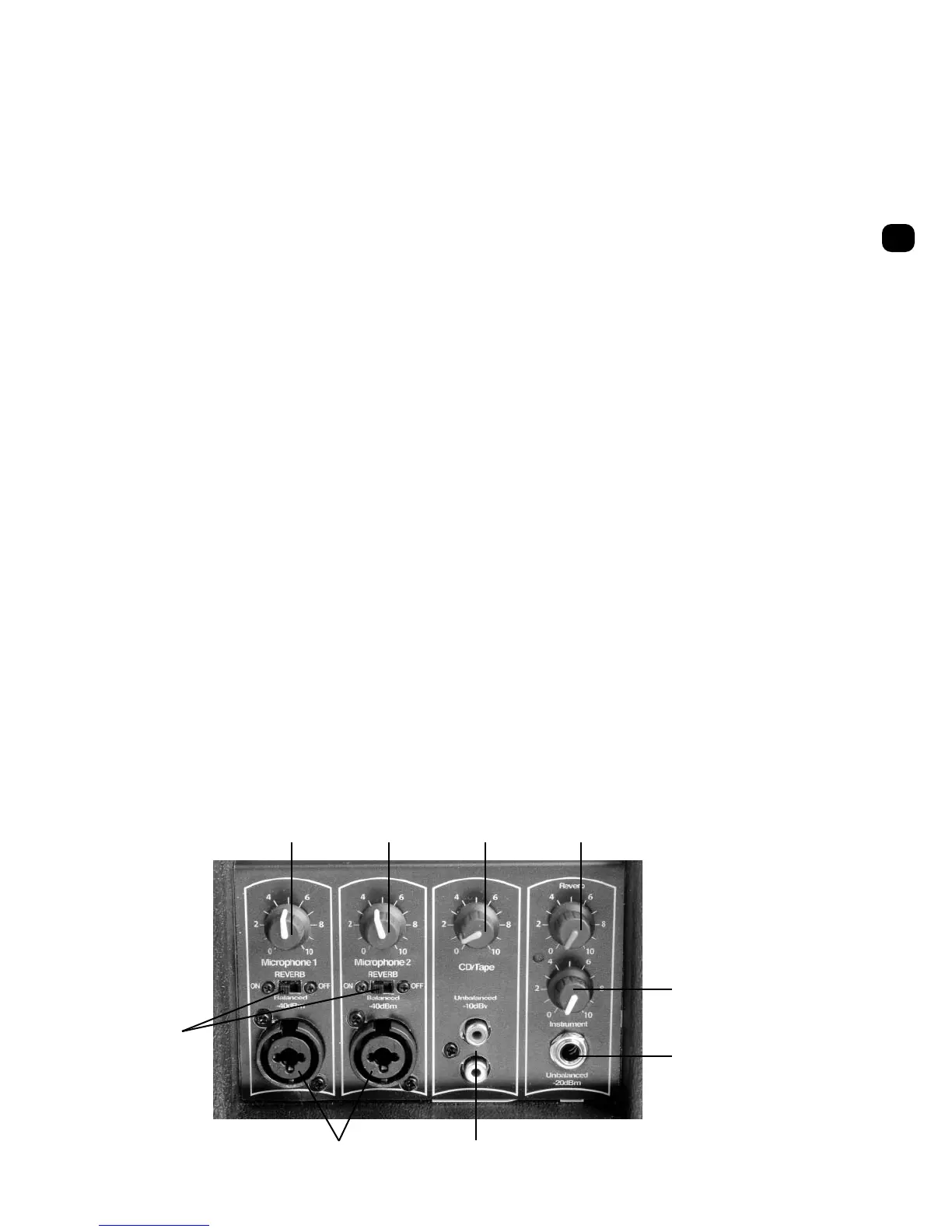
1. MICROPHONE 1 VOLUME CONTROL
If your Bravo system was ordered with a wireless
microphone, microphone 1 volume control will
be the volume control for this microphone. The
microphone 1 volume controls the volume for
any items plugged into the microphone 1 input
as well (#7 below). We do not recommend you
plug anything into the input of channel 1 if you
are using an internal wireless. We recommend a
starting volume of 5 (1/2 way).
2. MICROPHONE 2 VOLUME CONTROL
If your Bravo system was ordered with two wire-
less microphones, microphone 2 volume control
will be the volume control for this microphone.
The microphone 2 volume controls the volume
for any items plugged into microphone 2 input as
well. We do not recommend you plug anything
into the input of channel 2 if you ordered the
Bravo with two wireless (even if you are not
using the second wireless at this time.) We
recommend a starting volume of 5 (1/2 way.)
3. CD/TAPE VOLUME CONTROL
This controls the volume of anything plugged
into the RCA inputs below this volume control.
Typical items include computer, VCR,
CD player, etc.
4. INSTRUMENT VOLUME CONTROL
This controls the volume of anything plugged
into the 1/4" input below the volume control.
5. REVERB CONTROL
T
he Bravo includes an internal spring reverb.
The reverb control is a master reverb for both
channels 1 and 2 (reverb does not affect channels
3 and 4.) The reverb is intended for singing or
musical purposes.
6) REVERB ON/OFF
Reverb on/off gives you the ability to turn the
reverb on and off on Channels 1 and 2. Place the
switch to the right to turn reverb off and to the
left to turn reverb on. The amount of reverb
desired is controlled from the reverb volume
(number 5 above).
7. MICROPHONE/LINE LEVEL INPUTS
Channels 1 and 2 have a custom input jack
that can accept XLR or 1/4" inputs. We do not
recommend plugging items into these inputs
if a Bravo wireless was ordered with internal
wireless on these inputs.
8. RCA INPUTS
Dual RCA jacks are provided for easy interface
to CD players, tape decks, or similar devices.
These two RCA jacks are summed electronically
to a single mono signal.
9. INSTRUMENT INPUT
A single jack has been provided for easy
interfacing of musical inputs such as guitar,
electronic keyboard, etc. Do not plug a
microphone into this input.
1235
4
9
6
7
8



 To Next Page