4 5
Technical Specications:
Model Number: LP001
Operating Power Voltage (Battery): Li-ion Polymer 7.4 V / 500 mAh
Operating Power Voltage (USB Charging): DC 5 V 1.0A
Height: 22.6 mm
Width: 74.5 mm
Length: 116.5 mm
Weight: 182 g
Communication: Bluetooth 4.0
Support Media: ZINK Lifeprint Film
App Compatibility: iOS 8 or higher, Android 4.2 or higher.
Disclaimer:
Products design and specications are subject to change
without notice.
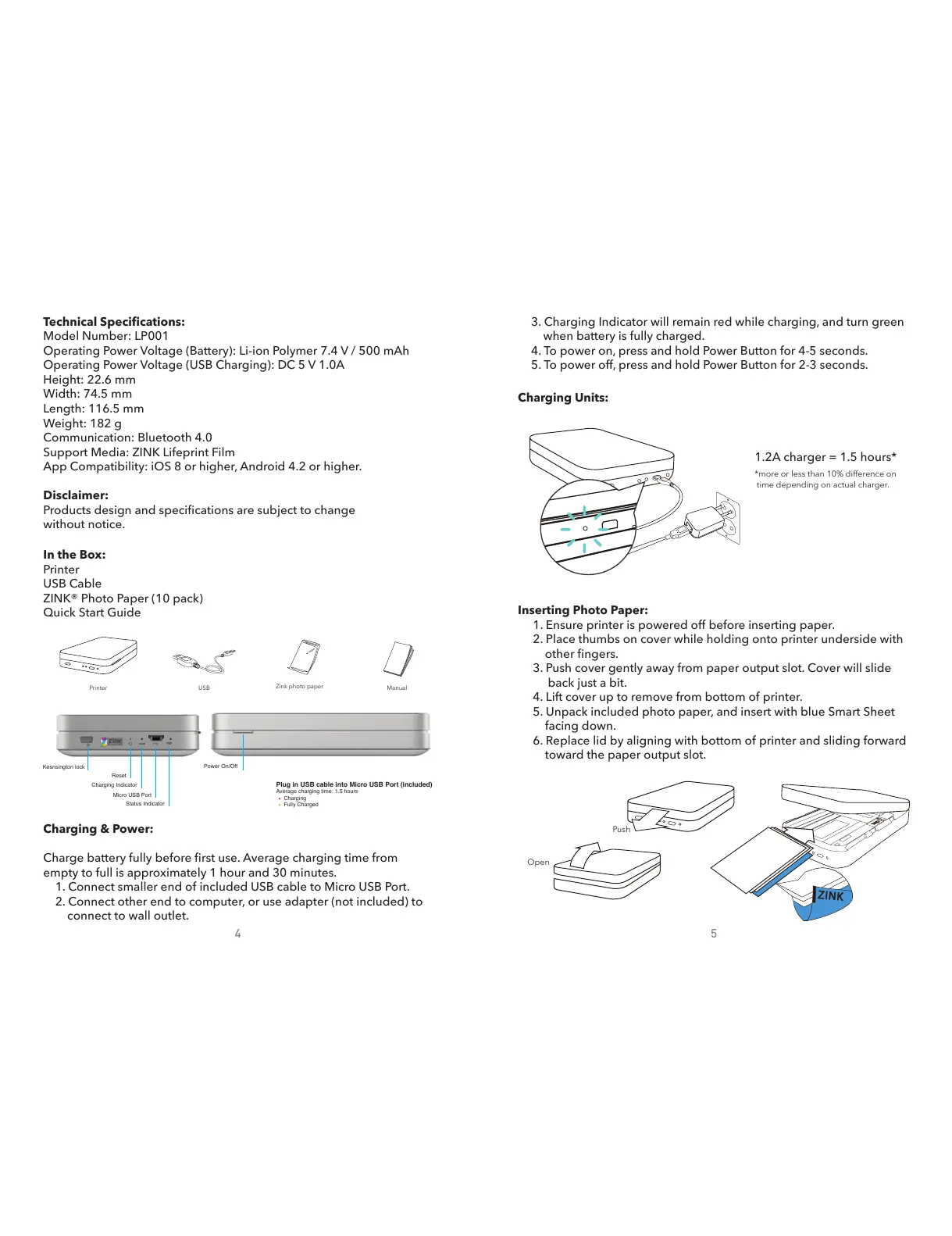
In the Box:
Printer
USB Cable
ZINK® Photo Paper (10 pack)
Quick Start Guide
Inserting Photo Paper:
1. Ensure printer is powered off before inserting paper.
2. Place thumbs on cover while holding onto printer underside with
other ngers.
3. Push cover gently away from paper output slot. Cover will slide
back just a bit.
4. Lift cover up to remove from bottom of printer.
5. Unpack included photo paper, and insert with blue Smart Sheet
facing down.
6. Replace lid by aligning with bottom of printer and sliding forward
toward the paper output slot.
Charging & Power:
Charge battery fully before rst use. Average charging time from
empty to full is approximately 1 hour and 30 minutes.
1. Connect smaller end of included USB cable to Micro USB Port.
2. Connect other end to computer, or use adapter (not included) to
connect to wall outlet.
3. Charging Indicator will remain red while charging, and turn green
when battery is fully charged.
4. To power on, press and hold Power Button for 4-5 seconds.
5. To power off, press and hold Power Button for 2-3 seconds.
1.2A charger = 1.5 hours*
*more or less than 10% difference on
time depending on actual charger.
Charging Units:
Kesnsington lock
Reset
Power On/Off
Charging Indicator
Micro USB Port
Status Indicator
Plug in USB cable into Micro USB Port (included)
Average charging time: 1.5 hours
Charging
Fully Charged
Zink photo paper
USBPrinter Manual
Push
Open


 To Next Page
 Loading...