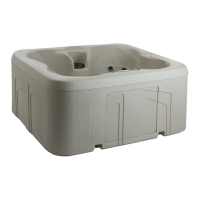
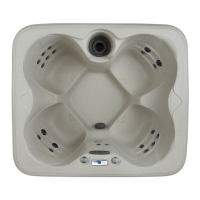
This document is an owner's manual for LifeSmart spas, specifically the Estrella™L, Estrella™NL, Carino™, and Playa™ models. It provides comprehensive information on the spa's function, technical specifications, usage, and maintenance.
Function Description
LifeSmart spas are designed to provide a relaxing and therapeutic experience through hydrotherapy and warm water immersion. The spas feature multiple jets for massage, a multi-color LED light for ambiance, and various operational modes to customize the user experience. The control panel allows users to adjust temperature, operate jets, and manage other spa functions. Some models include an ozone generator for water purification and a Bluetooth sound system for music.
Important Technical Specifications
The manual provides a table of specifications for different models:
| Model |
Spa Seating |
Length |
Width |
Height |
Dry Weight |
Water Capacity |
Electrical 60Hz |
| Carino™ |
6 person |
89" (226 cm) |
89" (226 cm) |
36" (91 cm) |
918 lbs (416 kg) |
409 (1548 lit) |
230V |
| Estrella™ L |
6 person |
84" (213 cm) |
84" (213 cm) |
36" (91 cm) |
796 lbs (361 kg) |
330 (1249 lit) |
230V |
| Estrella NL |
7 person |
84" (213 cm) |
84" (213 cm) |
36" (91 cm) |
818 lbs (371 kg) |
360 (1363 lit) |
230V |
| Playa™ |
3 person |
65" (165 cm) |
84" (213 cm) |
29.5" (75 cm) |
663 lbs (301 kg) |
210 (795 lit) |
230V |
Electrical Requirements:
The spa requires a dedicated 230V, 60Hz electrical supply. Installation must comply with the National Electrical Code (NEC) and local electrical codes. A 50-amp GFCI breaker is recommended, with 8 AWG solid copper wire for connections. The electrical wiring diagram shows connections for red (hot), black (hot), white (neutral), and green (ground) wires.
Temperature Range:
The spa's temperature can be adjusted between 80°F (26.5°C) and 104°F (40°C). Water temperatures between 100°F (38°C) and 104°F (40°C) are considered safe for healthy adults. Lower temperatures are recommended for extended use.
Usage Features
Control Panel Operation:
The spa features a digital control panel with an LCD display.
- Initial Start-Up: Upon first power-up, the system performs a 2-minute start-up mode.
- Temperature Adjustment: Use the Up/Plus or Down/Minus buttons to set the desired temperature. The display shows the set temperature for 5 seconds, then reverts to the current water temperature.
- Jet Operation: Press the "Jets" button to activate the jets. Some models have multiple jet pumps, allowing for different speeds (low/high) and combinations.
- Multi-Color LED Light: Press the "Light" button to cycle through various light colors and modes.
- Modes: The spa offers different operational modes:
- CLEANUP MODE (2 pump models only): Initiates a 1-minute cleanup cycle.
- SOAK MODE (2 pump models only): Runs for 5+ seconds, displaying "SbY".
- OFF MODE (all models): Turns off all functions except filtration.
- ECONOMY MODE (2 pump models only): Lowers the set point to 20°F (11°C) below the standard mode, or 5+ seconds after the light button is pressed.
- STANDARD MODE: Maintains the desired temperature with periodic water circulation.
- SLEEP MODE: Heats only during filter cycles.
- QUIET MODE: Keeps the jet pump from running during filter cycles.
- Filter Cycles: The spa has two filter cycles (F1 and F2) per day, with adjustable durations (0.5 to 6 hours) and start times.
- Diagnostic LCD Messages: The display shows various messages (HL, AOH, Prr, OH, Hr, FLO) to indicate system status or errors, such as high limit temperature, internal equipment compartment temperature, probe issues, water temperature issues, hardware errors, or no water flow.
Filling and Start-Up:
- Clear all debris from the spa.
- Open all jets to allow air to escape.
- Insert a garden hose into the filter compartment to fill the spa.
- Check unions inside the equipment compartment for leaks.
- Ensure water level is above the highest jets.
- Check filter installation.
- Turn on power at the main panel and subpanel.
- Press the "Jets" button to activate pumps and purge air from the system.
- Press the "Plus" or "Minus" button on the topside control panel to adjust the desired temperature.
Maintenance Features
Water Chemistry Guidelines:
Maintaining proper water chemistry is crucial for spa longevity and user safety.
- pH Level: Recommended range is between 7.2 and 7.8.
- Total Alkalinity: Recommended range is 40-120 ppm.
- Calcium Hardness: Recommended range is 75-150 ppm.
- Sanitizing: Use chlorine (sodium dichlor) 2-3 times per week. Add 2 teaspoons of chlorine and adjust as necessary.
- Weekly Shock: Use potassium monopersulfate (MPS) shock, approximately 2 oz. (60 ml) weekly.
Filter Cartridge Maintenance:
- Cleaning: Press the "Mode" button for 8+ seconds to turn off the spa. Remove the basket and weir, then unscrew the filter cartridge. Clean the filter with a garden hose, spray cleaner, and soak in a filter degreaser solution.
- Replacement: Replace the cartridge in the spa, ensuring it is seated correctly.
- Frequency: Clean the filter weekly and replace it every 4-6 months, or more frequently depending on usage.
Surface Care:
Clean the spa surface with a mild detergent and water. Avoid abrasive cleaners.
Cover Care:
Clean the cover with a mild soapy water solution. Do not use silicone-based products. Check for tears or cracks and replace if damaged.
Cabinet Care:
Clean the cabinet with a mild soapy water solution. Avoid abrasive or harsh chemicals.
Draining or Winterizing:
- Draining: Turn off power. Attach a garden hose to the drain spigot and allow the spa to drain. Remove the filter cartridge and vacuum any remaining water from the jets and plumbing.
- Winterizing: For prolonged periods of non-use in freezing temperatures, it is essential to winterize the spa to prevent damage. This involves draining the spa completely, removing all water from the plumbing, jets, and equipment, and using an anti-freeze solution.
Troubleshooting Procedures:
The manual includes a troubleshooting guide for common issues such as:
- No component operation.
- Pump not operating but light working.
- Jets malfunctioning.
- Water being too hot.
- Electrical issues (GFCI tripped, no power).
For further assistance, users are advised to contact customer service.

 Need help?

 To Next Page
 General