Whole-House Water Systems
CUSTOMER SERVICE INSTRUCTIONS
IMMEDIATELY AFTER INSTALLATION
1. Flush lines of old water by running water from each faucet. Remember that your
hot water heater will be filled with old water.
2. Aerators on faucets, faucet heads, toilets, etc. may have to be cleaned of scale
and sediment that dislodge from old pipes. On old pipes that have accumulated
sediment ONLY: For the first 15 days, run your water for a couple of minutes after it
has been sitting in the pipes overnight or for a prolonged period.
AIR IN THE WATER AFTER SYSTEM IS INSTALLED
If the water appears cloudy when you fill a glass of water, this usually indicates that
air has gotten into the water lines during installation. Open all faucets in the house
and run water for a couple of minutes to flush out the air.
HOT WATER HEATERS
1. Set the temperature at the medium setting to achieve 140 degrees. Older water
heaters may have to be turned to high to achieve this temperature due to scale
buildup in the unit.
2. One month after your LifeSource system installation, drain the hot water heater
until the drained water runs clear. In addition your hot water heater should be
drained once a year per manufacturer’s instructions. Older water heaters may de-
scale with LifeSource water and should be drained after one month or so (as scale
dislodges).
3. Recirculating pumps should be unplugged if the main water line is shut off in
order to avoid burning out the motor. They should also be unplugged when draining
the hot water heater.
4. Hot water heaters can easily be drained by attaching a hose to the faucet at the
bottom of the unit. Open the faucet and allow the water to run until it is fairly cool.
CHANGING BACKWASH TIME
Backwashing is pre-programmed to occur at 2 a.m. for the 5600 valve head on the
standard systems (note: on the 1-1/2" valves it is pre-programmed to occur at 12
a.m.) It takes 30 minutes for the piston to move down and back up, allowing
backwashing to occur twice for roughly seven minutes each time. During the thirty
minutes the system is going through backwashing, the system is on bypass. Water
pulled into the house during this period will not be filtered by the system.
If you would like backwashing to occur at a different time, you must adjust the time
of day. For example, if you would like backwashing to occur between 12 a.m. and 3
a.m. (which is two hours earlier than programmed), you must set the time of day two
hours later than it actually is. If you want backwashing to occur between 9 a.m. and
12 a.m. (which is seven hours later), you must set the time of day seven hours earlier
than it actually is.
RESETTING THE TIMER
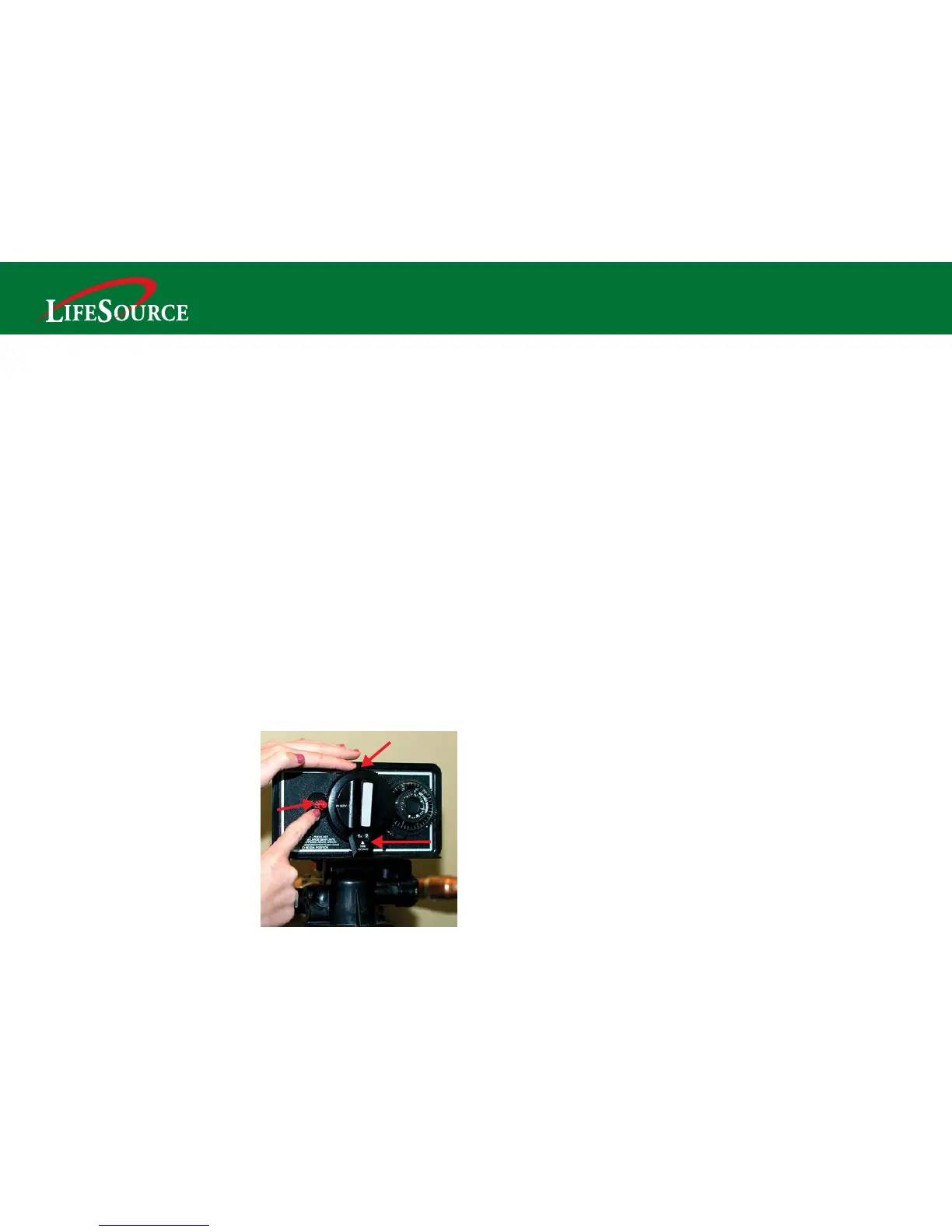
LifeSource Premier Series 2250
This system is preset to automatically backwash once each week between 2 a.m. and 5 a.m.
To reset the weekly automatic backwash timer*
• Remove the cover at the top
• Depress and hold down the red button (A)
• Place your finger on top of the large gear (B) and rotate it until the correct
"present time of day" shows in the lower window (C)
• Release the red button
• Replace the cover
*After a power outage you should confirm
that the timer is set at the correct time of
day. To determine if the timer has
electrical power, lightly place your fingers
on the gray clock located on the back of
the timer face. If the clock is warm, it is
receiving electrical power.
For detailed video instructions, please go
to
www.LifeSourceWater.com and
click on the Customer Care button.
A
B
C
10 11


 To Next Page