8
X SECTION 1 (CONTINUED) / SECTION 1 (SUITE) / SECCIÓN 1 (CONTINUACIÓN)
TOOLS AND HARDWARE REQUIRED / OUTILS ET QUINCAILLERIE REQUIS / INSTRUMENTAL Y HERRAJE REQUERIDOS
AON (x2)
CSI (x2)
MM
10 mm (x2)
CRI
CSI
CSI
AON
AON
CRL
1.1
1.2
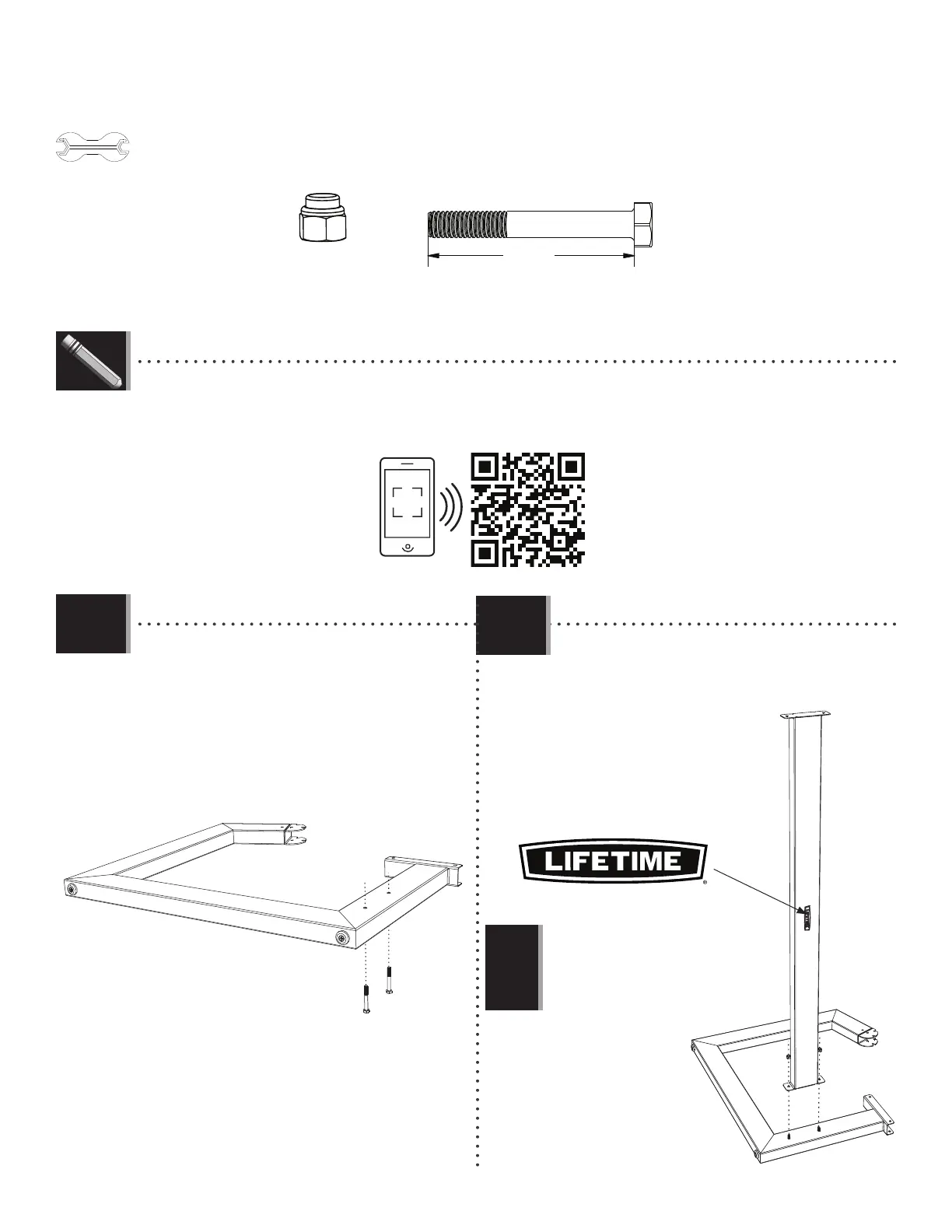
• Insert two Bolts (CSI) through the holes in the Left
Leg (CRI).
• Insérer deux boulons (CSI) à travers les trous dans
le pied gauche (CRI).
• Insertar deux pernos (CSI) a través de los agujeros
en la pata izquierda (CRI).
• Set the two holes in the Cross Support (CRL) over
the two Bolts, and secure. Do not overtighten.
• Mettre les deux trous sur le support transversal
(CRL) sur les deux boulons, et bien l’attacher. Ne pas
trop serrer.
• Colocar los dos agujeros
en el soporte transversal
(CRL) sobre los dos pernos,
y sujetarlo bien. No apretar
demasiado.
Note: Orient the Lifetime logo as shown.
Remarque : Orienter le logo Lifetime comme
illustré.
Nota: Orientar el logotipo Lifetime como se
muestra.
!
LIFETIME
©
• If you have trouble with this section, follow the code below to view a video on how to assemble the Seat.
• En cas de problèmes avec cette section, suivre le code en bas pour voir un vidéo sur l’assemblage de cette section.
• En caso de problemas con esta sección, seguir el código debajo para ver un video sobre el ensamblaje de en esta sección.
http://go.lifetime.com/cbseatassembly


 To Next Page