OPERATION:
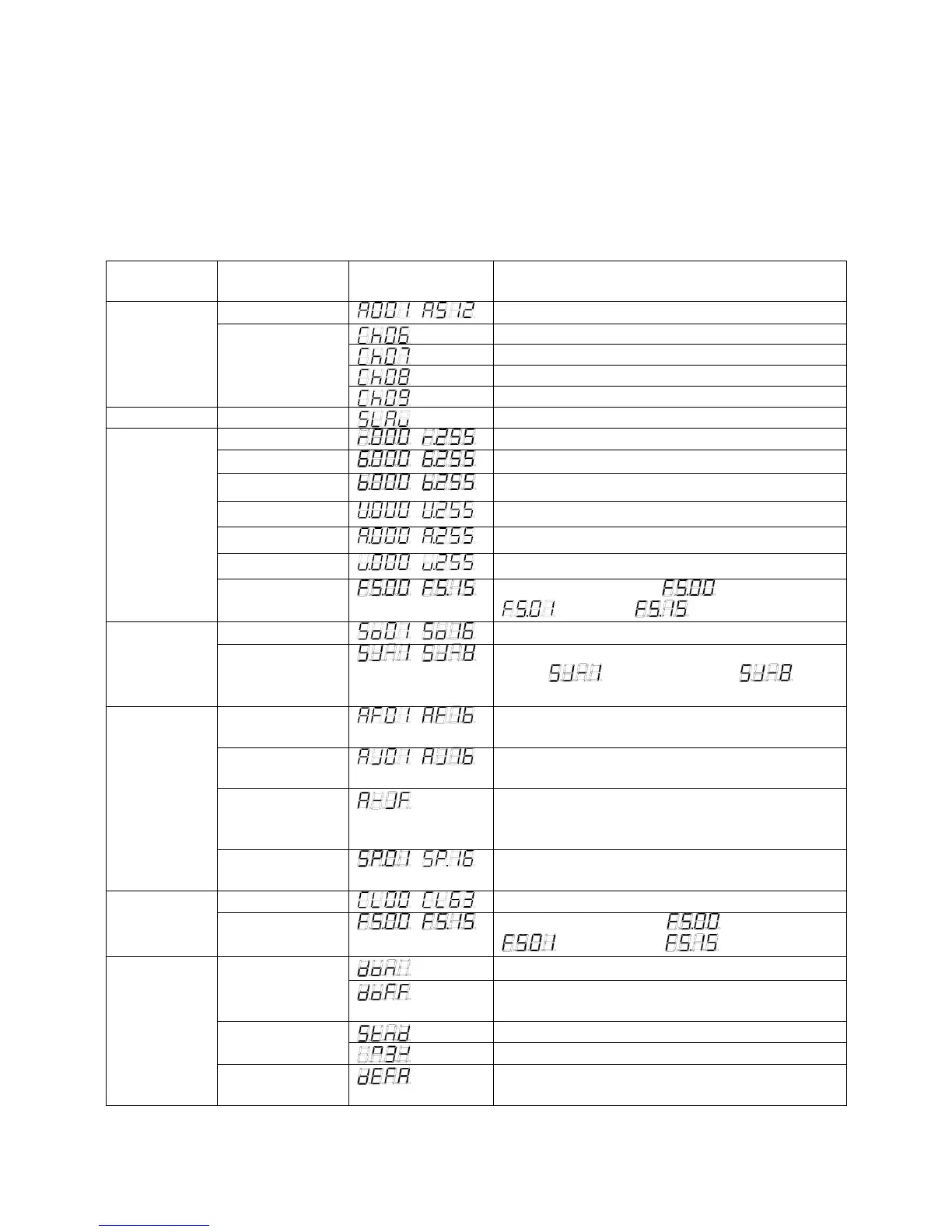
There are six operation modes which are selected by ‘MODE’ button. The dot that locates at the
fourth LED display will flick when you operate control panel. The dot will automatically turn off
after 60 seconds if you do not select anything. The LED display shows the current operation mode.
When LED display switches off, press the ‘MODE’ button to switch back on again.
MODE
manual
SET UP manual
UP/DOWN
manual
Instructions
Address
~
Sets the DMX starting address
6 channels mode
7 channels mode
8 channels mode
DMX
Channel mode
9 channels mode
Master/Slave Slave mode
Set the unit into slave mode
Red dimmer
~
Adjust the intensity of the red color
Green dimmer
~
Adjust the intensity of the green color
Blue dimmer
~
Adjust the intensity of the blue color
White dimmer
~
Adjust the intensity of the white color
Amber dimmer
~
Adjust the intensity of the amber color
UV dimmer
~
Adjust the intensity of the UV color
Dimmer
Flash
~ Adjust the flash speed, is flash off,
is slowest, is fastest
Program
~
Select the built-in sound mode
Sound
Active
Sensitivity
select
~
Adjust the sensitivity of the sound-
active, is the lowest level, is the
highest level
Dreaming
mode
~
Select the built-in dreaming mode
Jumping
mode
~
Select the built-in jumping mode
Dreaming &
Jumping mode
Set the light in auto dreaming & jumping
mode, the dreaming mode and jumping mode
will run in a continuous cycle
Auto Run
Speed set
~
Adjust the speed of the dreaming/jumping
mode
Color select
~
Select the 63 static colors Static Color
Strobe
~ Adjust the flash speed, is flash off,
is the slowest, is the fastest
LED display always stays on Display
on/off
LED display turns off automatically after 60
seconds if there is no operation.
LED display normal Display
normal/inverse
LED display inversion
Other
Function
Initialization
mode
Initialize the unit default to manufactory setting



 To Next Page
 Loading...