EasyManua.ls Logo

Light Rider LR512 - User Manual

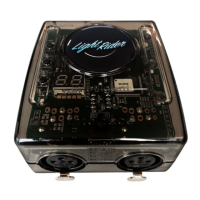
Light Rider LR512
4 pages
Print Icon
To Next Page IconTo Next Page
Loading...
© Nicolaudie Group 1989-2018. All rights reserved. We reserve the right without notice to amend the technical information and specications.
LR512
USB & WiFi - DMX controller
www.lightrider.com
Key Features
Light Rider app connectivity for Android tablet and
Apple iPad.
Tablet app designed for live use to create an automat-
ed light show.
USB & WiFi connectivity for programming/control
Up to 2 DMX512 universes in live and stand alone
(Light Rider app only supports 1 DMX512 universe)
DMX Stand Alone controller for computer software
Stand Alone mode with 99 scenes
100KB ash memory for storing stand alone programs
8 dry contact trigger ports via HE10 connector
Network communication. Control lighting remotely
OEM customization
SUT Technology allows the device to be used with
other Nicolaudie Group software via an online upgrade
Note: feature compatibility depends on which applica-
tion is being used with the controller and which SUT
add-ons have been purchased
Technical Data
Input Power
5-5.5V DC 0.6A
Output Protocol
DMX512 (x2)
Programmability
Android Tablet and Apple
iPad (for Light Rider app).
PC and Mac (for Hard-
ware Manager / computer
software). See website for
specifrication requirements.
Available Colors
Orange
Connections
USB-C, 2x XLR3, 2x HE10,
Memory
100KB ash
Environment
IP20. 0°C - 50°C
Buttons
2 buttons to change scene
1 button to change dimmer
Dimentions
Complete Package
79x92x43mm 120g
140x135x50mm 340g
Standards
Low voltage, EMC, and
RoHS
Optional Accessories
POWER1_EU/UK/US
5V ACDC power supply with EU/UK/US plug
Overview
The LR512 DMX controller can control a wide
variety of dierent DMX systems- from RGB/
RGBW to more advanced moving and color
mixing xtures, as well as other stage eects.
Directly connect to the Light Rider app via an
Apple iPad or Android tablet with no additional
requirements. The controller supports 512
DMX channels in the tablet app, as well as WiFi
connectivity and SUT capabilities.
SUT (Smart Upgrade Technology) enables
upgrades such as compatibility with additional
software and apps when purchased at
store.dmxsoft.com.
Question and Answer IconNeed help?

Do you have a question about the Light Rider LR512 and is the answer not in the manual?

Summary

Connectivity

Live Use with a Computer

Connect the controller to a PC or Mac for programming and control using WiFi or USB.

Light Rider App Live Use with a Tablet

Connect the controller to an Apple iPad or Android tablet for live control via WiFi.

Setting Up the Controller

Network Control

Configure the controller for direct connection or integration into an existing local network.

Upgrades

Unlock hardware features and purchase software upgrades online.

Dry Contact Port Triggering

Initiate scenes by triggering input ports with contact closure.

iPhone;iPad;Android Control

Control lighting remotely using dedicated apps like Easy Remote Pro, Arcolis, or Light Rider.

UDP Triggering

Connect to automation systems for triggering via UDP packets.

Programming the Controller

Program the controller using PC, Mac, Tablet, or Smartphone software.

Service

Information on serviceable parts, specifically DMX Chips.

Troubleshooting

Display Indicators (88, LI, EA)

Understand meanings of display codes like bootloader mode, live mode, or no show.

Controller Not Detected by Computer

Steps to resolve issues where the computer does not recognize the controller.

Bootloader Mode for Firmware Update

Force a firmware update by starting the controller in bootloader mode.

Lights Not Responding

Check DMX connections, fixture settings, and device limits when lights are unresponsive.

LED Status Indicators

Interpret the meaning of the Blue, Yellow, and Red LEDs for connection and activity.

Light Rider LR512 Specifications

General IconGeneral
BrandLight Rider
ModelLR512
CategoryController
LanguageEnglish