SCREEN
1
3
2
DMX 512
3 PIN
SIGNAL
SIGNAL
6
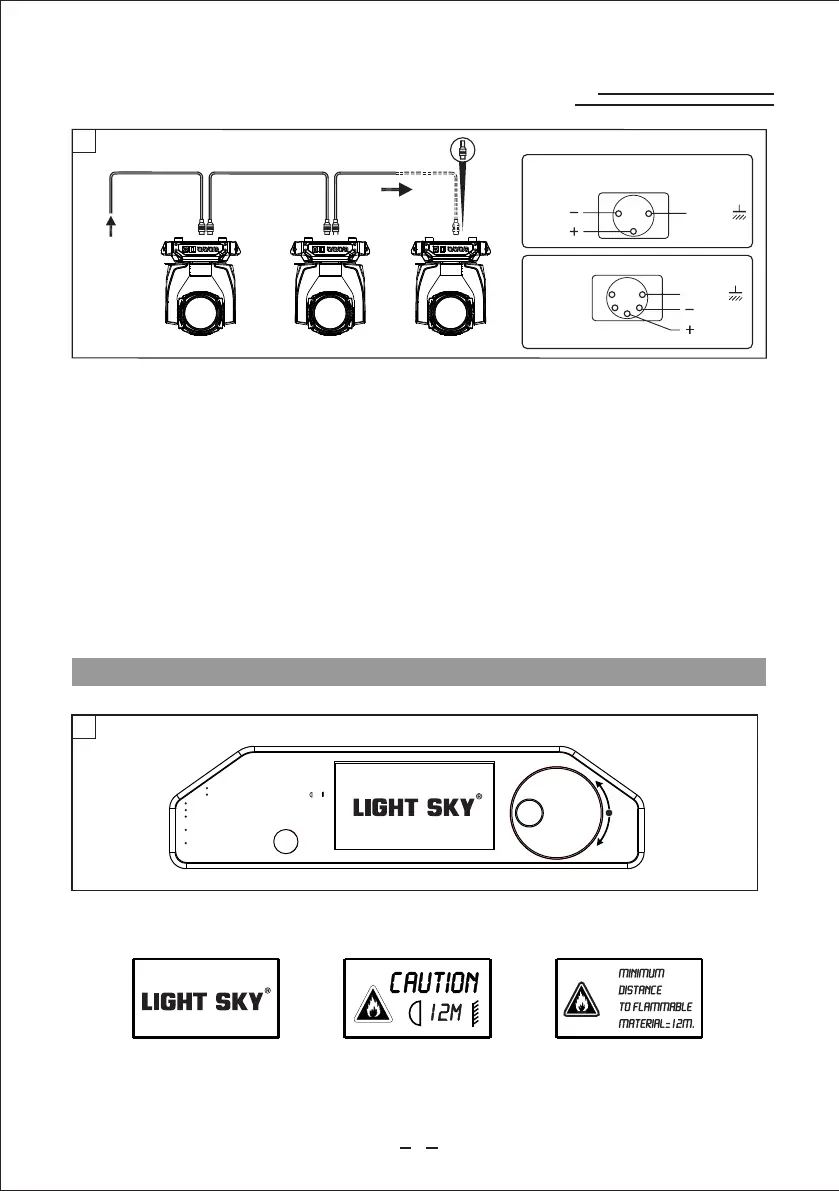
Connecting to the control signal line (DMX) - Fig. 5
Please use the round 3 or 5-pin XLR plugs &sockets offered by menu facture to connect the first
projector's output to the second projector' input and connect the second projector's output to the
third projector's input. And in the same way for the rest,eventually connect the last projector's
output,all the projectors are together.
The projectors's control signal output or input by using the 3 or 5-pin XLR pug and socket.If need to
lengthen the communication cable,please make sure the both side of 3 or 5-pin plug is one to one .
(one to one,two to two,three to three).Otherwise,the communication cable will be interrupted.The
communicate cable is 2-cord screened cable 75¦ resistance with each core is at least a 0.5mm
diameter.(Caution:All the inside leading wire of 3 or 5-pin XLR plug couldn't touch each other or
plinth).
Recommend to use the DMX signal terminator for the installation to avoid the electronic noise dama
-ge the digital control signal.Simply speaking,DMX terminator is an XLR connector with a 120¦ 1/2W
resistor connected across pin 2 and 3.Which is then plugged into the output socket on the last projec
-tor in the chain.Refer to the connection.
CONTROL PANEL
SIGNAL
SCREEN
DMX512
5 PIN
1
2
3
4
5
SIGNAL
UP ARROWHEAD:Page up or increase;
DOWN ARROWHEAD:Page down or reduce;
ENTER:OK Function
RETURE:Exit (In the choice screen)
Press the switch. The projector starts resetting the effects. At the same time, the following
information scrolls on the display:
DMX 512
5
ENTER
Minim um d istance to fl ammable mat er ial=12m.
Minim um d istance to il luminated s ur face=
12m
WARNING :HOT!
Maxim um a mbient temp erature t = 38 ˇ .
a
Alway s di sconnect fr om mains befo re r eplacing th e lamp.
Cauti on :Hot lamp. All ow to cool for 30 m in utes
befor e op ening.
Exter io r surface tem perature un de r
stead y st ate conditi on =100 .ˇ
Prolo ng ed exposure t o
unshi el ded lamp can
cause e ye a nd skin burns .
www.lightsky.com.cn
www.lightsky-china.com
7
PROFESSIONAL SHOW LIGHTING


 To Next Page