51
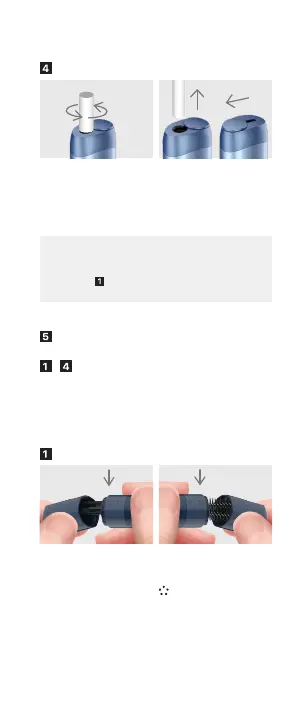
Removing the tobacco stick
Consecutive uses
For consecutive use, please repeat the above
-
steps.
May use up to 3 consecutive uses.
If a stick is not removed as described above, the
remnants of a used stick may remain inside.
If there are some remnants inside the stick insertion
part, refer to
of 6. Troubleshooting.
5. Cleaning and handling
Cleaning with the Dual Cleaner
Grab the Dual Cleaner.
To use the Cleaning
Wiper, gently snap
open the side with the
⊙ mark.
To use the Cleaning
Brush, gently snap
open the side with the
mark.
Rotate the stick to
one direction 3 times
or more.
Pull the stick out the
device.
Close the Cover of the
stick insertion part.
3 times


 To Next Page