EasyManua.ls Logo

Limitless Innovations PowerPro Go - User Manual

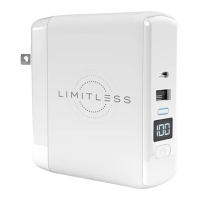
Limitless Innovations PowerPro Go
3 pages
Print Icon
To Next Page IconTo Next Page
Loading...
PowerPro Go FAQ’s
Q. How do I turn the PowerPro Go on/off?
A.
1. Press the Power Button to turn on the PowerPro Go™.
NOTE: When a device is plugged into the Type-C or USB-A Charging Ports the
PowerPro Go™ will automatically turn on.
2. The PowerPro Go™ will automatically turn off after approximately 20
seconds of being idle.
3. To manually turn off the PowerPro Go™, double-click the Power Button.
Q. Do I have to charge the PowerPro Go™ before I use it?
A. The PowerPro Go™ can be used as a wall charger or portable power bank. It is
recommended to charge the internal battery to 100% before charging connected
devices.
Q. How do I recharge the PowerPro Go™?
A. The PowerPro Go™ can be recharged by plugging into a standard wall outlet, or by using
the included Type-C to USB-A Cable and a secondary power source.
NOTE: Some outlets are controlled by a switch. Make sure the PowerPro Go is plugged
into a live outlet. The Digital Display should light up and flash the current power level,
until a 100% charge is met. If the Digital Display does not turn on when plugged into an
outlet, try another outlet.
Q. Why does the PowerPro Go get hot when charging?
A. The PowerPro Go may appear to be hot or heating up because it is taking the power
voltage from the wall and converting it to power the cell phone, laptop, or other
devices. This is normal and is of no serious concern. To remedy the heat of the
PowerPro Go, unplug/remove the device, and allow the PowerPro Go to cool before
adding the device back to the charger.
Q. How do I use the Wireless Charger?
A.
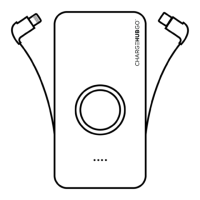
1. Press the Power Button to turn on the Qi Certified Wireless Charger.
2. Place your compatible device on top of the Wireless Charging Pad (The side
with the Limitless logo).
NOTE: The LED Indicator Light will illuminate solid blue when a successful
connection is made, and the device will begin charging.
If the LED Indicator Light is not blue or is flashing between blue and green,
check that the device is compatible with wireless charging and try
Question and Answer IconNeed help?

Do you have a question about the Limitless Innovations PowerPro Go and is the answer not in the manual?

Summary

Turning the PowerPro Go On and Off

Power On;Off Procedures

Learn how to manually turn the PowerPro Go on, off, and its auto-off feature.

Recharging the PowerPro Go

Recharging Methods and Notes

Recharge via standard wall outlet or secondary power source, ensure outlet is live.

Device Heat During Operation

Using the Wireless Charger

Wireless Charging Operation and Indicators

Steps to use the wireless charger and interpret LED indicators for connection.

Device Charging Capacity

Battery Management and Safety

Power Delivery and Technology Support

Warranty and Support Information

Overview

The PowerPro Go™ is a versatile charging device that functions as both a wall charger and a portable power bank, designed to provide efficient and safe charging for a variety of electronic devices. It incorporates multiple charging technologies, including USB-A, Type-C, and Qi-certified wireless charging, making it a comprehensive solution for powering your gadgets.

Function Description:

The primary function of the PowerPro Go™ is to charge electronic devices. When plugged into a standard wall outlet, it acts as a wall charger, delivering power directly to connected devices. Simultaneously, it can recharge its internal battery. When unplugged, it transforms into a portable power bank, utilizing its internal battery to charge devices on the go. The device is equipped with fast charging technology to optimize charging speeds while ensuring safety. It also features a Qi-certified wireless charging pad for compatible devices, offering a convenient cable-free charging option. The PowerPro Go™ is designed for both indoor and outdoor use, provided it is kept in dry locations and not exposed to extreme environmental conditions.

Important Technical Specifications:

  • Power Output (Wall Charger): Max output of 5V/1A for Type-C + USB-A + Wireless charging outputs.
  • Type-C Power Delivery: Supports 18W power delivery from the Type-C Port when used as a wall charger. When sharing power with the internal battery, the output is lowered to 5V/1A.
  • Qualcomm Quick Charge 3.0: Meets technical specifications of Quick Charge 3.0, though it is not Qualcomm certified.
  • Dual Voltage: Yes, the PowerPro Go™ is dual voltage, allowing for use in various regions with different voltage standards.
  • Wireless Charging: Qi Certified.
  • Internal Battery: Rechargeable, with a recommendation to charge to 100% before charging connected devices.

Usage Features:

  • Turning On/Off:
    • To turn on: Press the Power Button. The device will also automatically turn on when a device is plugged into the Type-C or USB-A Charging Ports.
    • To turn off: Double-click the Power Button. The device will automatically turn off after approximately 20 seconds of inactivity (being idle).
  • Recharging the PowerPro Go™: Can be recharged by plugging into a standard wall outlet or by using the included Type-C to USB-A Cable with a secondary power source. The Digital Display will light up and flash the current power level until a 100% charge is met.
  • Wireless Charging:
    • To activate: Press the Power Button.
    • To use: Place a compatible device on top of the Wireless Charging Pad (the side with the Limitless logo).
    • Indicator: The LED Indicator Light will illuminate solid blue when a successful connection is made and charging begins. If the light is not blue or flashes between blue and green, reposition the phone or check device compatibility.
  • Charging Multiple Devices: While possible, it is recommended to charge only one device at a time to achieve maximum power output. Connecting multiple devices may cause them to charge at a slower rate if the PowerPro Go™ reaches its maximum charge capacity.
  • Power Bank Functionality: The Power Bank feature offers faster charging than the Wall Charger. When plugged into the wall, the device prioritizes recharging its internal battery first, then charges connected devices.
  • Overcharge Protection: Designed to optimally charge devices quickly and safely, preventing overcharging.
  • Compatibility: A wide range of devices are compatible with its various charging ports and wireless charging. Wireless charging compatibility includes Samsung (Note 7 and newer, S6/S6 Edge and newer), Apple (iPhone 8 and newer, AirPod Pro), Sony (Xperia: Z3V, Z4V, XZ2, X2V Premium, XZ3), Microsoft (Lumia: 950 and newer), LG (G8 ThinQ, V35 ThinQ, G7 ThinQ, V30S ThinQ, V30, G6 Plus, G6), and Motorola (Droid: Maxx, Mini, Turbo, Turbo 2, Moto: Maxx, X Force).
  • Continuous Plugging: The device can be left plugged in all the time without causing harm.

Maintenance Features:

  • Heat Management: It is normal for the PowerPro Go™ to become warm or hot during charging, as it converts power voltage. If it becomes too hot, unplug/remove the device and allow the PowerPro Go™ to cool before resuming charging.
  • Environmental Protection: Designed for use in dry locations. It should NOT be exposed to extreme heat, moisture, water, rain, or snow to prevent damage.
  • Warranty: Comes with a 1-Year Limited Warranty by Limitless Innovations.
  • Support: For questions or issues, users can contact Limitless Innovations support via their website (LimitlessInnovations.com/Support), email (Support@LimitlessInnovations.com), or phone ((855) 843-4828).

Limitless Innovations PowerPro Go Specifications

General IconGeneral
BrandLimitless Innovations
ModelPowerPro Go
CategoryAccessories
LanguageEnglish

Related product manuals