EasyManua.ls Logo

Limitless Innovations TikiTunes - User Manual

Limitless Innovations TikiTunes
20 pages
Print Icon
To Next Page IconTo Next Page
Loading...
User Manual
Question and Answer IconNeed help?

Do you have a question about the Limitless Innovations TikiTunes and is the answer not in the manual?

Summary

Safety Information

Introduction

Whats Included

Lists the items included in the package: 1x Speaker, 1x Cable, 1x Manual.

Components

Technical Specifications

Operation Instructions

Turning On;Off the TikiTunes

Instructions on how to power the TikiTunes on and off using the power button.

Pairing Two TikiTunes

Steps to wirelessly connect two TikiTunes speakers for stereo sound.

Pairing to a Compatible Device

Guide for connecting the TikiTunes speaker to a Bluetooth-enabled device.

Operation Instructions Continued

Adjusting Volume

How to increase and decrease the volume of the TikiTunes speaker.

Song Navigation

Instructions for navigating tracks: next song, previous song, restart song.

Ambient Light Control

How to turn the ambient light feature of the TikiTunes speaker on or off.

Charging the TikiTunes

Step-by-step guide on how to charge the TikiTunes speaker using the USB cable.

Trouble Shooting

Consumer Rights & Arbitration Agreement

Resolution of Claims or Disputes

Explains that claims must be resolved through binding arbitration, not court.

Limitation of Legal Remedies

Details restrictions on class-wide arbitration and representative actions.

Consumer Rights & Arbitration Agreement Continued

Arbitration Procedures

Outlines the process for presenting claims and commencing arbitration.

Choice of Law & Severability

Specifies governing law and how invalid provisions are handled.

Copyright Notice

Certification

IP65 Rating

Explains the IP65 rating for dust and water protection.

FCC Notice

Overview

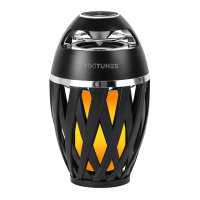
The TikiTunes is a portable Bluetooth® speaker with an ambient light feature, designed to provide both audio entertainment and atmospheric lighting.

Function Description:

The primary function of the TikiTunes is to play audio wirelessly from any Bluetooth® enabled device. It features a 5-watt speaker for sound output. In addition to its audio capabilities, the device incorporates an ambient LED light that emits a flickering, atmospheric flame effect. This light is intended to enhance the ambiance for outdoor evenings or cozy indoor settings. A key feature is its dual sync capability, allowing users to connect up to two TikiTunes speakers for a true stereo sound experience.

Important Technical Specifications:

  • Device Pairing Name: TikiTunes
  • Wireless Transmission Distance: 30FT (approximately 9.1 meters)
  • Built-In High Efficiency Lithium Battery: 3.7V / 2000 mAh
  • Output Power: 5W
  • Play Time: 6-Hours of continuous playback
  • SNR (Signal-to-Noise Ratio): <75dB
  • Distortion Rate: <10%
  • Power Supply: 5V / 1A
  • Horn Parameters: 4Ω / 5W
  • Product Dimensions: 4" x 6.5" (approximately 10.16 cm x 16.51 cm)
  • Speaker Pairing Capacity: 2 Speakers Maximum
  • Bluetooth® Version: 5.0
  • IP Rating: IP65 (dust tight and protected against water projected from a nozzle in all directions - limited ingress permitted).

Usage Features:

  • Power On/Off: The device is turned on or off by pressing and holding the power button. A "TikiTunes Ready to Pair" prompt and a continuously blinking white LED indicate power-on, while a power-off sound and the LED turning off indicate successful power-off.
  • Pairing Two TikiTunes: Two TikiTunes speakers can be automatically paired together for stereo sound. They need to be within 1-2 feet of each other for successful pairing, which typically occurs within 5-20 seconds, indicated by a "TikiTunes Connected" prompt.
  • Pairing to a Compatible Device: Once powered on, the TikiTunes enters "Ready to Pair" mode. Users enable Bluetooth on their device and select "TikiTunes" from the available devices list. A "TikiTunes Connected" prompt and a solid LED light confirm successful connection. The device automatically pairs to the last connected device.
  • Volume Adjustment: Volume can be increased by pressing and holding the '+' button. The device beeps when maximum volume is reached. Volume can be decreased by pressing and holding the '-' button. Volume can also be adjusted from the connected device.
  • Song Control:
    • Skip to the next song: Press '+' once.
    • Go back to the previous song: Press '-' twice.
    • Restart the current song: Press '-' once.
  • Ambient Light Control: The ambient light can be turned on or off by pressing the center button on the control panel.
  • Charging: The TikiTunes is charged via a Micro USB cable. The Micro USB cable is plugged into the Micro Charging Port (Input) after removing the silicone cover, and the other end into a USB charging port (not included). The LED indicator light turns red while charging and turns off when fully charged.

Maintenance Features:

  • Battery Care: The device should not be left plugged in for extended periods to avoid decreasing battery life. Batteries should be recycled or disposed of according to state and local guidelines.
  • Troubleshooting:
    • Ambient Light Not Working: Recharge the TikiTunes or reset it by turning it off and on again, waiting 15 seconds.
    • TikiTunes Not Pairing Together: Ensure speakers are within 1-2 feet, "forget" or remove TikiTunes from all mobile devices, and reset both speakers before re-pairing.
    • Sudden Power Off: Recharge the TikiTunes or reset it.
    • Not Showing in Bluetooth Menu: "Forget" TikiTunes from all nearby Bluetooth settings, reboot the device's Bluetooth connection, reboot the mobile device, or reset the TikiTunes.
    • Poor Sound Quality: Move the TikiTunes to avoid interference from surrounding devices or frequencies.
  • Safety Warnings (Important DO NOTs):
    • Not a toy; keep away from children.
    • Do NOT use near magnetic or electric fields, in direct sunlight, or extreme heat.
    • Do NOT use if damaged or modified.
    • Do NOT subject to harsh chemicals.
    • Do NOT submerge in water.
    • Do NOT store where temperatures exceed 140°F (60°C).
    • Do NOT insert foreign objects into openings or ports.
    • Do NOT charge in high humidity.
    • Do NOT attempt to replace the non-serviceable battery.
    • Do NOT attempt to open the outer casing.
    • Do NOT paint or apply coatings.
    • Do NOT disassemble or repair; contact customer service for assistance.
    • Do NOT leave plugged in for extended periods.
  • Warranty: The TikiTunes comes with a one (1) year Limited Warranty covering defects in materials and workmanship under normal consumer usage. Exclusions apply for normal wear and tear, abuse/misuse (including physical damage, contact with liquids, extreme heat, improper operation), unauthorized service/modification, altered products (e.g., removed serial numbers, broken seals), and issues related to communication services. Claims are resolved by repair, replacement, or refund at Limitless's discretion.

Limitless Innovations TikiTunes Specifications

General IconGeneral
BrandLimitless Innovations
ModelTikiTunes
CategorySpeakers
LanguageEnglish