User Manual English
Software Interface
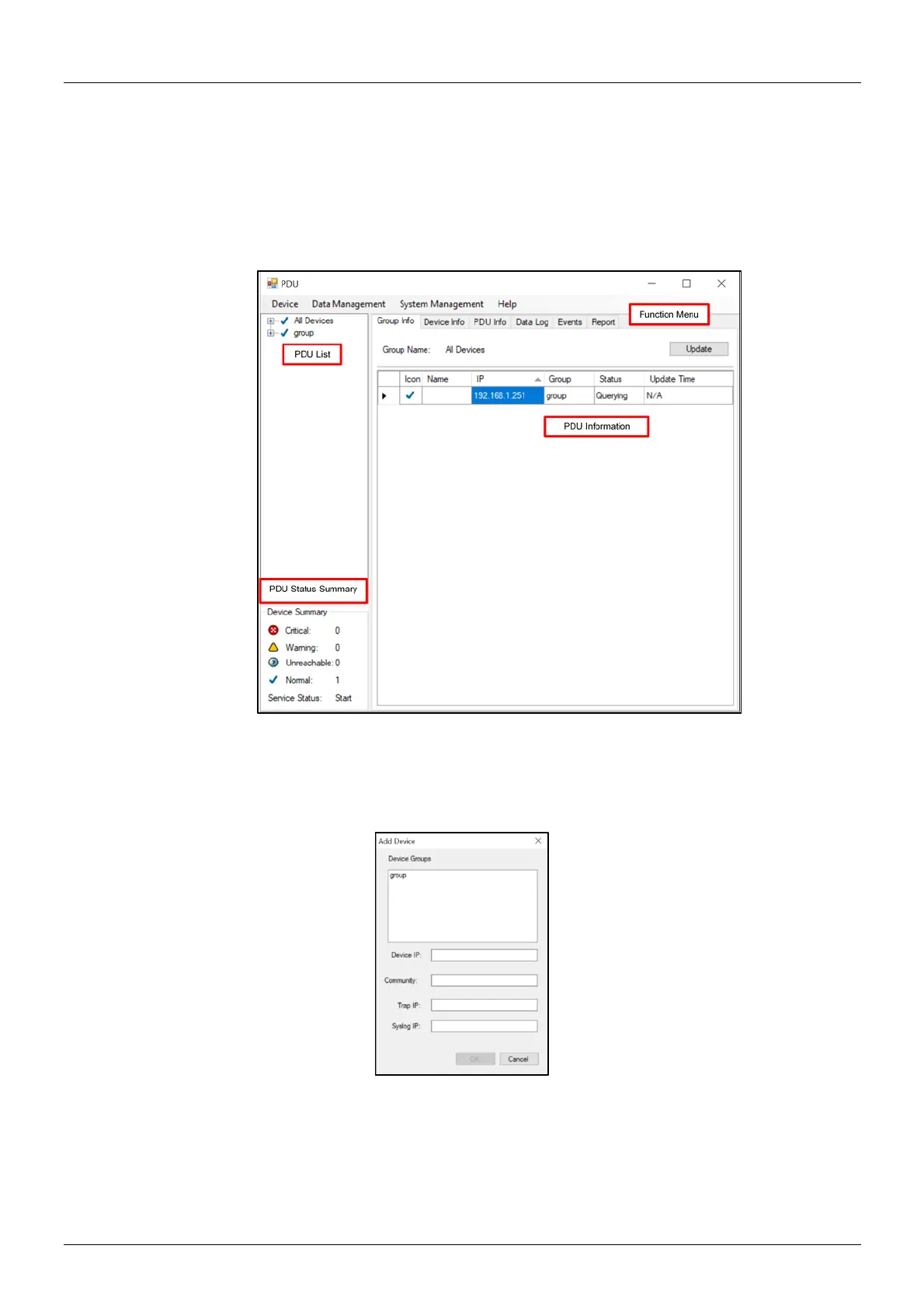
The software contains four sections:
1. Function Menu: PDU utility functions bar.
2. PDU List: List of all PDUs in the network. It is possible to define groups to manage a large amount of
PDUs.
3. PDU Information: This area provides detailled information about the PDU.
4. Device Summary: Indicates the status of the monitored PDUs.
Device
Add device
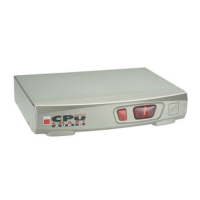
The system administrator can add a PDU manually if the IP address of the PDU has been setup before.
▪ Device Group: Select the PDUs which belong to a group.
▪ Community: Set the community, it must be the same as the PDU in order to communicate with it.
Default setting is “private”. Please note: This community is set for the authority of “WRITE”. The
“READ” community is set to public and cannot be changed.
▪ Trap IP: When event occurs, it can forward the event trap to certain users.
▪ Syslog IP: Forward the log to a certain Syslog server.


 To Next Page