Appendix B: Using Your Feet
B•4
FBV Shortboard
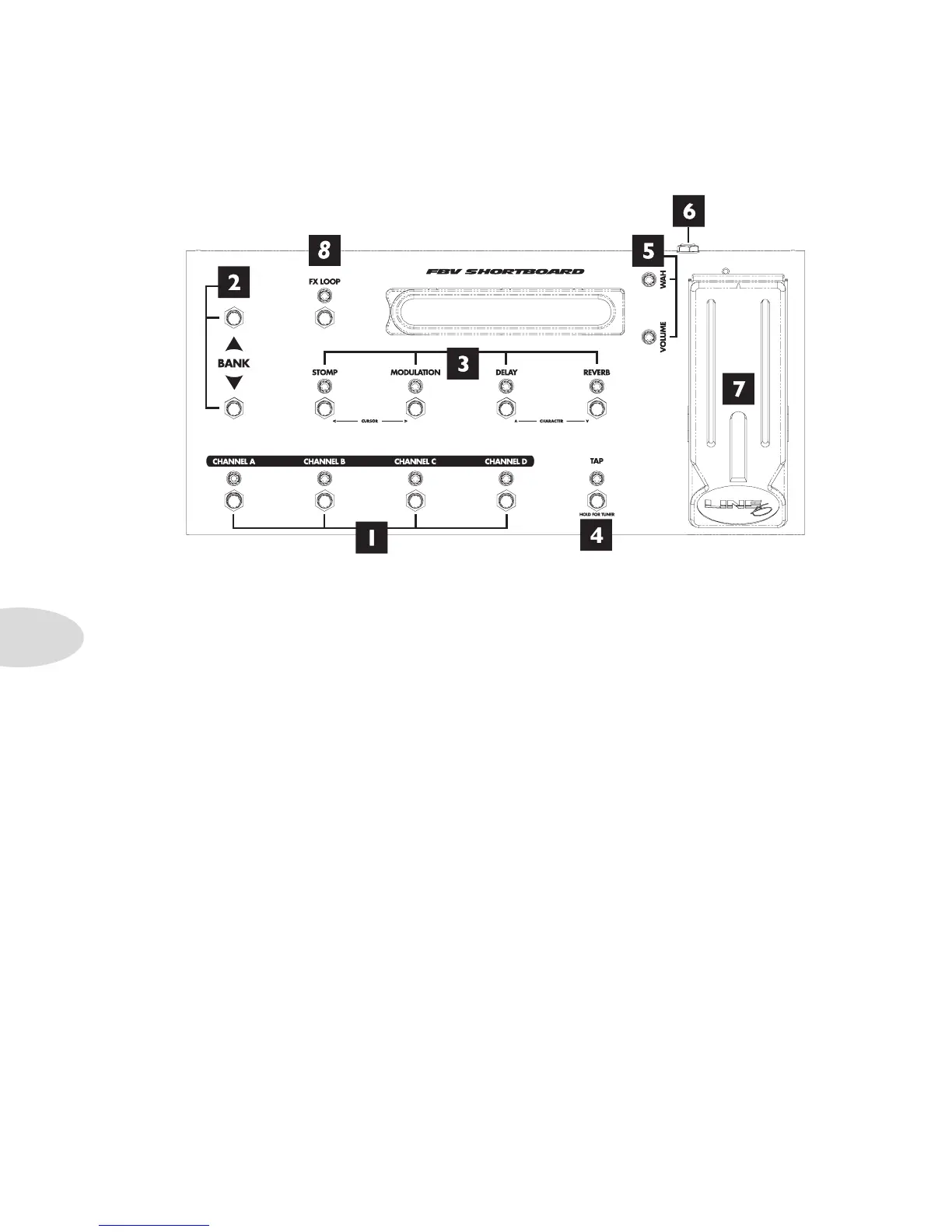
1. Channel A, B, C & D: See page 4•5. In Normal FBV Mode, these select presets and
you can tap on the lit switch to set Delay Time. In Jam Control Mode, these control
recorder/song/drum playback and recording.
*For details on new Alternate Footswitch Modes, which were implemented in the v2.09
firmware, please see the Spider Jam Advanced Guide at www.line6.com/manuals.
2. Bank Up - Bank Down: Select any of the 9 Banks of User presets.
3. Stomp/Mod/Delay/Reverb: You guessed it! These switch the Spider Jam effects Mod,
Delay and Reverb on and off kinda like they were stomp boxes on a pedal board. Stomp
engages the Distortion Boost.
4. Tap/Tuner: Tap a couple beats to set the tempo. Or press and hold this switch until you
see the tuner on the pedal’s display. Press it again to exit tuner mode.
5. Wah and Volume Lights: These light to show that a pedal is ready to control Wah
or Volume.
To switch the pedal to control Wah or Volume, press the pedal fully forward and •
shift your weight onto your toe enough to click the toe-switch.



 To Next Page