EasyManua.ls Logo

Link Controls VEK M2H - User Manual

Link Controls VEK M2H
2 pages
Print Icon
To Next Page IconTo Next Page
Loading...
1b 2a1a
24V 2b0V
1
22.50 74.00
80.00
1 2 3 4
ON DIP
5
6 7 8
24V
1b
2b
2a
0V
1a
1
2
1
2
1
2
5'
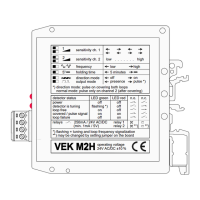
sensitivity ch. 1
sensitivity ch. 2
frequency
5' holding time
direction mode
output mode
*) direction mode: pulse on covering both loops
normal mode: pulse only on channel 2 (after covering)
*) flashing = tuning and loop frequency signalization
**) may be changed by setting jumper on the board
operating voltage
24V AC/DC ±10 %
power
detector is tuning
loop free
covered / pulse signal
loop failure
detector status
relays 250mA / 24V AC/DC relay 1
(min. 1mA / 5V) relay 2 **) **)
off
flashing *)
on
on
off
off
off
off
on
on
LED green LED red n.o. n.c.
low . . . . . . . high
low
5 minutes
off
presence
high
on
pulse *)
1
2
Connect Loops to
these terminals
Green Flashing, Red OFF:-
Green ON, Red OFF:-
Red ON, Green ON:-
Green ON-OFF-ON:-
Red ON, Green OFF:-
Red OFF, Green OFF:-
0V
24V
Relay 2
Relay 1
Loop Connections
L.E.D. Functions
Detector is Tuning
Loop Free
Loop is Covered
Pulse Output
Loop Fail
Power OFF
Loop Detector Layout
Operating Instructions
1. Connect the power, ground, loop & output (See Terminal & Loop Connections).
2. Sensitivity of Loop 1 is set by switches `1` & `2` (See Function Settings).
3. Sensitivity of Loop 2 is set by switches `3` & `4` (See Function Settings).
Terminal Connections
Title:- Drawing No:-
Revision No:-
Drawn By:-
Checked By:-
Page No:-
Rev Date:-
Date:-
Appr' By:-
Stuart Rd, Manor Park, Runcorn, Cheshire, WA7 1TS
T: +44 (0)1928 579050
www.linkcontrols.co.uk
F: +44 (0)1928 579259
sales@linkcontrols.co.uk
Link Controls
MFZ
LC-1687
26/11/99
B 25/02/09
1 of 2
S.B.P.
R.A.H. S.L.
VEK M2H LOOP DETECTOR MODULE
(STOCK CODE: 37-4078)
Function
Loop Free
Loop Covered
Loop Fail
Detector is Tuning
Power Off
1
1
2
2
3
3
Loop 1
Loop 2
Relay Function
As standard, both of the relays are Normally Open (N/O). To change Relay 2 to Normally Closed (N/C),
carefully open the detector housing and place the jumper (JP2) to the following position...
:Normally Open :Normally Closed
Note:- For additional information, please see side of loop detector
Function Settings
DIP Switches 1 & 2 :- Loop 1 sensitivity (4 steps)
DIP Switches 3 & 4 :- Loop 2 sensitivity (4 steps)
DIP Switch 5:- Frequency (High / Low)
DIP Switch 6:- Holding time (5 mins - Infinity)
Note:- Loop will recalibrate after 5 minutes constant detection
DIP Switch 7:- Direction detection
Note:- Directional operation is used for Traffic Management ONLY
DIP Switch 8:- Presence / Impulse selection
Note:- If Impulse operation is selected, the 1st loop to be activated will give a Presence signal when the
2nd loop is clear, a Pulse signal will then be given.
8
8
7
7
6
6
5
5
4
4
4
4
ON
ON
ON
ON
3
3
3
3
2
2
2
2
ON
ON
ON
ON
1
1
1
1
:High
:5mins
:Normal Operation
:Presence Operation
:Low
:Infinite
:Directional Operation
:Impulse Operation
MIN.
MIN.
MAX.
MAX.
Question and Answer IconNeed help?

Do you have a question about the Link Controls VEK M2H and is the answer not in the manual?

Summary

Loop Detector Layout and Functions

Relay Functionality

Describes the operation of relays, including Normally Open (N/O) and Normally Closed (N/C) configurations.

Detector Configuration Settings

Details the function of DIP switches for sensitivity, frequency, holding time, direction, and presence/impulse selection.

Connections and Indicators

Covers terminal connections, loop wiring, and the meaning of LED status indicators for detector operation.

Operating Instructions

Provides essential steps for connecting power, ground, loops, and outputs for initial operation.

Loop Installation Guidelines

Loop Cable and Size

Specifies requirements for loop cable material, size, and circumference based on the number of turns.

Loop Slot and Sealing

Details recommended depth for loop slots and the importance of using flexible, weather-proof sealant.

Feeder Cable and Placement

Provides guidelines for feeder cable twisting, length, and proper placement away from high tension cables.

Multiple Loop Configurations

Explains how to connect two loops to a single detector for detecting large vehicles, detailing series vs. parallel coupling.

Overview

The VEK M2H Loop Detector Module (Stock Code: 37-4078) is a device designed for vehicle detection, primarily used in applications such as traffic management and access control. It operates by detecting changes in inductance caused by a vehicle passing over an embedded loop.

Function Description

The core function of the VEK M2H is to detect vehicles using inductive loops. It features two independent detection channels, allowing for the connection of one or two loops. The device provides relay outputs that can be configured for various applications.

Relay Function: As standard, both relays are Normally Open (N/O). Relay 2 can be configured to Normally Closed (N/C) by adjusting an internal jumper (JP2).

Detection Modes:

  • Normal Operation: Detects vehicles and provides an output.
  • Directional Operation: Used for traffic management, where the device can detect the direction of vehicle travel based on the sequence of loop activation.
  • Presence Operation: Maintains an output as long as a vehicle is detected over the loop.
  • Impulse Operation: Provides a pulse signal when a vehicle is detected. If impulse operation is selected with two loops, the first loop activated will give a presence signal, and a pulse signal will be given when the second loop is clear.

Adjustable Settings: The module offers several adjustable settings via DIP switches:

  • Sensitivity: Independent sensitivity settings for Loop 1 (DIP switches 1 & 2) and Loop 2 (DIP switches 3 & 4), each with four steps from minimum to maximum.
  • Frequency: Allows selection between high and low frequencies (DIP switch 5) to prevent crosstalk between adjacent loops.
  • Holding Time: Configurable holding time (DIP switch 6) for the output, either 5 minutes or infinite. The loop will recalibrate after 5 minutes of constant detection.
  • Direction Detection: Enables or disables directional operation (DIP switch 7).
  • Presence/Impulse Selection: Toggles between presence and impulse output modes (DIP switch 8).

Important Technical Specifications

Electrical:

  • Operating Voltage: 24V AC/DC ±10%.
  • Relay Output: 250mA / 24V AC/DC (minimum 1mA/5V). The device has two relays, Relay 1 and Relay 2.

Physical:

  • Dimensions: Approximately 22.50mm (width) x 74.00mm (length) x 80.00mm (height).
  • Connections: Screw terminals for power (OV, 24V), loop connections (1a, 1b, 2a, 2b), and relay outputs (Relay 1, Relay 2).

Loop Specifications:

  • Loop Cable: Rubberised insulated wire of 0.75-1.50mm² (AWG 20 - AWG 16), preferably multi-stranded.
  • Loop Size: Larger loops are recommended for high-bed vehicles.
  • Number of Turns: The number of turns in the loop varies with loop circumference:
    • 2-4m circumference: 6 turns
    • 4-7m circumference: 5 turns
    • 7-12m circumference: 4 turns
    • 12-25m circumference: 3 turns
  • Loop Slot: Recommended depth to top of loop cable is 25-50mm (maximum 65mm). The slot MUST be sealed with a flexible, weatherproof sealant (e.g., hot bitumen, rubberised bitumen sealant) after cable installation and testing. Cement/concrete should NOT be used.
  • Feeder Cable: Must be twisted a minimum of 10 times per meter and can be up to 100m long.
  • Loop Placement: Loops should be placed at least 5m away from high tension cables and 1m away from low tension cables. If placed in an area with reinforcing iron (e.g., a concrete floor), the loop must be at least 50mm above the reinforcement.

Usage Features

Installation:

  1. Connect power, ground, loop(s), and output(s) to the appropriate terminals.
  2. Set the sensitivity for Loop 1 using DIP switches 1 & 2.
  3. Set the sensitivity for Loop 2 using DIP switches 3 & 4.
  4. Configure other function settings (frequency, holding time, direction detection, presence/impulse) as required using the remaining DIP switches.

Loop Configuration:

  • Single Detector, Multiple Loops: It is possible to connect two loops to a single detector.
    • Series Coupling: Provides the largest sensitivity.
    • Parallel Coupling: Gives the fastest reaction.
  • High Vehicle Detection: For detecting high vehicles (lorries, etc.), it is recommended to use only one loop per detector.

LED Indicators: The device features two LEDs (Green and Red) to indicate its status:

  • Green Flashing, Red OFF: Detector is tuning.
  • Green ON, Red OFF: Loop free (no vehicle detected).
  • Red ON, Green ON: Loop is covered (vehicle detected).
  • Green ON-OFF-ON: Pulse output.
  • Red ON, Green OFF: Loop fail.
  • Red OFF, Green OFF: Power OFF.

Maintenance Features

Troubleshooting (Based on LED Indicators):

  • Loop Fail (Red ON, Green OFF): Indicates an issue with the loop or its connection. This could be due to a broken loop cable, incorrect number of turns, or poor sealing of the loop slot.
  • Loop Recalibration: The device automatically recalibrates after 5 minutes of constant detection if the holding time is set to infinite. This helps maintain optimal performance over time.

General Maintenance:

  • Ensure all cable connections are secure and properly insulated.
  • Regularly inspect the loop slot sealant for any damage or deterioration, especially in outdoor installations, to prevent water ingress and protect the loop cable.
  • Verify that the feeder cable remains twisted to minimize interference.
  • Periodically check DIP switch settings to ensure they match the desired operational parameters.

Link Controls VEK M2H Specifications

General IconGeneral
BrandLink Controls
ModelVEK M2H
CategorySecurity Sensors
LanguageEnglish