Step
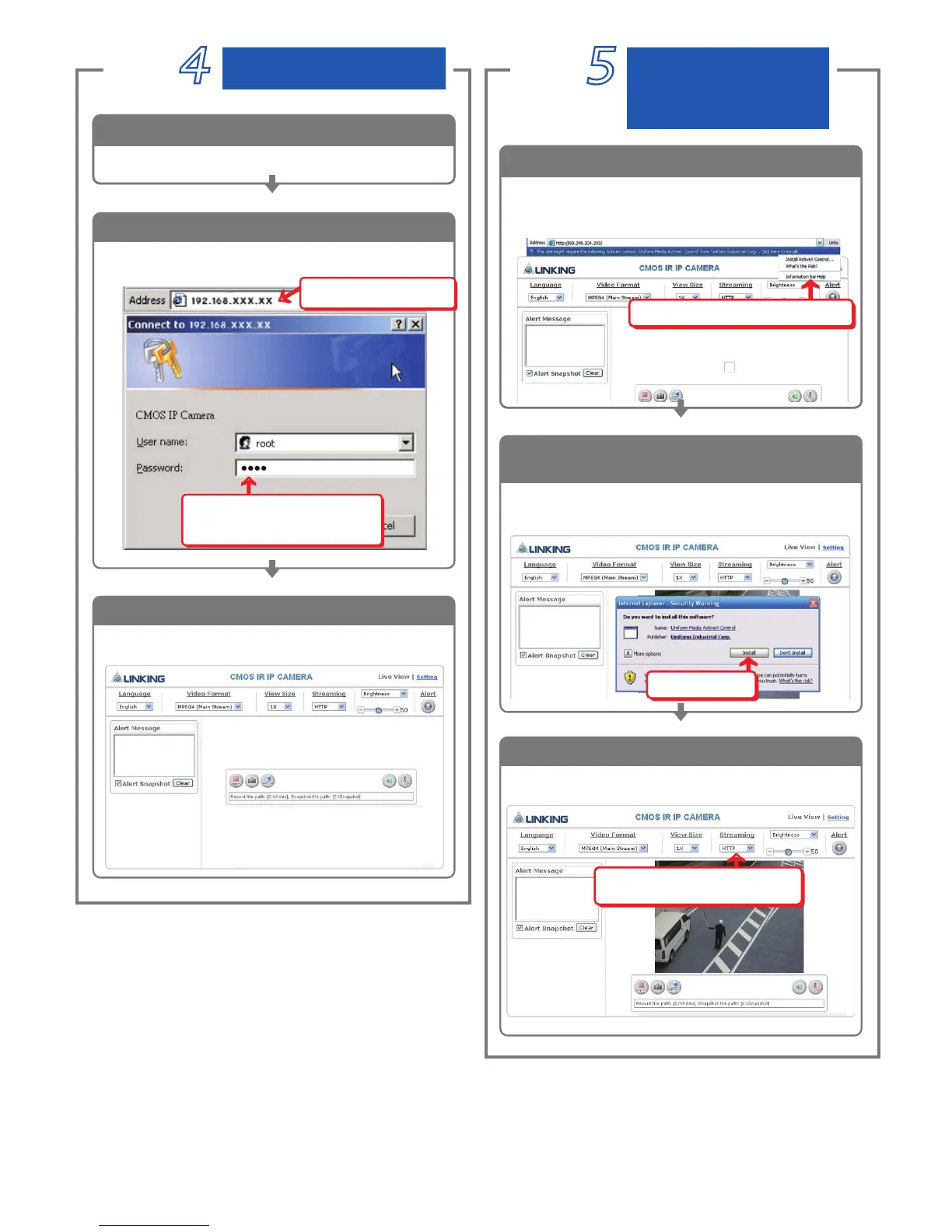
Open a new Internet Explorer window.
Start
1
Step
You can enter the control screen when the username
and password are confirmed.
Enter the control screen
3
Ļ
ɓ!
Select the HTTP mode if you
cannot see the image.
When ActiveX Control is installed successfully, you
can see the camera image and interface.
Camera operation and interface
3
Enter the Main Page
Install Internet
Explorer ActiveX
piug-in
Enter the new IP address and
key in the username “root” and password “root”.
Ļ
ɓ!
When the login screen appears,
key in
root in the User Name
and Password fields.
Click OK
1
Enter the IP address and login
2
Ļ
ɓ
Enter the IP address that
you have just set.
ɓ!
Click Install
The security warning screen aps.
Click Install.
2
The ActiveX Control is named ActiveX Control. This
software is well certified. You can use it without any
doubts on its validity.
When the username and password are confirmed, a
control setup screen pops up under the IE address bar.
Click “Install ActiveX Control” to install the controls.
Install ActiveX
1
ɓ!
Click Install ActiveX Control



 To Next Page