EtherFast
®
Cable/DSL Router with QoS and 8-Port Switch
Enter the 12-digit MAC address
that you wrote down from the
Physical Address shown in Figure
F-5. Make sure to type the 12 dig-
its without the hyphens into one
of the fields for MAC Filtering.
(See Figure F-6.)
Click on Apply when finished.
When entering information for MAC Address Cloning, type the 12-digit MAC
address (see Figure F-7).
Click on Apply when finished.
Instant Broadband
®
Series
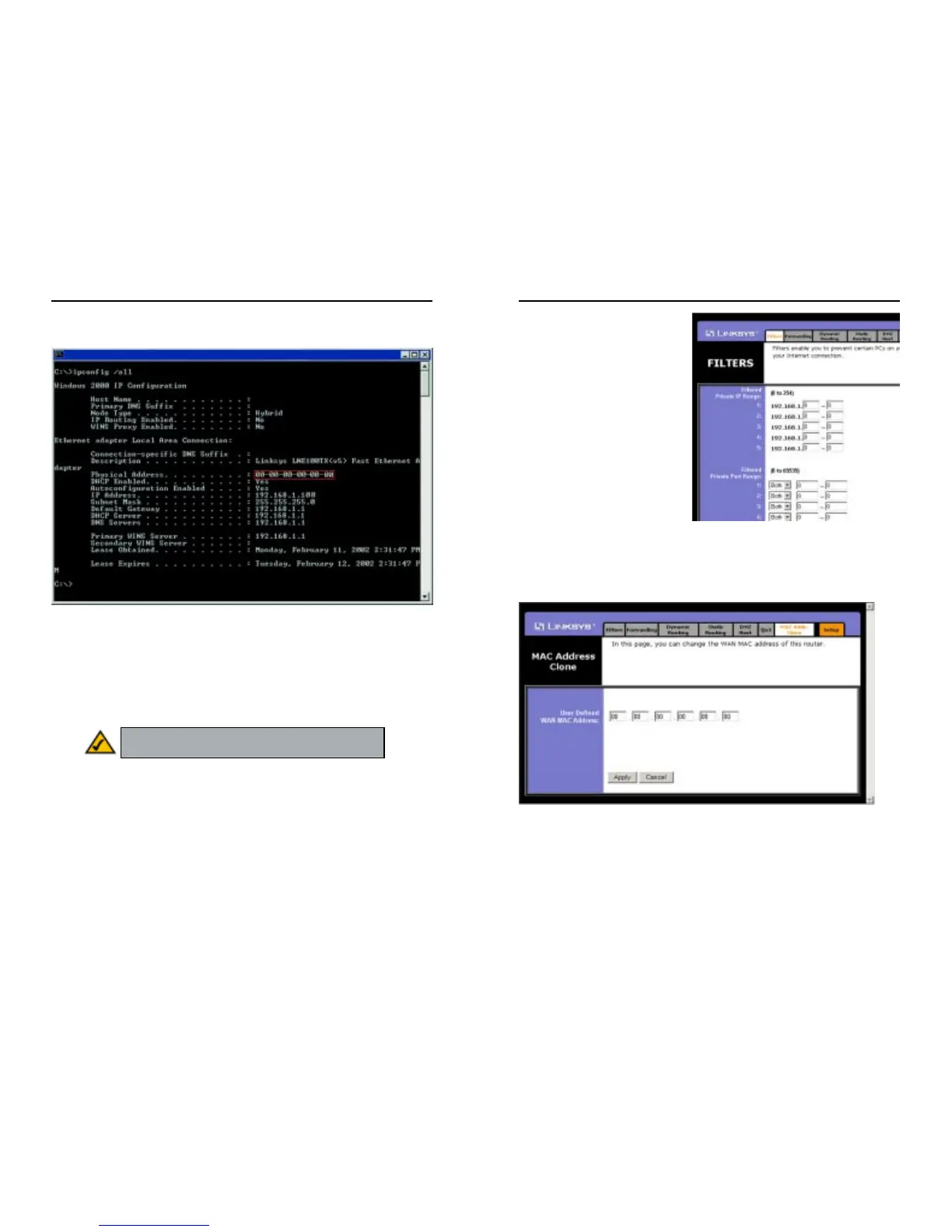
2. In the command prompt, enter ipconfig /all press the Enter key. Your PC’s
information will be displayed as shown in Figure F-5.
3. Write down the Physical Address as shown on your computer screen; it is
the MAC address for your Ethernet adapter. It will appear as a series of let-
ters and numbers.
The MAC address/Physical Address is what you will use for MAC Address
Cloning or MAC Filtering.
The example in Figure F-5 shows the IP address of your Ethernet adapter
as 192.168.1.100. Your computer may show something different.
94
Figure F-6
Figure F-7
93
Figure F-5
Note: The MAC address is also called the Physical
Address in Windows NT, 2000, and XP.






 To Next Page