2 3
Charge the powerbank
Charge the powerbank before rst use. Connect a charging cable
to the powerbank’s USB-C port and to a USB power adapter. The
LED indicators show the charging progress (25, 50, 75 and 100%).
A full charge takes about 3 hours.
Use
Connect a cable from one of the powerbank's USB ports (USB-A or
USB-C) to the USB port of a device. The USB-C port supports USB
PD (Power Delivery) for faster charging. The QC indicator lights
blue when Quick charge is activated. Note! It is only possible to
charge one unit at a time via Quick charge.
Press the power button to start charging your devices.
ENGLISH ENGLISH
Wireless charging
Turn on the powerbank and place your compatible device on the
magnetic charging area. The indicator for magnetic charging turns
orange when magnetic charging is activated.
Safety information
Do not expose the powerbank to temperatures over 45 °C over a
prolonged time. Do not charge the powerbank at the same time as
the powerbank is charging a device. Unplug all cables when the
powerbank is not in use. Do not puncture the powerbank. Do not
expose the powerbank to water. Do not use the powerbank if it
smells strange, is leaking, gets hot, or appears or acts abnormal.
Specications
Battery: Lithium polymer
Capacity: 10 000 mAh / 3.7 V / 37 Wh
Input: USB-C (PD): 5 V/3 A, 9 V/2 A, 12 V/1.5 A
Output: USB-A (QC): 5 V/3 A, 9 V/2 A, 12 V/1.5 A
(up to 18 W)
USB-C (PD): 5 V/3 A, 9 V/2.22 A, 12 V/1.67 A
(up to 20 W)
Wireless: 5 W/7.5 W/10 W/15 W
Total output
(USB A+C+wireless):
Max. 15 W
Charging time: 3 hrs (9 V/2 A)
Size/weight: 111 x 68 x 19 mm / 220 g
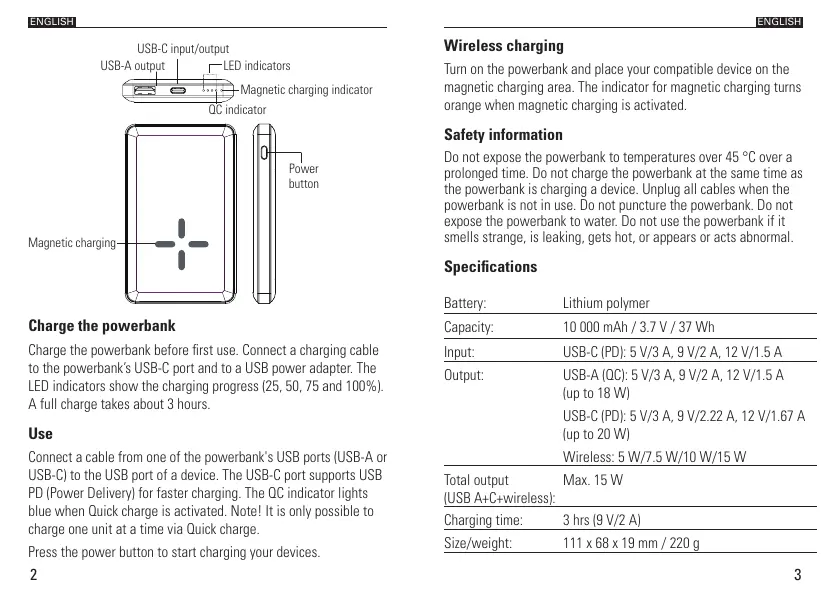
LED indicators
USB-C input/output
USB-A output
Magnetic charging
QC indicator
Magnetic charging indicator
Power
button


 To Next Page
 Loading...