English - 34 -
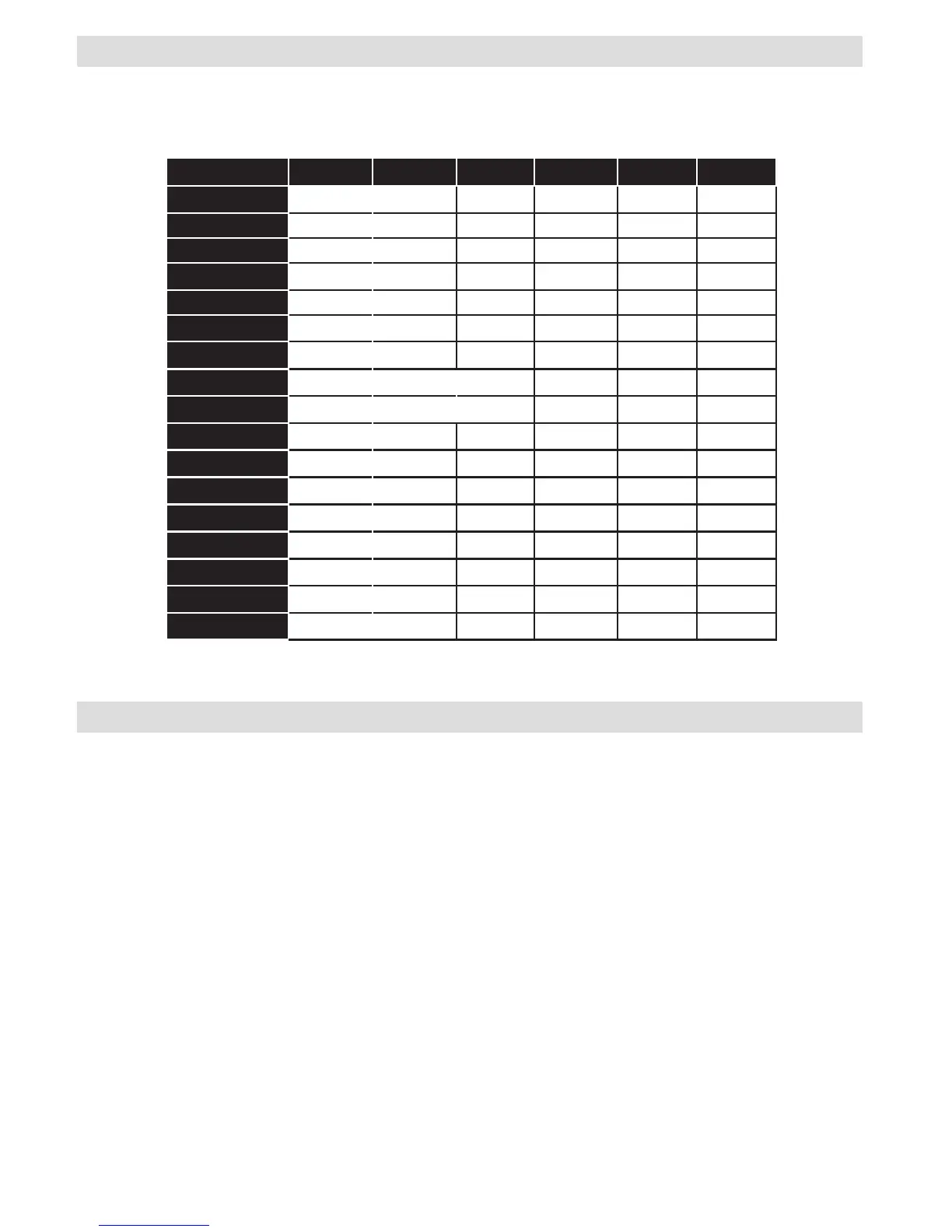
Appendix:SupportedDVIResolutions
When connecting devices to your TV’s connectors by using DVI converter cables (not supplied), you can refer
to the following resolution information.
56Hz 60Hz 66Hz 70Hz 72Hz 75Hz
640x400
þ
640x480
þ þ þ þ
800x600
þ þ þ þ þ
832x624
þ
1024x768
þ þ þ þ þ
1152x864
þ þ þ
1152x870
þ
1280x768
þ
1360x768
þ þ
1280x960
þ þ
1280x1024
þ þ
1400x1050
þ þ
1440x900
þ þ
1600x1200
þ
1680x1050
þ
1920x1080
þ
1920x1200
þ
The Sky Codes are:
0065, 0081, 0584, 0061, 1695, 1191, 1177, 0065
1 Turn your TV on.
2 Press TV on your Sky remote control handset.
3 Hold down SELECTand the REDbutton together for about two seconds, until the red light on the Sky
remote control blinks twice.
4 Key in 0065 or one of the above codes. The light on the Sky remote control should blink twice.
5 Press the STANDBYbutton on your Sky remote control. If your TV switches off, press SELECT. The light
on the Sky remote control blinks twice. Now try the other functions.
BT Vision remote codes are:
0000, 0016, 0019, 0152, 0184, 0197, 0198, 0225, 0244, 0324, 0325, 0339, 0319, 0669, 0725
Virgin remote code is:
0037
YouView remote code is:
204
Appendix:SKYRemoteControlCode


 To Next Page