EasyManua.ls Logo

Linsar LSSTB - Page 10

Linsar LSSTB
20 pages
Print Icon
To Next Page IconTo Next Page
To Previous Page IconTo Previous Page
Loading...
10 | REMOTE CONTROL
Remote Control
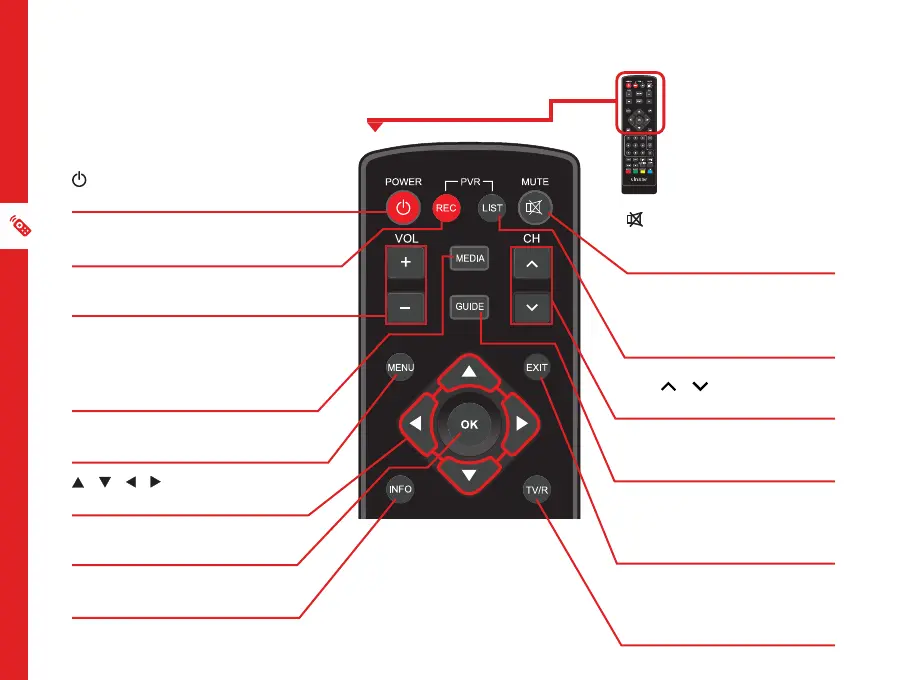
(POWER): Turn the unit
on or to standby.
REC: Record programs
(requires a USB drive).
VOL + / VOL -: Increase/
decrease the volume level.
MEDIA: View media files
or PVR recorded programs
on your connected USB
drive.
MENU: Go to the main
menu.
/ / / : Navigate
up/down/left/right.
OK: Confirm a selection.
Display the channels list.
INFO: Display channel
information.
(MUTE): Mute the
sound; press again to
restore the sound.
LIST: Show the list of
recorded programs on
the current disk.
CH / :Go to the
next/previous channel.
GUIDE: Turn the
program guide on.
EXIT: Leave the current
menu, or go back to the
previous menu.
TV/R: Switch between
the TV and radio
functions.