8 | CONTROLS AND CONNECTIONS
5
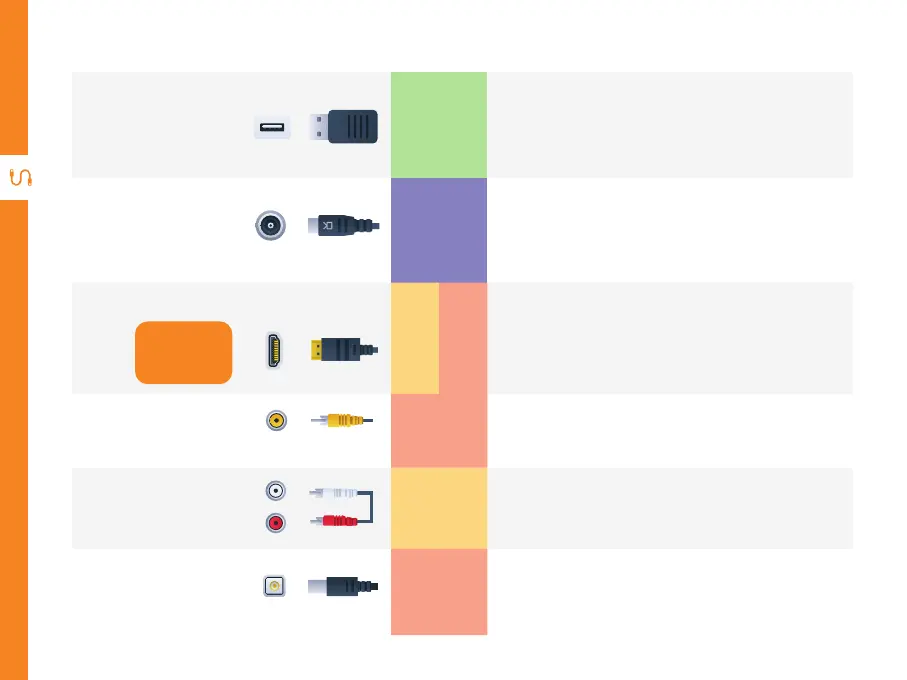
USB
STORAGE
Plug in your USB for PVR recording,
Timeshift, playing multimedia and for
software updates.
6
ANT IN
TV SIGNAL
Connect your antenna for live TV. (Antenna
cable not included).
7
HDMI
Use a HDMI
cable for best
picture and
sound quality.
SOUND
VIDEO
Connect to a TV. This requires a HDMI cable
(not included).
8
CVBS OUT
CVBS
VIDEO
You can use this to connect audio from your
set top box using the AV cable (included).
9
Audio L/R
SOUND
You can use this to connect your set top box.
Supports Standard Definition (SD) picture
quality. Requires an AV cable (included).
10
DC IN
POWER
Connect the AC adaptor.


 To Next Page