Need help?
Do you have a question about the Lintelek ID115U and is the answer not in the manual?
Provides essential safety guidelines for device operation, covering electrical hazards, skin irritation, and proper usage.
Details risks associated with the lithium-ion battery, including fire, chemical burns, and injury if not handled correctly.
Advises users with medical conditions to consult a doctor and clarifies the device's recreational purpose.
Step-by-step guide on how to charge the device using a USB port, noting the charging indicator.
Lists the necessary iOS, Android, and Bluetooth versions for smartphone compatibility.
Instructions for downloading the 'VeryFitPro' APP and performing initial charging before use.
Explains how to connect the fitness tracker to a smartphone via Bluetooth using the 'VeryFitPro' APP.
Details how to navigate through various screens showing time, heart rate, steps, and other metrics.
Guides users on using the tracker to control the smartphone's camera for taking photos.
Instructions on entering and operating the Sport mode, including stopwatch and heart rate tracking.
Describes the types of alerts (calls, messages, sedentary) the device can receive via silent vibration.
Explains how the device records daily activities and monitors sleep patterns, including deep and light sleep.
Covers device data storage, synchronization frequency, and syncing procedures with the APP.
Provides detailed steps for pairing and common troubleshooting tips, especially for iOS devices.
Details on receiving SMS/calls notifications and the mechanism of the built-in 3D step counting sensor.
Instructions for measuring heart rate, ensuring proper wrist band fit and adequate detection time.
Explains how to maintain smartphone connection and synchronize tracker data to the APP.
Offers advice for accurate sleep monitoring, including band fit, personal info updates, and data sync.
Covers water resistance, wrist sense activation, find phone function, battery life, and display settings.
Provides warranty information and clarifies the device's non-medical use and data accuracy limitations.
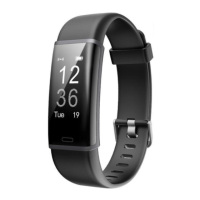
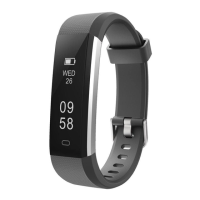
This document describes a fitness tracker, specifically models ID115U HR and ID115U, designed to record and analyze daily activities, monitor sleep, and provide various notifications. The device is intended for recreational use and is not a medical device.
The fitness tracker serves as a personal activity and sleep monitor. It automatically records daily activities, including steps taken, distance covered, and calories burned. For the ID115U HR model, it also monitors heart rate, providing data to help users make proper exercise plans. The device tracks sleep patterns, recognizing sleep states and monitoring the duration of deep sleep, light sleep, and awake hours. It offers notification alerts for incoming calls, messages, and sedentary reminders, all accompanied by silent vibration. Additionally, the tracker can function as a remote camera control for a smartphone, allowing users to take photos by flipping their wrist or tapping the device's touch key. The device stores activity data for up to 7 days, after which the data is cleared, emphasizing the need for regular synchronization with the companion app.
To begin using the device, it must be charged for at least 10 minutes, with a full charge typically taking 1 hour. Charging involves gently pulling the band out of the host and connecting the device host to a standard DC USB port (5V-500mA). A red indicator light confirms charging, turning off when fully charged.
The device requires a smartphone running iOS 7.1 or above, or Android 4.4 or above, with Bluetooth 4.0 or above. The "VeryFitPro" app must be downloaded from the APP store or Google Play. Binding the device to the smartphone is crucial for full functionality. This involves ensuring the smartphone's Bluetooth is on, opening the "VeryFitPro" app, navigating to the "Device" tab, and tapping "Bind Device." The fitness tracker's screen needs to be awake (tapped to light up) during the binding process. The device can only link to one Bluetooth device at a time. If unbinding the device while connected, all settings revert to default and data is cleared; if disconnected, settings revert but data remains.
The device features a non-touch display screen and a touch key for navigation. Tapping the touch key allows users to cycle through various display modes, including time, heart rate (for ID115U HR), steps, calories, distance, activity time, and alerts like alarm and find phone (if enabled in the app).
The "Sport" mode can be accessed by tapping the touch key to switch to the Sport mode icon and then pressing and holding the key for 3 seconds. Within Sport mode, users can view sport start, stopwatch, heart rate, calories, distance, and steps. Pressing and holding the touch key for 3 seconds again exits Sport mode.
Notification features, such as incoming call alerts, message alerts, alarming alerts, sedentary alerts, low power alerts, and fully charged alerts, are displayed on the device screen. When a call or message comes in, the device enters an alert mode before returning to the previous display.
The device includes a 3D sensor for step counting, which registers steps when the arm swings. Data may display with a slight delay and will reset if fewer than 10 continuous steps are taken. For accurate pedometer testing, walking casually and continuously for 100 steps or more is recommended.
For ID115U HR models, heart rate measurement requires the wrist band to sit neatly on the wrist. Tapping the touch key to enter heart rate mode and waiting 10-20 seconds will detect the heart rate.
The device may disconnect from the smartphone if Bluetooth is off, the connection distance (normally within 10 meters, but reduced by obstacles) is exceeded, or the "VeryFitPro" app is closed in the background. To reconnect, users should check smartphone settings to ensure "VeryFitPro" has location and notification permissions, clear background processes, and then open the app and swipe down the main page to refresh data. Restarting the smartphone and Bluetooth, then re-binding, can also resolve connection issues.
Data synchronization to the "VeryFitPro" app is done by swiping down the main page of the app while the device is connected. Sleep monitoring relies on sufficient power and the wrist band sitting closely on the wrist. It tracks sleep based on wrist action or body movement, recording sleep periods over 2 hours between 0:00 and 24:00. Personal information in the app should be updated for accurate sleep data.
The device is splash waterproof (IP67), meaning it can withstand hand washing but should not be used for showering or swimming. A "Wrist sense" function allows the screen to turn on when the wrist is slowly turned by 90 degrees, which can be enabled in the app. The "Find phone" function, also enabled in the app, allows the device to make the connected smartphone ring or vibrate by tapping the device's touch key for 3 seconds. The working time of the tracker is typically 5-7 days, potentially shorter with heart rate monitoring, depending on usage frequency. The device display mode can be set horizontally or vertically via the app. The OLED screen may require shading in bright sunlight for better visibility.
Regular cleaning of the wrist and the fitness tracker is important, especially after sweating or exposure to substances like soap or detergent. The internal side of the tracker should be kept clean. The fitness tracker should not be washed with household cleansers; instead, a soapless detergent should be used, followed by thorough rinsing and wiping with a soft towel or napkin. While the tracker is water resistant, it is not advisable to wear a wet band on the skin. If the bands get wet from sweating or showering, they should be cleaned and thoroughly dried before being put back on the wrist to prevent skin irritation.
 General
| Model | ID115U |
|---|---|
| Category | Fitness Tracker |
| Water Resistance | IP67 |
| Heart Rate Monitor | Yes |
| Step Counter | Yes |
| Sleep Monitoring | Yes |
| Connectivity | Bluetooth 4.0 |
| Charging Time | 1-2 hours |
| Display | OLED |
| Compatibility | Android 4.4 or above, iOS 7.1 or above |
| Sensors | Heart rate sensor, Accelerometer |
| Functions | Sedentary Reminder, Call/SMS Notification |

 To Next Page