Contact us: Lippert Components Inc. - www.lci1.com/support - Phone: (574) 537-8900 - Email: customerservice@lci1.com
Rev: 08.22.18
Page 1
QR-021 / CCD-0001814
Quick Reference
GROUND CONTROL
®
TT TOUCH PANEL/PAD OPTIONS
Using the Auto Leveling Control Touch Pad- Travel Trailers
B
C
A
D
F
E
A - Red/Green LED* - Indicates
the status of the system.
B- Up Arrow - Extends tongue
jack (raises the front of the trailer).
C- Down Arrow - Retracts tongue
jack (lowers the front of the trailer).
D- Auto Level Button - Initiates
Auto Level sequence.
E- Hitch Height Button - Initiates
the smart hitch feature.
F- Retract All Button - Initiates full
retract of all leveling jacks. Power
Tongue Jack does not retract.
Features
Features
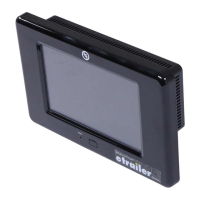
Using the OneControl Touch Panel™ - Travel Trailers
A - Jack Button - Front: Operates Power
Tongue Jack; Rear: Not operational in
standard mode.
B - Up and Down Arrows - Scrolls through
options on screen.
C - Connected Icon - Press 6 times to
program zero point/ wireless configurations.
D - Auto Retract - Enters Auto Retract mode
to retract all leveling jacks. Power Tongue
Jack does not retract.
E - Manual Mode - Enters Manual Mode to
manually operate jacks.
F - Enter - Push to select various modes.
G -Retract - Press to enter Retract mode.
H - Extend - Press to enter Extend mode.
I - Power - Turn touch panel on and off.
J - Auto Level - Starts auto level sequence
K - Auto Hitch - Initiates smart hitch feature.
* LED Indicator
• Off - Touch pad is locked
• Solid Green - Touch pad is active
¤ Blinking Green - Jacks are moving and/or pump active
• Solid Red - Low battery
¤ Blinking Red - Error: (Consult OneControl Touch Panel or
OneControl App for instructions.)
A
B
G
J
H
K
I
E
C
D
F
NOTE: Pressing the UP
and DOWN arrows
simultaneously turns
the touch panel ON.

 Need help?
 General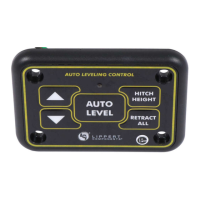

 To Next Page