The Listen EVERYWHERE LW-100P-02 and LW-200P-04/08/12/16 are audio streaming servers designed to provide audio to up to 1000 users per server via a free mobile app. These devices are suitable for multi-screen and assistive listening environments, including conference centers, sports bars, houses of worship, language interpretation, and hospitality settings. They offer flexibility in streaming audio options with strong, clear, and reliable performance. Cloud-based management simplifies system administration, including updates and customization. In-app functions allow for the creation of custom welcome messages, videos, and banners.
Function Description:
The Listen EVERYWHERE system streams audio over Wi-Fi to connected Android and iOS smart devices. The process involves two phases: Discovery and Streaming. In the discovery phase, the LE app on the smart device seeks out the LE Server on the Wi-Fi network via mDNS. It then moves to the streaming phase, where audio is streamed unicast (UDP) from the LE server to the LE app on the connected smart device. The system is designed for use on pre-existing wireless networks as a plug-and-play solution, though IT/Network Administrator assistance may be needed for initial setup.
Important Technical Specifications:
LW-100P-02 Server:
- IP Address: DHCP, Static, Reserved
- Prioritization: QoS/ToS
- Users: 1000 (per server)
- Max Channels: 2 mono (1 stereo)
- WAP Support: 802.11n or better w/WMM enabled
- Supported WAP Frequencies: 2.4 GHz & 5 GHz
- Bandwidth Use: Approx. 140 kbps per user
- App Support: iOS/Android
- Cloud Service: Yes
- Regulatory: FCC, CE, RoHS
- Warranty: 2 years
- Dimensions (H x W x D): 45mm x 170mm x 100mm (1.77in x 6.69in x 3.94in)
- Weight: .59 kg (1.3 lbs)
LW-100P-02 Interconnections:
- Audio Inputs (Terminal Block): Two analog inputs, rear panel, one terminal block connector per input, balanced, +4 dBu (line) nominal input level, +16 dBu maximum input level, impedance 100k ohm.
- Audio Inputs (RCA): Two analog inputs, rear panel, one dual summing RCA connector per input, unbalanced, -10 dBu (line) nominal input level, +2 dBu maximum input level, impedance 100k ohm. *Stereo operation requires the use of both inputs.
- Ethernet: RJ-45 supports 10/100/1000 Mbps speed. Green LED flashes at 100 Mbps, Yellow LED flashes at 1000 Mbps.
- USB: Type A 2.0 (female)
LW-100P-02 Power Supply:
- Connector: 5 VDC Barrel
- Input Voltage: 100-240 VAC, 50-60Hz
- Output Voltage: 5 VDC
- Current: 6.0 A
- Power: 30 W
- Countries: North American, UK, EU, AUS
LW-200P-(04, 08, 12, 16) Server:
- IP Address: DHP, Static, Reserved
- Prioritization: QoS/ToS
- Users: 1000 (per server)
- Max Channels: 4, 8, 12, or 16 mono
- WAP Support: 802.11n or better w/WMM enabled
- Supported WAP Frequencies: 2.4 GHz & 5 GHz
- Bandwidth Use: Approx. 140 kbps per user
- App Support: iOS/Android
- Cloud Service: Yes
- Regulatory: FCC, CE, RoHS
- Warranty: 2 years
- Dimensions (H x W x D): 45mm x 483mm x 155mm (1.77 in x 19.02in x 6.1 in)
- Weight: 2.2 kg (4.85 lbs)
- Rack Space: 1 RU
LW-200P-(04, 08, 12, 16) Interconnections:
- Audio Inputs (Terminal Block): Two analog inputs, rear panel, one terminal block connector per input, balanced, +4 dBu (line) nominal input level, +16 dBu maximum input level, impedance 100k ohm. *Each stereo channel requires the use of two inputs.
- Ethernet: RJ-45 supports 10/100/1000 Mbps speed. Green LED flashes at 100 Mbps, Yellow LED flashes at 1000 Mbps.
LW-200P-(04, 08, 12, 16) Power Supply:
- Connector: DC Barrel Connector
- Input Voltage: 100-240 VAC, 50-60Hz
- Output Voltage: 5 VDC
- Current: 6.0 A
- Power: 30 W
- Countries: North American, UK, EU, AUS
Usage Features:
Audio Connection:
- Connect audio sources to the LE server via terminal block connectors on the rear panel. LW-100P units can use the enclosed RCA connection cable.
- Input connectors accept line-level audio. RCA connectors on LW-100P units are unbalanced sum-to-mono. For stereo, connect to (1)L and (2)R connectors and select "stereo" in the Cloud Service.
Network Connection:
- Connect the LE server to the local area network (LAN) via the Ethernet port.
- A flashing blue power LED indicates booting; a solid blue LED indicates an established network connection.
- The enclosed CAT6 cable can connect the LE server to a network router or switch.
- The LE server and smartphones must be on the same public network.
- For high-traffic areas, 5 GHz or dual-band access points are recommended.
App Download and Usage:
- Download the Listen EVERYWHERE app from Google Play or the Apple App Store.
- Join the Wi-Fi network associated with the Venue Server (on the same LAN).
- Launch the app, select a channel to stream.
Cloud Server Setup (Optional):
- The Cloud Server provides in-app marketing features (banner ads, promotional videos), web-based remote setup and maintenance, and advanced customization.
- Create an account by emailing support@listentech.com with user and company setup information.
- Internet connectivity to the LE server is required for initial setup and for some features.
Network Configuration Recommendations:
- Enterprise Grade Router and Access Point(s): Recommended for optimal performance, 802.11n or better (802.11ac is recommended).
- Multicast UDP (mDNS/Bonjour/Avahi): Must be enabled for app discovery.
- Bandwidth: Data load is approximately 140 kbps per connected user. Listen Everywhere traffic should account for no more than 20% of total available bandwidth.
- Wi-Fi Encryption: No encryption is preferred to lower latency and increase user capacity. If encryption is used, WPA2-AES is preferred (TKIP encryption should not be used).
- Quality of Service (QoS): Enable QoS on the network (WMM - Wireless Multimedia Extensions in the access point, and QoS in Switch/Router) to prioritize audio data.
- Network Topology: Avoid range extenders, mesh networks, or multi-hop networks to prevent latency, noise, or dropouts.
- BSS Minrate: Set to 12,000 (12 Mbps) to disconnect clients with low signal strength, reducing AP strain.
- Static IP: Assign a static IP to the Listen Everywhere server through the LAN Manager.
- Static Channels: Set access points to static channels to avoid audio drops caused by automatic channel changes. Use a Wi-Fi signal analyzer for optimal channel selection.
- Channel Width: For 2.4GHz, set to 20MHz to reduce interference.
Stand-Alone Networks:
- The LE server can function as a DHCP server if it doesn't find a connected DHCP server within 5 minutes of power-on.
- Requires at least one access point.
- No internet connectivity is available in this mode.
- Network settings in DHCP mode: Gateway: 172.30.0.1, Netmask: 255.255.0.0, Lease Time: 2 Hours.
Ports and Services:
- LAN Ports:
- LE server/phone app discovery: HTTP server on port 8000.
- File server: HTTP on port 90 for promotional media download.
- Audio Streaming: LE server sends RTP packets via UDP over a range of ports; mobile apps listen for UDP on port 16384.
- WAN Ports (for Cloud Manager features):
- LE server communicates with Cloud Manager at *.exxothermic.com (IP address: 108.166.110.178) via HTTP on port 1025.
- Media files stored on *.rackcdn.com via HTTP.
Enabling Multicast UDP (mDNS/Bonjour/Avahi):
- Used for app and server discovery.
- Add ExXothermic._tcp and AsClient_ExXothermic._tcp to the allowed list in Router/AP mDNS settings.
- Open Port 5353.
- Add mDNS IP address (e.g., 224.0.0.251) to the allowed subnets list.
- If multicast discovery is not preferred, connections can be made by entering the server's IP address or hostname (serial number) in the app.
Guest Networks:
- If using a guest network (which typically includes client isolation and disables mDNS), add the Listen Everywhere server to the allowed address list (whitelist) for the Guest VLAN in the router configuration (by IP or MAC address).
- The mDNS IP address must also be whitelisted.
Cisco Flex Connect:
- If using Cisco's Virtual Network Controller, ensure mDNS Global Snooping is enabled.
- Add ExXothermic._tcp and AsClient_ExXothermic._tcp to the Master Services Database.
Troubleshooting:
- App not connecting to LE server: Verify smart device and LE server are on the same network and IP range. If connecting by IP/hostname works but scan does not, check Multicast settings.
- Audio cuts out, high latency, or excessive noise:
- Check for Wi-Fi interference (optimize AP channels).
- Check for bandwidth bottlenecks at the access point (add more APs, disable encryption or use WPA2-AES, enable QoS).
- Check the audio source (use balanced cables for long runs, ensure line-level input, not Mic level).
Maintenance Features:
Cloud-Based Management:
- Allows for simple management of the system, including updates and customization options.
- Features requiring a persistent connection to the Cloud Manager: Banner Ads, Offers, Documents, Analytic Reports, Firmware updates, Downloading log files.
- Features available without a persistent connection after initial setup: Audio Streaming, Theme Settings (title, colors, images), Channel Settings (names, images, gain, delay), Welcome ad (image or video).
Warranty:
- Listen Technologies provides a limited lifetime guarantee for its products.
- For warranty and service information, visit www.listentech.com/support/warranty/.
Safety Cautions:
- Hearing Safety: This product can amplify audio to high volume levels. Turn down volume before using headsets and adjust to the minimum setting required. Prevent unauthorized access.
- Medical Device Safety: Consult a physician or medical device manufacturer before using with an implantable or other medical device. Use in accordance with safety guidelines.
Compliance:
- FCC Statement: Complies with Part 15 of FCC Rules. Operation is subject to not causing harmful interference and accepting any interference received.
- Canada: CAN ICES-3 (B)/NMB-3 (B).
- Warning: Electrical Shock Hazard. No user serviceable parts inside. Do not remove or open the cover. Contact Listen Technologies for assistance.

 Need help?
 General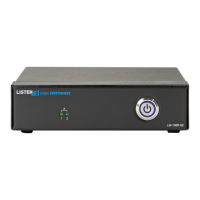

 To Next Page