The Premier Hearing Aid is an air-conduction amplification device designed to compensate for impaired hearing in adults. It utilizes Bluetooth Low Energy (BLE) radio technology operating at 2.4 GHz, with a radio transmitter power always below 4 dBm e.i.r.p. The device is available in models KRS70 and KRS50.
Function Description:
The hearing aid's primary function is to amplify sound, helping users re-engage with conversations and environmental sounds they may have missed. It features multiple listening programs to adapt to various sound environments, adjustable volume control, and the ability to connect with a remote control and a mobile application for enhanced user control. The device is intended for daily wear, with a recommendation of at least eight hours per day for optimal acclimatization.
Important Technical Specifications:
- Standard: ANSI S3.22-2003
- OSPL90 (90 dB SPL Output):
- Max HFA: 110 dB SPL
- HFA: 105 dB SPL
- Acoustic Gain (50 dB SPL Output):
- Max HFA-FOG: 35 dB
- RTG: 28 dB
- Frequency Range: 100-7000 Hz
- Total Harmonic Distortion:
- 500 Hz: <1%
- 800 Hz: <1%
- 1600 Hz: <1%
- Current Drain (Reference Test): 1.65 mA
- Equivalent Input Noise: 21 dB SPL
- Compression:
- Attack Time: 1 ms
- Recovery Time: 64 ms
- Battery Type: #312 size battery (zinc-air recommended)
- Battery Life: Approximately 7-10 days or more
- Remote Control Battery Type: AAA Alkaline battery
Usage Features:
- Getting Started: The hearing aid comes pre-assembled. Users need to install a #312 size battery by opening the battery door, inserting the battery with the positive (+) side up, and closing the door.
- Wearing the Device: Ensure the ear tip is secure on the speaker. Gently insert the ear tip into the ear canal, then place the sound processor behind the ear. Blue speakers indicate the left ear, and red speakers indicate the right ear.
- Turning On/Off: The device automatically powers on when the battery door is closed. To turn it off, open the battery door and leave it open. A brief power-on delay is normal.
- Adjusting Programs: A push button on the hearing aid cycles through available programs, each signaled by an audio indicator.
- Premier 70 Programs: Automatic, Quiet, Noisy, Auditorium, Outdoor, TV Streaming.
- Premier 50 Programs: Automatic, Quiet, Noisy, TV Streaming.
- Program 1 (Automatic) is the power-on default setting.
- Telephone Use: When using a telephone, hold the phone close to the ear without fully covering it. Tilt the receiver slightly if feedback (whistling or buzzing) occurs.
- Remote Control: The remote control allows users to change programs, adjust volume, and mute the hearing aids.
- Buttons: Home (returns to program #1 and default volume), Volume Up/Down (+/-), Program (cycles programs), Mute, L/R/B (Left, Right, or Both hearing aids for volume control), Lock (prevents accidental changes, turns remote on/off), TV (activates TV Streamer audio).
- Indicator Lights: Green lights indicate unlocking/locking. Blue lights indicate volume adjustments, program changes, or Home/Mute/TV button presses. Red lights indicate a command failure to one hearing aid or a low AAA battery in the remote.
- Pairing Remote: The remote comes pre-paired. To re-enter "Pairing Mode," hold the Home button for five seconds until lights flash blue.
- Mobile App (ListenClear App for iPhone®):
- Available as a free download from the App Store.
- Pairing: Open and close the hearing aid battery door, then hold the hearing aid button down for three seconds until a "Pairing" voice indicator is heard. Repeat for each hearing aid. On the app's Scan screen, tap the hearing aids to pair, then select "OK" for Bluetooth pairing requests.
- Main Navigation: Tabs at the bottom for Programs, Volume, and Settings.
- Volume Control: Move a blue slider up/down. A switch allows independent Left/Right hearing aid volume control. A Mute button is available. A Home button returns to 50% volume and program #1. A TV button activates TV Streaming.
- TV Streaming: Requires the ListenClear TV Streaming accessory. Activate via the TV Streaming button on the Volume or Program screen in the app. A yellow volume slider appears for TV Streaming volume control.
- Noise Reduction & Feedback Control: Accessed via the Noise Reduction button on the Programs screen. Controls for background noise reduction and whistle reduction are available, with a Save button for changes.
- Tuning: Accessed via the Tuning button on the Programs screen. Functions as a stereo equalizer with four preset EQ options and individual control for Bass, Mid, and Treble acoustics. Tuning can be set separately for left and right hearing aids, with a Save button for changes.
Maintenance Features:
- Battery Storage: Store spare batteries in a dry, moisture-free location. Do not refrigerate or use a dehumidifier for batteries. Avoid batteries touching each other to prevent discharge.
- Ear Tips: Ear tips have a filter to collect wax. Replace ear tips monthly to maintain audio quality and prevent speaker damage. Clean surfaces with a clean cloth; do not use sharp instruments.
- Cleaning: Do not use alcohol, solvents, or detergents as these can cause damage.
- Inspection: Regularly inspect ear tips for swelling, discoloration, tears, cuts, or other damage. Replace damaged tips immediately to prevent them from coming off in the ear.
- Resting the Device (Nightly): Open the battery door, remove the battery, and place the device in its protective case. Leaving the door and case open allows moisture to evaporate.
- Long-Term Storage: Clean the hearing aid, remove the battery, and store it in its protective case in a cool, dry area to reduce corrosion.
- Dehumidifier: For ideal performance, store the hearing aid (without batteries) in a dehumidifier.
- Troubleshooting: If the device is not working properly, check the battery and ear tip. If issues persist, contact ListenClear Customer Service at 1-888-320-0424. Do not attempt to disassemble the device, as this may void the warranty.
Safety Applications and Warnings:
- The hearing instrument is warranted for design quality and reliability, but fail-safe reliability is not implied. It should not be relied upon as a primary safety system.
- The hearing system complies with electromagnetic compatibility standards, but interference with other equipment (medical devices, alarm systems, room surveillance, mobile phones) is possible.
- FDA Notice: A medical evaluation by a licensed physician (preferably an ear specialist) is recommended before purchasing a hearing aid to identify and treat medically treatable conditions affecting hearing. A waiver statement is available for fully informed adults declining medical evaluation for religious or personal beliefs, though its use is strongly discouraged.
- Hearing instruments cannot restore normal hearing or prevent/improve impairment from organic conditions. Success depends on hearing loss and individual experiences. Consistent use (at least eight hours daily) is crucial for full benefit. Hearing rehabilitation may require auditory training and lip reading.
- Warning to Dispensers: Advise prospective users to consult a physician if they have: visible congenital/traumatic ear deformity, active ear drainage within 90 days, sudden/rapidly progressive hearing loss within 90 days, acute/chronic dizziness, unilateral hearing loss of sudden/recent onset within 90 days, audiometric air-bone gap ≥ 15 dB at 500, 1000, or 2000 Hz, significant cerumen accumulation/foreign body in the ear canal, or pain/discomfort in the ear.
- Exercise special care when selecting hearing aids with a maximum sound pressure level exceeding 132 dB, as this may risk impairing remaining hearing.
- Children with Hearing Loss: In addition to a medical evaluation, a child with hearing loss should be directed to an audiologist for evaluation and rehabilitation to address potential language development and social growth issues.
- General Warnings: Water, shock, excessive heat, and dropping can damage the device and void the warranty. Keep devices away from pets. Batteries can be harmful if swallowed; keep out of reach of children, animals, or persons of diminished mental capacity. Seek immediate medical attention if a battery is swallowed.
Warranty:
The sound processor and speaker link ("Hearing System") include a one-year limited warranty against defects in material and workmanship. Claims must be submitted to the Manufacturer within the warranty period. The Manufacturer will repair or replace defective merchandise at its sole discretion. The warranty is void if the merchandise is misused, abused, tampered with, modified, has an altered serial number, or unauthorized repairs. The warranty is also void if the Speaker is used without an approved tip. Ear tips are considered maintenance items and are excluded from the limited warranty.

 Need help?
 General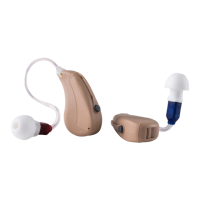

 To Next Page