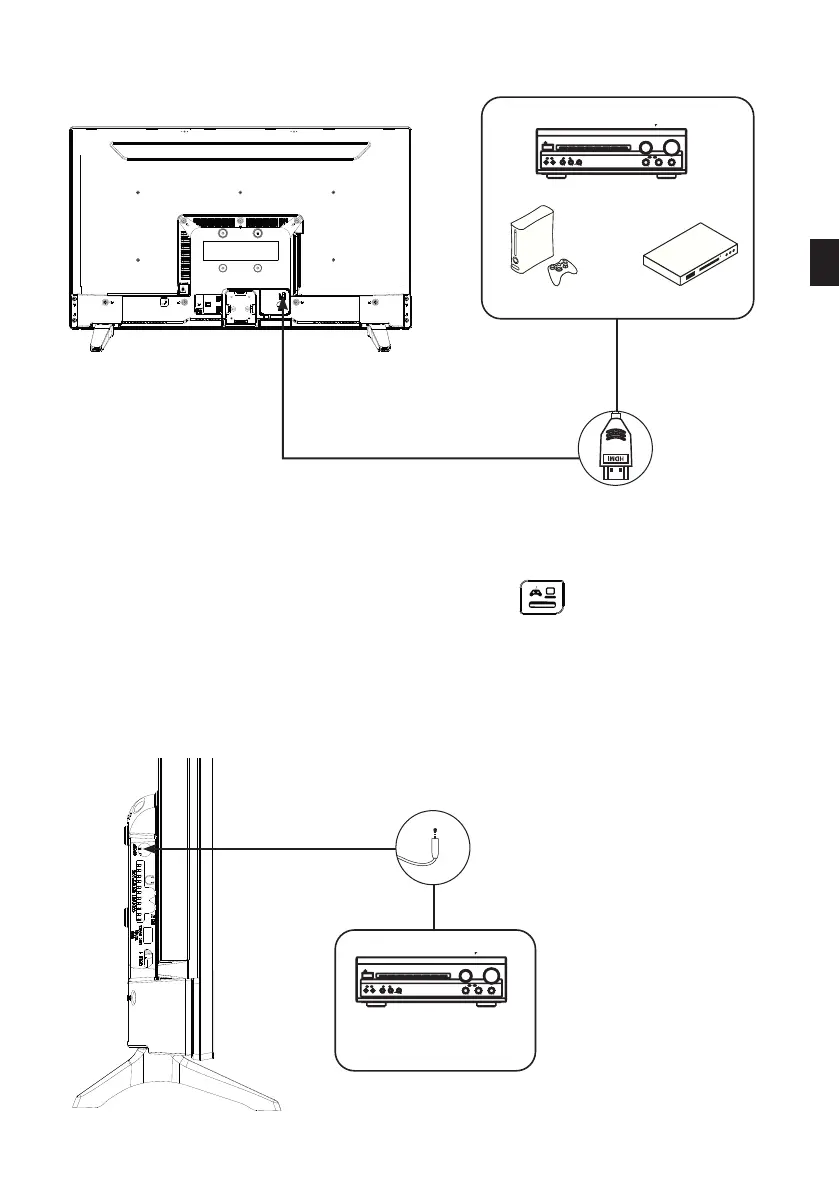
Connection with an HDMI cable
Game console Blu-Ray player
Amplier
Home cinema
HDMI cable
Front panel and Rear pane i llustration
Front panel
Rear panel
Connecting to a TV Set
9a
+]
SCART OUT
SCART IN
&&RRDD[[LLDDOO
''LLJJLLWWDDOO
$$XX GGLLRR
9a
+]
&RD[LDO
'LJLWDO
$XGLR
79
%$66
75(%/(
(&+2
'2:1
83
92/80(
,13876(/(&725
087(
.$5$2.(
&+$11(/
7(67
02'(
67(5(2
352/2*,&
%<3$66
(;&,7(
32:(5
0,&
0,&92/
0,&
&RD[LDO
6$7,1
6$7287
6$7,1
6$7287
VCR
TV
VCR
Second
Démodulateur
The HDMI connection carries digital signals only. If your device (DVD player, decoding box,
etc.) is equipped with an HDMI jack, we recommend that you use this type of connection in
order to obtain optimal video quality.
Select the HDMI1 or HDMI2 source by pressing the button
on the remote control and
conrming with the OK button.
If you are using an HDMI cable, the TV receives video and audio signals simultaneously. No
cables are needed to provide the audio connection.
Connection with a coaxial cable
Coaxial cable
Front panel and Rear pane i llustration
Front panel
Rear panel
Connecting to a TV Set
9a
+]
SCART OUT
SCART IN
&&RRDD[[LLDDOO
''LLJJLLWWDDOO
$$XX GGLLRR
9a
+]
&RD[LDO
'LJLWDO
$XGLR
79
%$66
75(%/(
(&+2
'2:1
83
92/80(
,13876(/(&725
087(
.$5$2.(
&+$11(/
7(67
02'(
67(5(2
352/2*,&
%<3$66
(;&,7(
32:(5
0,&
0,&92/
0,&
&RD[LDO
6$7,1
6$7287
6$7,1
6$7287
VCR
TV
VCR
Second
Démodulateur
Amplier
Home cinema
EN
41 V.1.0



 To Next Page