28 29
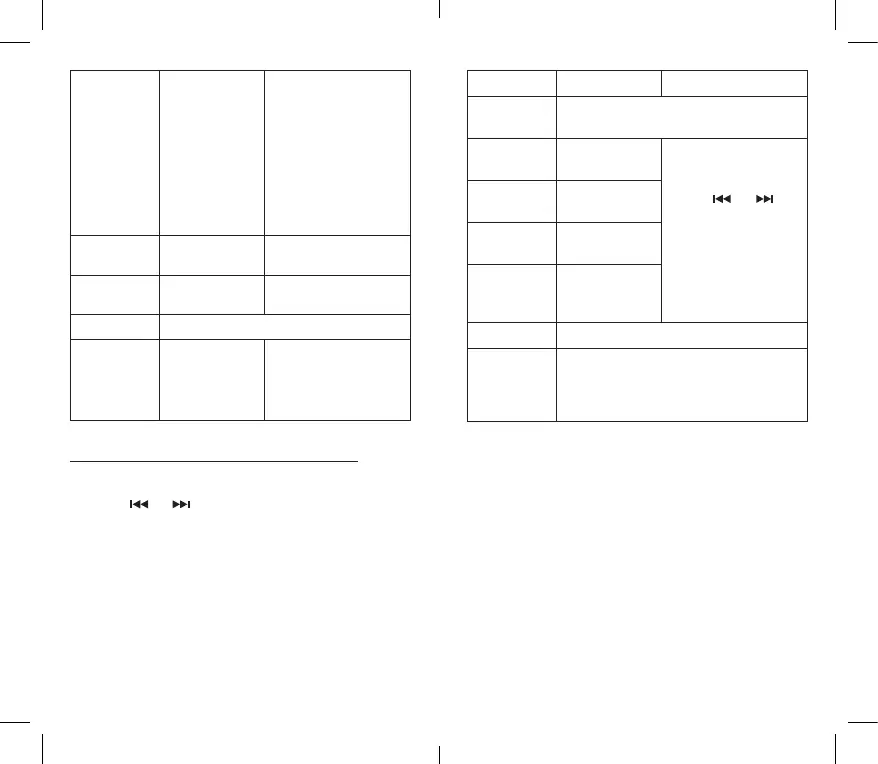
Settings Set sound eects
and playback
speed
Equaliser: O/Rock/
Funk/Hip-hop/Jazz/
Classic/Techno.
Playback speed:
Set the playback speed.
The higher the rate, the
faster the song will be
played. Conversely, the
lower the rate, the lower
the track will be played
(from -8 to +8).
Add to playlist Add songs to a
playlist
Three playlists are
available.
Delete from
playlist
Delete songs
from a playlist
Three playlists are
available.
Deleting Delete the song currently being played.
Bookmarks Setting
bookmarks
You can add a bookmark/
Go to a bookmark/
Delete a bookmark
while music is playing or
paused.
Using the settings sub-menu while playback is paused
1. When playback is paused, press and hold the multi-function
button to display the settings sub-menu.
2. Use the and buttons to select the desired option, then
press the multi-function button to conrm.
3. To return to the playback screen, press the M button.
Sub-menus Options Description
Playback in
progress
Display the song currently being played.
All songs Display the list
of songs.
Use the
and
and buttons to make a
selection, then press the
multi-function button to
conrm.
Artists Display the list
of artists.
Albums Display the list
of albums.
Genres Display the
list of musical
styles.
Playlists Three playlists are available.
Create
Playlist
Divide the MP3 les on the micro SD card
into
"Albums", "Artists" or "Genres” folders (if
the information on the les allows it).



 To Next Page