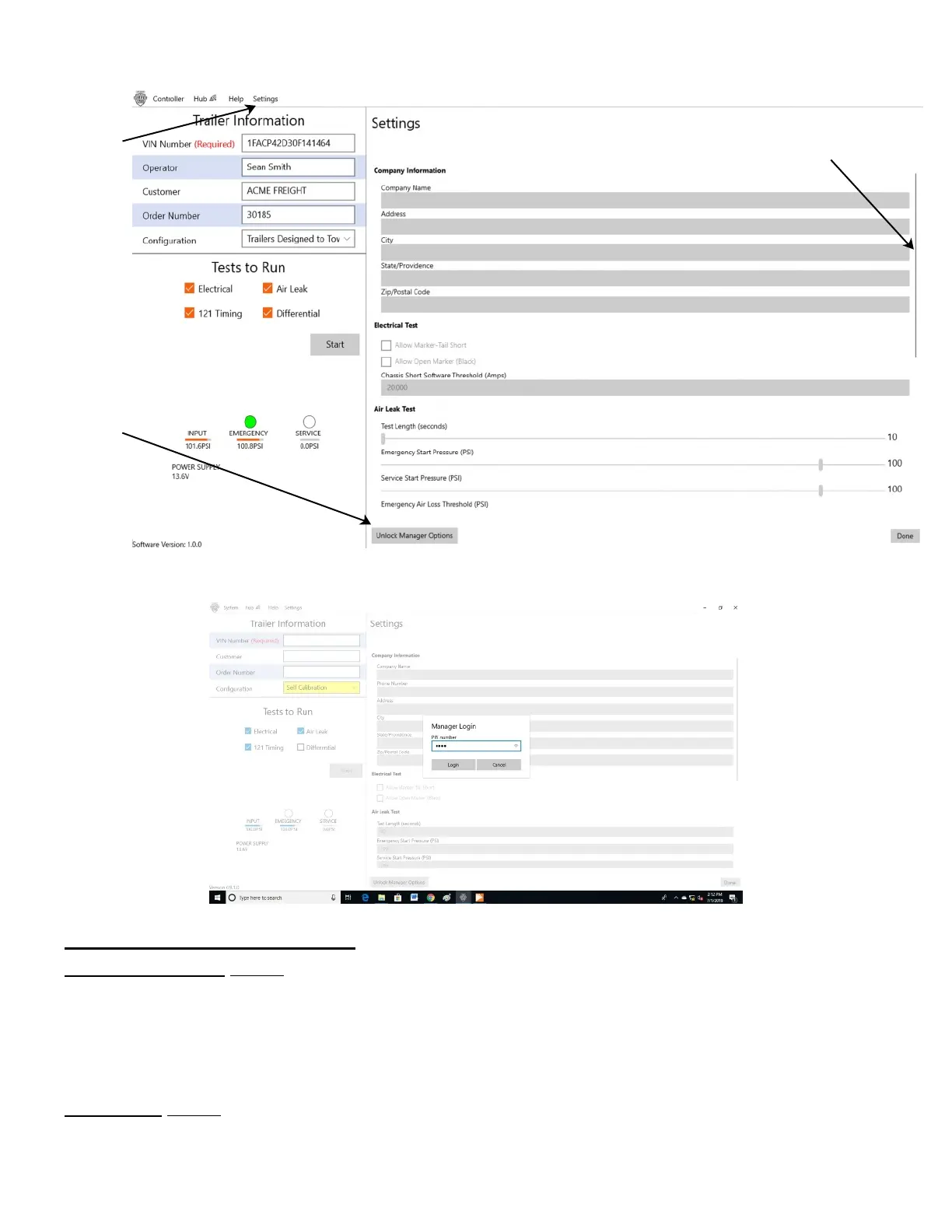
Settings dropdown (Page 1 of 2):
Company Information section: After Logging in using the Manager PIN, all the fields on the ‘Settings’ page may be
edited, including Company Information (such as Company name, address, etc). After filling them in, you may scroll
down to the bottom of this page and select “Done” to ‘lock’ them in, or you may fill in more fields on this page and select
“Done” when you are ready. You may return to this page anytime, unlock, and modify fields as needed.
Air Leak Test section: First, use the Scroll Bar on the far right edge to be able to see all 6 items in the Air Leak Test
section. Detail for these items are on the next page.
SETUP TESTING: “Settings” dropdown (Page 1 of 2)
Click on
‘Settings”
to display
the data in
the right
side of this
screenshot
Click on
“Unlock
Manager
Options”
to edit the
dithered
selections
on the
right of
this
screenshot
Clicking “Unlock Manager Options” allows you to type in the PIN and select ‘Login’ (below).
Lite-Check CERTIFIER 1200 Operations Manual
28
Use the scroll Bar to
see more Setting lower
down on this page.



 To Next Page