Automatically Running Tests (page 3 of 3) Electrical done, Air Leak Started
Lite-Check CERTIFIER 1200 Operations Manual
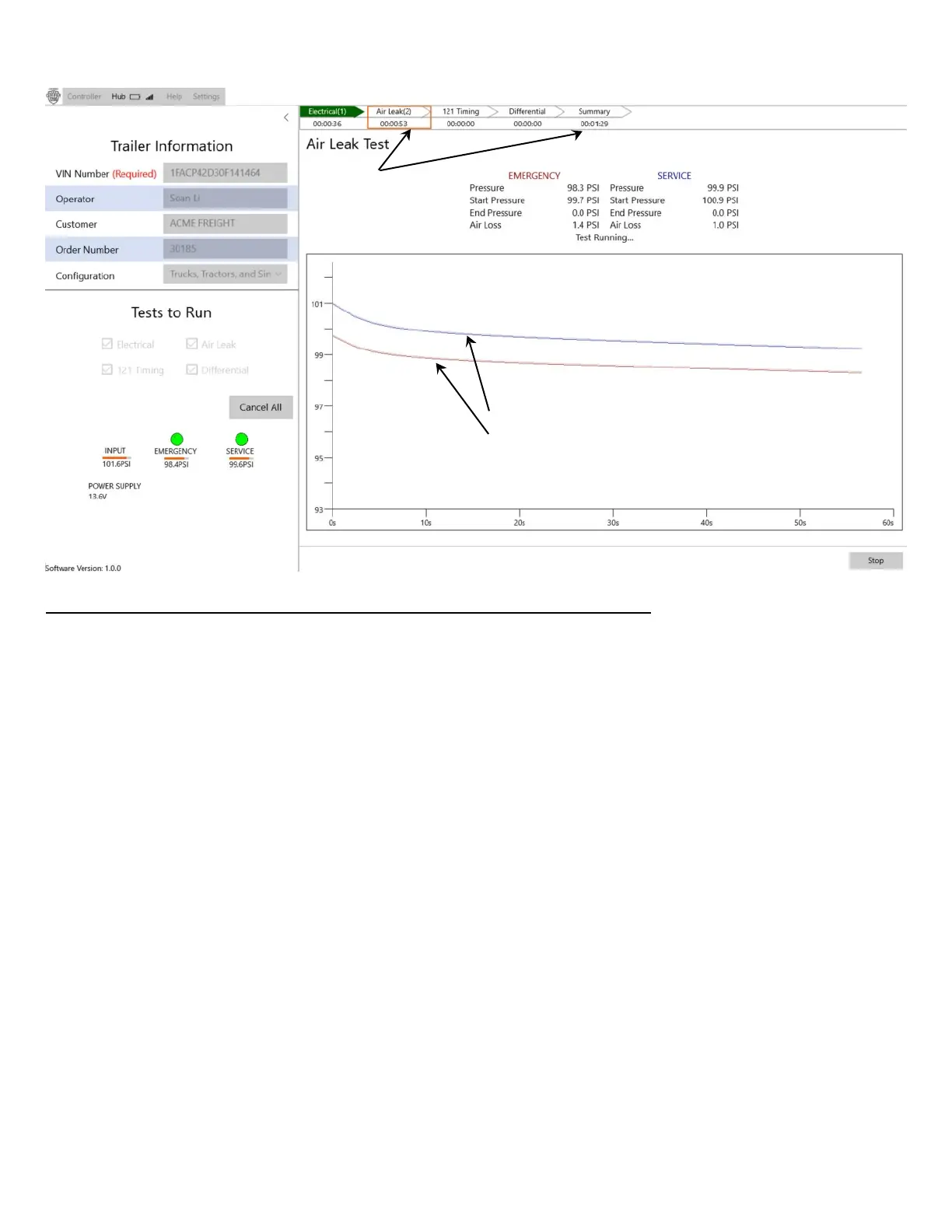
Electrical tests have completed, and the Air Leak test is in progress.
Electrical tests have completed and passed:
“Electrical” indicator (top-center of screen) is Green. It’s total test time (00:36) is displayed.
Air Leak test has started and is running:
- Elapsed time so far (00:53) in the top-center Air Leak indicator. (Because it is not Green or Red and
you can watch the elapsed time of the test is incrementing, it means the test is still running.)
- Elapsed time is also available by looking at the “progress line” in the large graph, or in the “Summary”
box at the top of the display.
- While the test is running, in the large “Test Running…” graph, if you hover over the chart with your
mouse, a faint vertical line will appear on the chart. You may move the vertical line to the left or right to
see the Emergency Air and Service Air pressures at any specific time in the test. These pressures
will be shown right below the graph.
32
Status of the
currently running
test.
Summary bar has
times of each test
and the total time.



 To Next Page