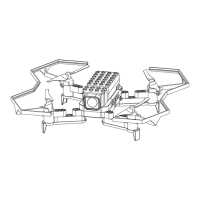
The LiteBee Brix III is a multi-rotor aircraft designed for users aged 8 and above, with younger children requiring adult supervision. It features a modular design, allowing for various configurations (Type A, B, C, D, E) by assembling different components.
Function Description:
The LiteBee Brix III is a drone that can fly in small spaces or outdoors with light wind. It is controlled via a 2.4GHz controller, offering a longer control distance without interference. The drone has basic 4-channel functions: flying forward/backward, rolling left/right, yawing clockwise/counter-clockwise, and performing somersaults.
Key usage features include:
- Binding: The process of connecting the drone to its controller.
- Calibration: Ensuring the drone is level for stable flight.
- Unlock: Activating the motors for flight.
- Somersault (360°): A one-key function allowing the drone to perform a 360-degree flip in the air. Users are advised to keep a safe distance during this maneuver.
- Throw & Go: After binding, the drone can be thrown vertically from 20-30cm to initiate flight, eliminating the need for ground takeoff. It's crucial to ensure the drone is bound and thrown vertically in a space at least 2m high, avoiding creatures or horizontal throws.
- Headless Mode: This mode allows the drone to maintain its initial forward direction regardless of its orientation. By default, this mode is off, and the drone's nose always indicates forward. It can be toggled on/off with a button press on the controller.
- Three-level Speeds: The drone offers slow, normal, and fast flight speeds, adjustable via a button on the controller. New users are advised to start with the slow speed.
- Altitude Hold: Equipped with a barometer, the drone can maintain a stable altitude, making it easier for beginners to fly. However, unstable airflow environments can affect this function.
Important Technical Specifications:
- Wheelbase: 117mm
- Propeller: 58mm
- Motor: 8620 brushed (44000rpm)
- Battery: 3.7V 850mAh 50c Li-Po Battery
- Charger: One-way 4.2V/4.35V
- Weight: 72-88g
- Flight Time: 7 minutes
- Max Control Distance: 50 meters
- Controller: 2.4GHz, requires UM-3 "AA" 1.5V batteries (not rechargeable).
Usage Features:
- Controller Layout: The controller includes a power switch, throttle/yaw joystick, roll/pitch joystick, buttons for somersault, calibration, headless mode, takeoff, crash-land, land, and speed adjustment. It also features spinners for forward, roll left, backward, and roll right movements, along with a mode 1/mode 2 switch.
- Modular Design: The drone can be assembled into various configurations (Type A, B, C, D, E) using different blocks, motors, propellers, and propeller guards. This allows for customization and learning about drone construction.
- Easy Motor Installation: Motors can be easily installed and replaced with a button battery design.
- Screw-less Propeller Guards: The 4 propeller guards can be installed without screws, simplifying assembly.
- Trimming Button: When the drone is in the air, the trimming button can be used to adjust its movement.
Maintenance Features:
- Battery Charging: The drone's battery is charged by connecting it to a USB adapter via a charge wire. An indicator light on the wire shows charging status (on when charging, off when fully charged). A full charge takes approximately 60 minutes.
- Low Voltage Alarm: The front LED of the drone will flash when its battery is low. Similarly, the controller's LED will flash when its battery is low. In both cases, flight should be stopped immediately, and the battery replaced.
- Battery Safety:
- Always use the original charger.
- Do not charge swollen, leaky, or broken batteries.
- Avoid overcharging or over-discharging.
- Do not charge immediately after use.
- Cut off power when fully charged and avoid repeated charging to prevent overheating.
- Charge on non-flammable surfaces (e.g., not carpet, wood).
- Charge in an environment with temperatures between 15-30 degrees Celsius.
- Keep batteries away from children.
- Do not install or remove batteries while the device is working.
- Avoid striking batteries or placing them near heat sources, fire, or liquids.
- Do not store batteries in humid conditions, microwaves, or pressure tanks.
- Do not disassemble, drill, reshape, cut, or load weight onto the battery.
- Do not wash batteries with industrial alcohol or other flammable liquids.
- Avoid short circuits.
- General Cautions:
- Keep away from the drone during flight to avoid injury.
- Do not look directly at the light ray.
- Fix any broken or distorted parts before flying; do not fly a badly broken drone.
- Remove batteries from the controller and drone when not in use for extended periods to prevent leakage damage.
- Avoid dropping the drone from high altitudes or crushing it to ensure long service life.
- In case of battery leakage, avoid skin or eye contact. If contact occurs, wash immediately with water and seek medical care.
- If any smell, noise, or smoke is detected during charging, cut off power immediately.
- Recycling: Do not dispose of batteries with normal waste; use special recycling bins.
Troubleshooting (FAQ):
- Fail to take off after assembly: Check motor installation and battery volume.
- Drone flies in a wrong way: Check flight control installation and calibrate the drone.
- Can't bind after changing the battery: Turn off the controller and attempt to bind again.
- Somersault failed: Operate the joystick after hearing the "Beep" sound from the controller, or check for low battery voltage.
- Controller indicator light flashes and buzzer rings: Battery is low; replace the battery.
The manual emphasizes reading all instructions carefully for safe and skillful operation and keeping the manual for future reference. It also includes a disclaimer stating that the manufacturer is not responsible for injuries or property damage caused by non-compliant operations or failure to follow safety guidelines.

 Need help?

 To Next Page
 General