Need help?
Do you have a question about the LiteBee Wing EDU and is the answer not in the manual?
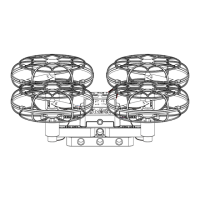
Illustrates the seven-hole arm extension configuration for the drone.
Illustrates the nine-hole arm extension configuration for the drone.
Illustrates the shape stretch arm extension configuration for the drone.
Details the meaning of various LED light states on the remote control for operational feedback.
Explains the drone's flight controls and stick movements in Mode 2 for operation.
Indicates the flight controller is ready for takeoff with altitude hold and fixed-point stability.
Describes light patterns for one-key take-off/land and fixed-point moving status.
Explains light signals for photo-taking and video recording modes.
Details light indicators for connection failures, low voltage, and system errors.
Indicates sensor errors, gyroscope calibration, and aerobatics mode via light patterns.
Instructions for executing a 360-degree rotation with a single button press.
How to activate and use the bounce mode for vertical movement.
Explains the meaning of red and green lights during battery charging and completion.
Guide to searching, downloading, and connecting to the LiteBee Wing app via Wi-Fi.
Instructions for connecting the radio transmitter to a computer for programming.
Steps to program the drone using a mobile app via Wi-Fi connection.
Detailed sequence for programming the LED module, including color changes and timing.
Explanation of musical notes and programming examples for the buzzer module.
Troubleshooting steps for when the drone's motor does not work.
Solutions for when the Litebee Wing cannot fly, checking installation and battery.
Resolving issues with the LiteBee Go programming not recognizing the radio transmitter.
Instructions on how to switch the radio transmitter between Mode 2 and Mode 1.
Troubleshooting advice for propellers falling off frequently.
Information on the maximum weight the LiteBee Wing can carry.
Warning regarding use by children under 3 years old due to small parts.
 General
| Camera | No |
|---|---|
| Control Range | 100m |
| Sensors | Optical flow sensor |
| Compatibility | Windows |
| Programming Support | Scratch 3.0, Arduino IDE |

 To Next Page